
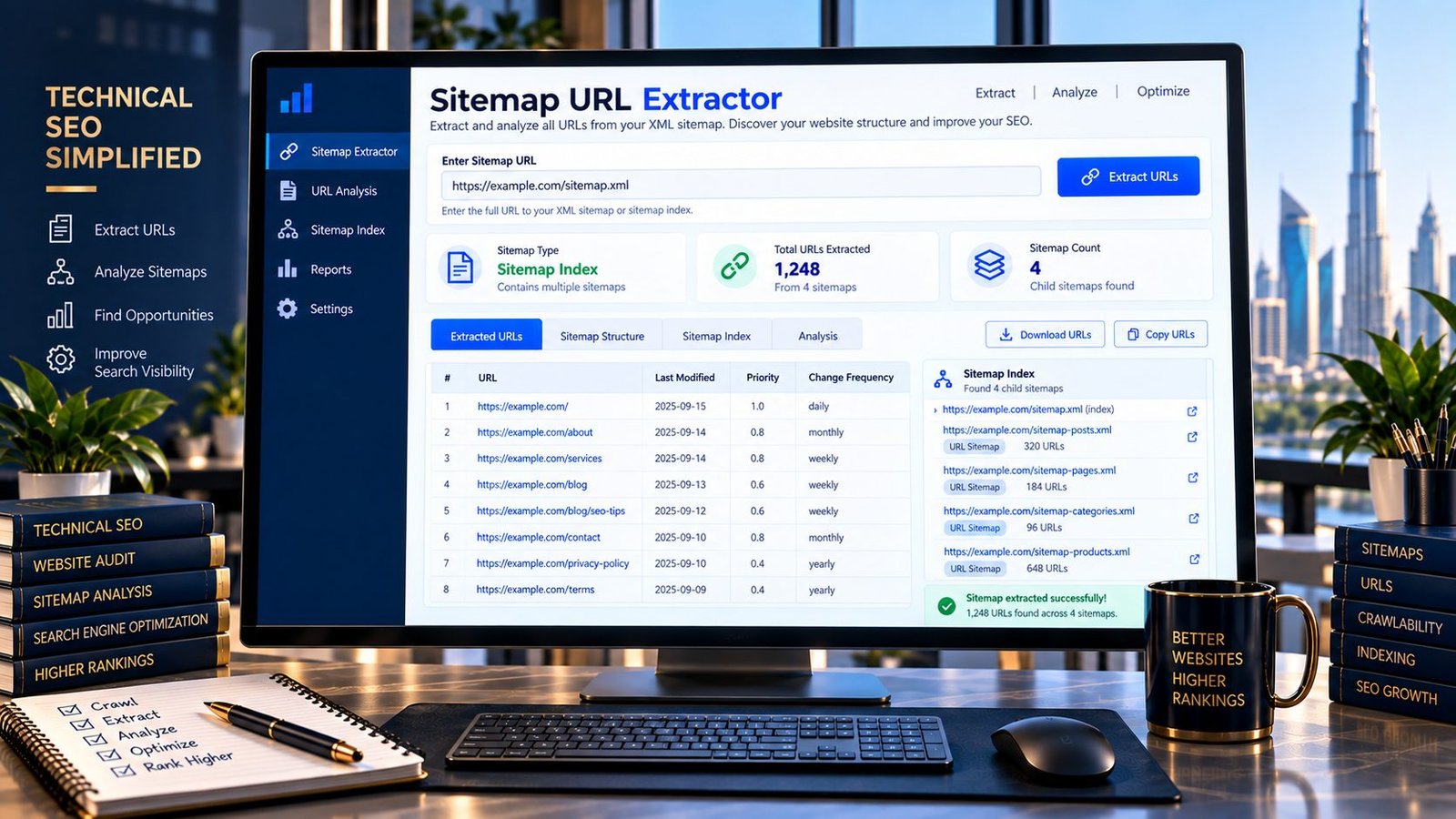
Extract URLs from XML Sitemaps Online
Need to quickly see all URLs contained in an XML sitemap? PKCapra’s Sitemap URL Extractor lets you inspect a sitemap and extract its URLs into a clean, easy-to-copy list.
Enter a public sitemap URL and the tool identifies the sitemap structure, extracts available URLs, removes duplicates, and provides useful counts.
It can also recognize sitemap index files and show the child sitemap URLs contained within them.
What Is a Sitemap URL Extractor?
A Sitemap URL Extractor is a tool that reads an XML sitemap and extracts the URLs listed inside it.
An XML sitemap commonly contains URLs that a website wants search engines to discover and crawl. A website can also use a sitemap index to reference multiple individual sitemap files.
Manually reviewing large XML files can be inconvenient. A sitemap URL extractor provides a simpler way to inspect the URLs and work with the resulting list.
What Can You Extract?
PKCapra’s Sitemap URL Extractor can identify and extract information from two common sitemap structures:
XML URL Sitemap
A standard URL sitemap uses a urlset structure and contains individual URL entries.
The tool extracts the available URLs into a clean list that you can review or copy.
Sitemap Index
A sitemap index uses a sitemapindex structure and contains references to other sitemap files.
For example, a website might have separate sitemaps for:
- Blog posts
- Pages
- Products
- Categories
- Images
- Other content types
PKCapra identifies a sitemap index and displays the child sitemap URLs it references.
The tool does not automatically crawl every child sitemap from an index.
Why Extract Sitemap URLs?
Extracting sitemap URLs can be useful during SEO audits, site migrations, content inventories, and technical website analysis.
You can use the extracted URL list to:
- Review URLs included in a sitemap.
- Create a quick content inventory.
- Inspect the structure of a sitemap.
- Identify duplicate entries.
- Compare sitemap contents with another URL list.
- Investigate large websites.
- Prepare URLs for further technical analysis.
- Understand how a sitemap index is organized.
A sitemap URL list is particularly useful when you need to work with the URLs separately from the original XML document.
How to Use the Sitemap URL Extractor
Step 1: Enter a Sitemap URL
Enter the public HTTP or HTTPS address of the XML sitemap you want to inspect.
Step 2: Start Extraction
Run the tool to retrieve and analyze the sitemap.
Step 3: Review the Results
The tool identifies the sitemap type and displays the extracted URLs or child sitemap references.
Step 4: Copy or Download
Copy the extracted URLs or download the available URL list as CSV for further analysis.
Sitemap URL Sitemap vs. Sitemap Index
These two sitemap structures serve different purposes.
| Sitemap Type | Main Purpose |
|---|---|
| URL Sitemap | Contains individual page URLs |
| Sitemap Index | Contains links to other sitemap files |
A sitemap index does not necessarily contain the individual page URLs directly. Instead, it points to additional sitemap files.
This distinction matters when auditing a website because extracting the index itself may only give you the child sitemap URLs rather than the complete website URL inventory.
Sitemap URLs and SEO Audits
Sitemaps are one component of technical SEO. They can help search engines discover URLs, but simply including a URL in a sitemap does not guarantee that the URL will be indexed.
When reviewing sitemap URLs, consider other signals as well, including:
- HTTP status
- Canonical URLs
- Indexability
- Internal links
- Robots directives
- Page quality
- Redirects
- Duplicate content
For example, URLs listed in a sitemap can be reviewed alongside the HTTP Status Checker, Redirect Checker, and Canonical URL Checker to investigate technical issues.
For larger technical audits, the Indexability & Crawlability Analyzer can provide another layer of analysis.
Sitemap URLs and Website Migrations
Sitemap extraction can also be useful during website migrations.
Before or after a migration, you may want to create a list of URLs from an existing sitemap and compare it with the URL structure of the new website.
This can help teams identify URLs that need further review.
However, a sitemap should not be treated as the complete historical URL inventory of a website. URLs may exist outside the current sitemap, so migration planning can require additional sources such as analytics data, server logs, crawl data, redirects, and existing URL databases.
Sitemap URL Extraction for Large Websites
Large websites may use multiple XML sitemaps organized through a sitemap index.
For example:
sitemap-index.xml
├── posts.xml
├── pages.xml
├── products.xml
└── categories.xml
The index provides the locations of the individual sitemap files.
PKCapra can identify this structure and show the child sitemap URLs, helping you understand how the site’s sitemap architecture is organized.
Because the tool does not automatically crawl every child sitemap, you can decide which individual sitemap needs further inspection.
Duplicate URLs in Sitemaps
Duplicate URLs can make sitemap data harder to analyze.
PKCapra automatically removes duplicate extracted URLs from the displayed result set, making the output easier to review.
Removing duplicates from the tool’s output does not modify the original sitemap on your website.
If duplicate entries exist in your actual XML sitemap, you should investigate the source that generates the sitemap rather than assuming the extraction tool has corrected the underlying website.
What a Sitemap URL Extractor Does Not Tell You
Extracting a URL from a sitemap does not automatically tell you whether the URL:
- Is indexed by Google.
- Ranks for a keyword.
- Is receiving organic traffic.
- Is canonicalized correctly.
- Can be crawled successfully.
- Has high-quality content.
- Should remain in the sitemap.
The extractor focuses on URL extraction and sitemap structure, not complete search-engine indexing analysis.
Common Sitemap Problems to Check
When reviewing a sitemap, look for issues such as:
Non-Canonical URLs
A sitemap URL should generally represent the URL you actually want search engines to discover and consider.
Redirecting URLs
URLs that redirect can deserve review rather than being treated as final destination URLs.
Broken URLs
A sitemap can contain URLs that no longer return a successful response.
Non-Indexable URLs
A URL may be technically accessible but unsuitable for indexing because of other directives or page-level conditions.
Outdated URLs
Old URLs can remain in sitemap data if the site’s sitemap-generation process has not been updated correctly.
Unexpected URL Patterns
Extracting the URL list makes it easier to spot unusual paths, parameters, duplicate structures, or sections that were not expected to appear.
Key Features
Sitemap Structure Detection
Identify whether the supplied XML is a standard URL sitemap or sitemap index.
URL Extraction
Extract individual URLs from supported XML URL sitemaps.
Sitemap Index Inspection
Display child sitemap URLs referenced by a sitemap index.
Duplicate Removal
Automatically remove duplicate URLs from the displayed results.
URL Count
See how many unique URLs were extracted.
Sitemap Count
For sitemap indexes, see how many child sitemap references were detected.
CSV Export
Download the extracted URL list for further analysis.
Copy Results
Copy URLs directly for use in another SEO or analysis workflow.
Browser-Friendly Interface
Use the tool from desktop or mobile devices with a responsive interface.
Privacy & Processing
The tool requires a publicly accessible sitemap URL so it can retrieve and inspect the XML sitemap.
It does not require a Google account or external SEO API.
Do not submit private sitemap URLs containing confidential information.
PKCapra does not claim that extracting a sitemap changes indexing, rankings, crawling, or search-engine behavior.
Important Limitations
The tool works with publicly accessible HTTP/HTTPS sitemap resources that it can successfully retrieve.
Very large responses may exceed the tool’s processing limits.
A sitemap index is not automatically expanded into every descendant sitemap. The tool displays the child sitemap references so they can be inspected separately.
Malformed XML, blocked requests, authentication requirements, server restrictions, unsupported responses, or network problems can prevent extraction.
The extracted list represents what was available in the retrieved sitemap at the time of analysis.
Frequently Asked Questions
What is a Sitemap URL Extractor?
A Sitemap URL Extractor reads an XML sitemap and produces a clean list of the URLs contained within it.
Can I extract URLs from an XML sitemap?
Yes. Enter a publicly accessible XML sitemap URL into PKCapra’s Sitemap URL Extractor to extract its available URLs.
Can the tool detect a sitemap index?
Yes. The tool can identify sitemap indexes and display the child sitemap URLs referenced by the index.
Does the tool crawl every sitemap in a sitemap index?
No. The tool identifies the sitemap index and displays its child sitemap references. It does not automatically crawl every child sitemap.
Can I download the extracted URLs?
Yes. The tool provides a CSV download option for the extracted URL list.
Does extracting sitemap URLs improve SEO?
No. Extraction itself does not improve rankings or indexing. It is an analysis utility that can help you inspect sitemap contents and support technical SEO workflows.
Can I use the tool for a large website?
Yes, provided the sitemap response is within the tool’s practical processing limits and can be retrieved successfully.
Does the tool modify my sitemap?
No. The tool only analyzes the retrieved sitemap. It does not edit or publish changes to your website.
Does a sitemap URL guarantee indexing?
No. A URL appearing in a sitemap does not guarantee that a search engine will crawl or index it.
Related PKCapra Tools
For a broader technical SEO workflow, use the Indexability & Crawlability Analyzer to investigate crawl and indexability signals, the HTTP Status Checker to inspect response codes, the Redirect Checker to investigate redirect behavior, and the Canonical URL Checker to review canonical signals.
You can also use the Internal Links & Crawl Path Analyzer to examine how URLs are connected through internal links.