
Use the free Nofollow Checker to analyze a public URL for nofollow, sponsored, UGC, and do-follow links. Scan page-level robots directives, inspect link attributes, and identify links that may restrict crawling or search-engine association.
Nofollow Checker
Scan a public URL for link-level rel attributes and page-wide robots nofollow directives, then classify every discovered hyperlink.
<a> element is classified from its rel tokens.| # | URL | Anchor Text | Scope | Link Type | rel |
|---|
The result reflects the HTML returned to the local WordPress server at scan time. A page-level robots nofollow directive is reported separately from link-level rel attributes.
Only submit public URLs that you are authorized to analyze. The checker uses native WordPress networking with a robust local cURL path and requires no paid API, proxy, or VPS.
What Is a Nofollow Checker?
A Nofollow Checker analyzes the links on a web page and identifies how their rel attributes are configured. It can detect nofollow, sponsored, and ugc link attributes while also identifying links without restrictive relationship values.
This makes the tool useful for technical SEO audits, internal linking reviews, affiliate link checks, sponsored content reviews, and website migrations.
Google recommends using specific rel values to describe certain types of outbound links. For example, sponsored is intended for paid or advertising links, while ugc is recommended for user-generated content links such as comments and forum posts. The nofollow value can be used when other relationship values do not apply and a site owner does not want Google to associate the site with, or crawl the linked page from, that link.
Why Check Nofollow Links?
Link attributes can affect how search engines interpret relationships between pages. A page may contain a mixture of ordinary links, nofollow links, sponsored links, and user-generated links.
A technical SEO audit should therefore examine the actual HTML rather than assuming that every hyperlink behaves the same way.
Nofollow analysis is especially useful when checking:
- Affiliate links
- Sponsored placements
- Paid editorial links
- Blog comments
- Forum links
- User-generated content
- Internal navigation
- External references
- Website migrations
- SEO plugin configurations
- Template-generated links
- Large WordPress websites
How Does the Nofollow Checker Work?
The Nofollow Checker fetches the target page and analyzes its HTML source. It identifies anchor elements and examines their href and rel attributes.
The tool then classifies the discovered links into meaningful SEO categories. It also checks page-level robots directives for a global nofollow instruction.
This provides a practical view of how link relationships are represented in the HTML returned by the server.
What Is the rel Nofollow Attribute?
The rel="nofollow" attribute tells search engines not to follow the link in the normal way. Google documents nofollow as an option for links where other relationship values do not apply and the site owner would rather Google not associate the site with, or crawl the linked page from, that link.
A typical example is:
<a href="https://example.com/" rel="nofollow">Example</a>The attribute belongs to the individual hyperlink. It is different from a page-level robots directive that applies to links across the page.
What Is a Do-Follow Link?
“Do-follow” is commonly used by SEO professionals to describe an ordinary link without a restrictive nofollow, sponsored, or similar relationship attribute.
There is no separate HTML attribute called rel="dofollow". A normal crawlable link can simply omit the rel attribute:
<a href="https://example.com/">Example</a>Google’s documentation explains that ordinary links do not need a rel value when the publisher expects Google to crawl or analyze them without additional relationship information.
What Is rel Sponsored?
The rel="sponsored" value identifies links created as part of advertisements, sponsorships, or other paid placements.
Google recommends sponsored for these situations. It also notes that nofollow remains an acceptable way to qualify paid links, although sponsored is preferred for sponsored relationships.
Example:
<a href="https://example.com/" rel="sponsored">Sponsored Link</a>What Is rel UGC?
The rel="ugc" value is intended for links contained in user-generated content.
Common examples include:
- Blog comments
- Community posts
- Forum discussions
- User profiles
- Public submissions
Google recommends the ugc value for links in user-generated content such as comments and forum posts.
Can Multiple rel Values Be Used?
Yes. HTML links can contain multiple relationship values.
For example:
<a href="https://example.com/" rel="ugc nofollow">Example</a>Google documents both space-separated and comma-separated forms for multiple rel values.
This is important during technical audits because a link should not always be treated as belonging to only one conceptual category. A link can carry more than one relationship signal.
What Is a Global Nofollow Meta Directive?
A page can also contain a robots meta tag with a nofollow directive:
<meta name="robots" content="nofollow">This is different from adding rel="nofollow" to individual links.
A page-level robots nofollow directive tells Google not to follow the links on that page. Google documents nofollow as a robots meta rule that prevents following links from the page.
Robots Meta Nofollow vs Link-Level Nofollow
These two mechanisms should not be confused.
| Implementation | Scope | Purpose |
|---|---|---|
rel="nofollow" | Individual link | Qualifies a specific hyperlink |
rel="sponsored" | Individual link | Identifies a paid or sponsored relationship |
rel="ugc" | Individual link | Identifies a user-generated link |
meta name="robots" content="nofollow" | Page level | Instructs crawlers not to follow links on the page |
Google’s robots meta documentation confirms that page-level nofollow controls links on the page, while link-level rel values describe individual links.
Nofollow Checker Results
After scanning a URL, the checker presents the link profile in a dashboard-style report.
Total Links Found
This metric shows the number of anchor links detected in the fetched HTML document.
Do-Follow Links
This count represents links that do not contain the restrictive relationship values recognized by the checker.
No-Follow / Restricted Links
This metric groups links carrying restrictive or qualifying relationship values such as nofollow, sponsored, or ugc.
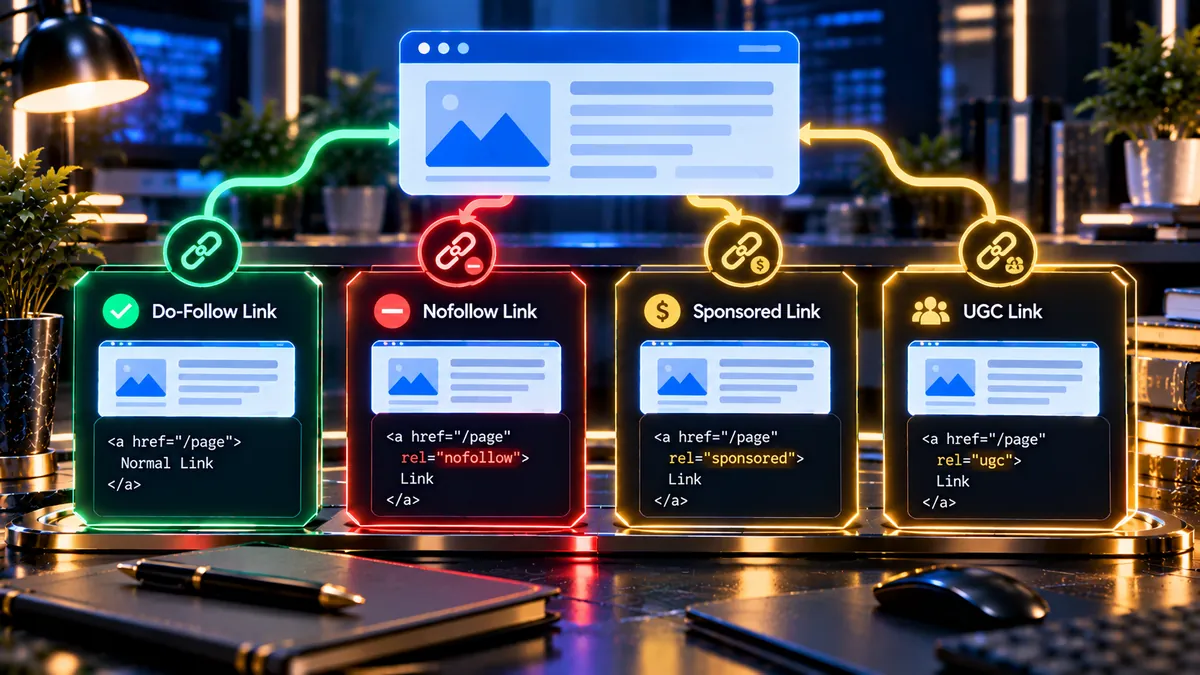
Understanding the Link Classification
The checker visually separates link types so technical issues can be identified quickly.
- Green — Do-Follow: ordinary links without detected restrictive relationship values.
- Red — Nofollow: links containing the
nofollowrelationship or a detected page-level nofollow directive. - Yellow — Sponsored: links containing
sponsored. - Yellow — UGC: links containing
ugc.
The colors are visual indicators for audit workflows. They do not by themselves mean that a particular link is good or bad.
Why Sponsored Links Need Special Attention
Sponsored links should accurately represent a paid or advertising relationship. Google specifically recommends the sponsored value for paid links.
Google’s spam policies also address paid links and link manipulation. Paid links intended to manipulate ranking signals can violate spam policies, while advertising and sponsorship links can be appropriately qualified using nofollow or sponsored.
Why UGC Links Need Special Attention
User-generated links can come from areas of a website where the publisher has less direct editorial control.
Comments, forums, community posts, and other public submission areas can therefore benefit from appropriate link qualification. Google recommends rel="ugc" for these links.
Nofollow and Internal Links
Nofollow is not only an external-link consideration. A page can contain internal links with rel="nofollow" as well.
During an SEO audit, unexpected internal nofollow links can be worth investigating because they may affect how crawlers discover and process site navigation.
For internal links, Google recommends using robots.txt rules when the goal is to prevent Google from crawling a URL on your own site, rather than relying on nofollow as a substitute for crawl management.
Nofollow and Link Equity
Nofollow is often discussed in relation to link equity and ranking signals. Modern search engines can use link attributes as signals describing how a publisher wants a link to be treated.
For technical auditing, the safest approach is to inspect the actual attribute values rather than assuming that every link without a visible nofollow attribute has identical SEO behavior.
Google states that links using these relationship attributes will generally not be followed, while the linked URLs may still be discovered through other sources such as sitemaps or links from other websites.
Nofollow vs Robots.txt
rel="nofollow" and robots.txt serve different purposes.
A link-level nofollow relationship qualifies a hyperlink. Robots.txt controls whether crawlers can request URLs according to the site’s crawling rules.
Google explains that robots.txt is primarily a crawler-access mechanism and should not be treated as a reliable way to keep a page out of Google Search.
Nofollow vs Noindex
Nofollow and noindex also solve different problems.
nofollow controls link-following behavior. noindex is used to prevent eligible content from appearing in search results.
Google documents noindex as an indexing rule and nofollow as a rule for links.
A page can use both:
<meta name="robots" content="noindex, nofollow">Google recognizes this combination as two separate instructions: do not index the page and do not follow its links.
Nofollow and WordPress Websites
WordPress websites can generate links through posts, pages, menus, widgets, comments, plugins, affiliate systems, and page builders.
This makes link attribute auditing useful when a website has undergone a redesign or when several SEO and marketing plugins control outbound links.
A Nofollow Checker can help identify unexpected relationship attributes directly from the rendered HTML returned by the server.
Nofollow Checks for Affiliate Links
Affiliate websites often contain many external product links. These links should be reviewed to ensure their relationship attributes match the site’s affiliate implementation and current search-engine guidance.
Google also distinguishes useful affiliate content from thin affiliate pages. Affiliate participation itself is not automatically a problem; the quality and value of the page remain important.
Use the Nofollow Checker to inspect the actual link markup instead of relying only on plugin settings.
Nofollow Checks for Sponsored Content
Sponsored articles, paid placements, advertising pages, and other commercial relationships deserve specific review.
Google’s current documentation recommends rel="sponsored" for paid links, while nofollow remains an accepted qualification method.
Nofollow Checks During Website Migrations
Website migrations can change templates, navigation systems, content modules, and SEO plugin settings.
After a migration, inspect important pages for unexpected nofollow attributes and page-level robots directives.
Compare critical navigation and content pages before and after the migration so unintended changes can be identified early.
Nofollow Checks After a WordPress Redesign
A redesign can introduce new theme templates, widgets, page-builder elements, or custom link components.
Run the checker on representative pages after launch. Pay particular attention to navigation, category pages, articles, landing pages, author pages, and pages containing affiliate or sponsored links.
How to Use the Nofollow Checker
- Enter the full public URL you want to analyze.
- Start the Nofollow Checker.
- Wait while the page HTML is fetched and analyzed.
- Review the total number of detected links.
- Compare do-follow and restricted-link counts.
- Inspect the link table.
- Review the detected
relattributes. - Check for a global robots nofollow directive.
- Use the JSON report when you need structured audit data.
- Download the PDF report for documentation or client reporting.
What Does a Nofollow Finding Mean?
A nofollow finding does not automatically mean that the page contains an SEO error.
Nofollow can be intentional. It may be used for links where a publisher does not want to associate with or crawl the linked page from that link, or where another qualifying relationship is appropriate.
The important question is whether the detected attribute matches the purpose of the link.
What Does a Sponsored Finding Mean?
A sponsored finding means the checker detected the sponsored relationship value on a link.
This is normally relevant to paid placements, advertisements, or sponsorship relationships. Google recommends sponsored for paid links.
What Does a UGC Finding Mean?
A UGC finding means the link contains the ugc relationship value.
This is commonly appropriate for links generated by users, including forum and comment content.
What Does a Global Nofollow Finding Mean?
A global nofollow finding means the page contains a robots directive instructing search-engine crawlers not to follow links from that page.
Google documents nofollow as a page-level robots rule and notes that it can be combined with other robots rules.
JavaScript Links and Nofollow Audits
HTML source analysis and rendered-page analysis are not always identical.
Some modern websites use JavaScript frameworks that generate or modify content after the initial HTML response. Google explains that some JavaScript-heavy sites require rendering before all links become visible to crawlers.
The Nofollow Checker analyzes the HTML response it can fetch. If a website creates links only after client-side JavaScript execution, those links may require additional browser-based testing.
Nofollow Checker vs Link Analyzer
A general link analyzer may focus on URLs, status codes, anchor text, or internal and external relationships.
The Nofollow Checker focuses specifically on link qualification and page-level nofollow signals. This makes it useful as a focused component of a broader technical SEO audit.
Nofollow Checker vs Full SEO Site Audit
A full SEO audit evaluates many technical and on-page factors at once. A Nofollow Checker focuses on link relationships and nofollow directives.
For a broader technical review, combine the Nofollow Checker with the Full SEO Site Audit, Technical SEO Checker, and Internal Links / Crawl Path Analyzer.
Related Technical SEO Checks
Nofollow analysis works best as part of a connected technical SEO workflow. After reviewing link attributes, you can investigate related crawlability, indexability, canonical, and robots signals.
Useful checks include the Crawlability Checker, Indexability Checker, Canonical URL Checker, Robots.txt Analyzer, and XML Sitemap Analyzer.
Frequently Asked Questions
What does a Nofollow Checker do?
A Nofollow Checker scans a web page for link-level nofollow attributes, other qualifying relationship values, and page-level robots nofollow directives.
Does nofollow mean a link is broken?
No. Nofollow describes a link relationship. It does not indicate whether the destination URL works.
Is rel=”nofollow” still used?
Yes. Google continues to document nofollow as a supported relationship value for qualifying links.
Should sponsored links use nofollow?
Google recommends rel="sponsored" for paid or advertising links. It also states that nofollow remains an acceptable qualification method.
What is the difference between sponsored and UGC?
sponsored describes paid or advertising relationships. ugc is intended for user-generated content links such as comments and forum posts.
Can a link have both ugc and nofollow?
Yes. Multiple rel values can be specified on the same link, such as ugc nofollow.
Does a robots nofollow meta tag affect every link?
A page-level robots nofollow rule applies to the links on that page. Google documents this separately from individual link-level rel attributes.
Can nofollow links still be discovered?
Yes. Google states that URLs associated with links using these relationship attributes may still be found through other sources, including sitemaps and links from other websites.
Does nofollow prevent indexing?
No. Nofollow and noindex are different rules. Nofollow concerns following links, while noindex is used to prevent eligible content from appearing in search results.
Final Thoughts
Link attributes are an important part of technical SEO and website governance. A page can contain ordinary links alongside nofollow, sponsored, and UGC relationships, while a page-level robots directive can apply a broader nofollow instruction.
PKCapra’s free Nofollow Checker brings these signals together in one practical report. Use it during technical SEO audits, WordPress troubleshooting, affiliate reviews, sponsored-content checks, migrations, and post-launch quality control.
For a broader technical SEO workflow, continue with the SEO & Website Tools collection and combine link analysis with crawlability, indexability, canonical, robots, and sitemap checks.