
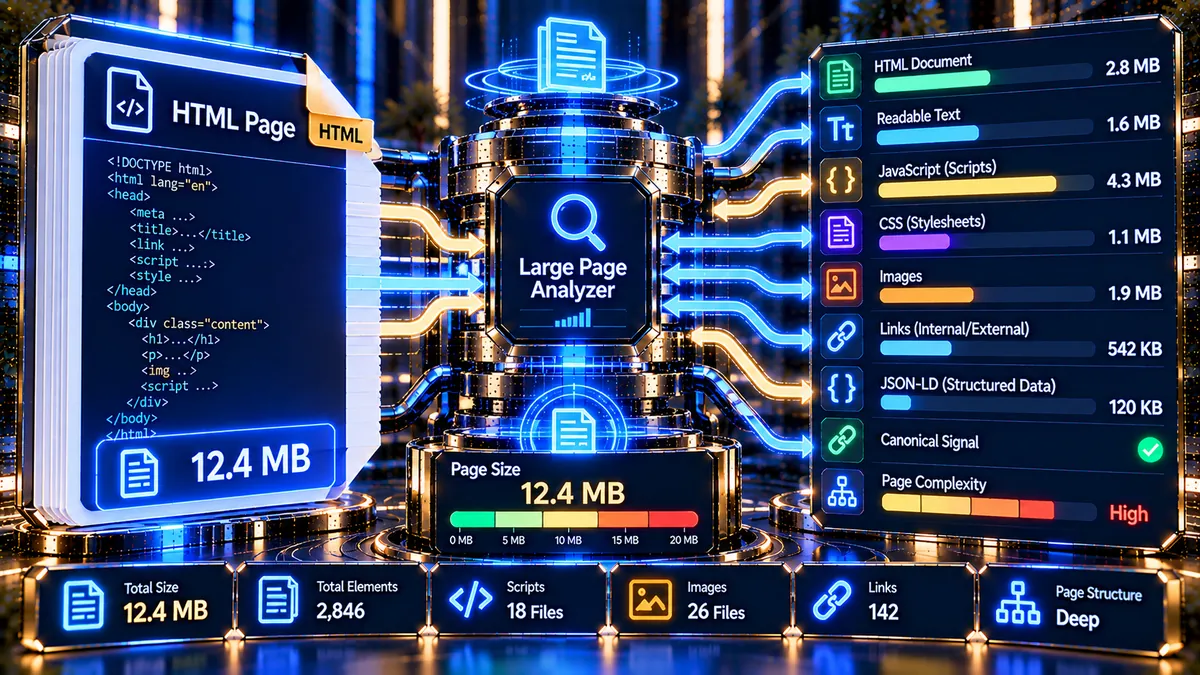
A very large HTML document can make a page harder to diagnose, maintain, and optimize. PKCapra’s Large Page Analyzer checks the HTML document returned by a public URL and breaks down its size, structure, content, resources, and technical signals so you can identify pages that deserve further investigation.
The analyzer focuses on the retrieved HTML document itself. It does not treat a large HTML file as an automatic Google ranking penalty, and its size thresholds are diagnostic indicators rather than Google ranking limits.
Large Page Analyzer
Analyze HTML document size, content volume, resource counts and technical page-weight signals.
—
—
Page size and thresholds are diagnostic indicators, not universal Google ranking limits. The analysis measures the retrieved HTML document; it does not execute page JavaScript or measure the combined transfer size of every image, script, stylesheet, font, or third-party resource.
What Does the Large Page Analyzer Check?
Enter a public page URL and PKCapra analyzes the response and available HTML structure.
The report can include:
- HTTP status code
- Final URL
- Redirect count
- Redirect destination
- Response time
- Time to First Byte (TTFB)
- Transferred response bytes
- Retrieved HTML document size
- HTML size in megabytes
- Whether the diagnostic size cap was reached
- Page title
- Meta description
- Canonical URL
- Readable text character count
- Text-to-HTML ratio
- H1, H2 and H3 counts
- Total links
- External links
- Images
- JavaScript files
- External scripts
- Stylesheets
- Iframes
- Forms
- JSON-LD blocks
- Inline scripts
- Inline styles
- Detected resources
- Technical findings and diagnostic recommendations
This makes the tool useful when a page feels unusually heavy, contains excessive markup, or needs a closer technical review.
Why Analyze HTML Page Size?
HTML is the document that the browser initially requests before loading many of the resources referenced by that document. Web performance guidance emphasizes that the HTML request has an important role in how quickly a page can begin loading and rendering. :contentReference[oaicite:0]{index=0}
A large HTML document can also be a useful diagnostic signal when it is accompanied by other problems, such as:
- Excessive DOM or markup
- Very large amounts of inline CSS
- Excessive inline JavaScript
- Large numbers of HTML elements
- Repeated or unnecessary content
- Extremely high image or script counts
- Low amounts of useful readable text relative to markup
- Complex page-builder output
- Embedded widgets and third-party integrations
- Poorly controlled templates or components
However, HTML size should be evaluated in context. A large document is not automatically a search-engine penalty or evidence of poor SEO.
Google’s page-experience guidance considers multiple signals, including Core Web Vitals, mobile usability, security and the overall user experience rather than a single page-size metric. :contentReference[oaicite:1]{index=1}
How the Large Page Analyzer Works
The analyzer retrieves the public URL and examines the HTTP response and HTML document returned by the server.
It follows redirects within its diagnostic limit and records the final destination. It then measures the retrieved document and parses the available markup to identify important page elements and resource references.
The analyzer can inspect:
- HTTP response information
- Response timing
- Retrieved HTML size
- Document structure
- Text content
- Links
- Images
- Scripts
- Stylesheets
- Iframes and forms
- Structured data
- Metadata
- Canonical signals
- Technical warning conditions
The result is designed to help you decide whether a large page needs deeper investigation rather than simply reporting a single size number.
Large HTML Does Not Mean Large Total Page Weight
One of the most important distinctions is the difference between HTML document size and total page weight.
The Large Page Analyzer measures the HTML document retrieved from the target URL. It does not download every image, JavaScript file, stylesheet, font, video, advertising resource, analytics request, or third-party asset referenced by that HTML.
For example, a page might have:
- 1.8 MB of HTML
- 20 images
- 15 JavaScript files
- 10 stylesheets
- Several web fonts
- Third-party analytics
- Embedded video
The HTML analyzer can identify many of those references, but the HTML size itself is not the same as the total amount of data transferred while the complete page loads.
For a broader performance investigation, use a dedicated performance-testing workflow such as Google PageSpeed Insights alongside this diagnostic.
Diagnostic Size Thresholds
PKCapra uses practical diagnostic thresholds to make unusually large HTML documents easier to identify.
The current analyzer treats:
- Up to 2 MB — Within the tool’s diagnostic size range
- Over 2 MB — Large document
- Over 5 MB — Very large document
- 8 MB diagnostic cap — Safety limit for the analyzed HTML document
These thresholds are PKCapra diagnostic classifications. They are not presented as Google ranking limits.
The purpose is to highlight pages that may deserve additional technical investigation.
What Does a Large HTML Document Tell You?
A large HTML document can have different causes.
Large Templates
Some websites generate extensive HTML through themes, page builders, reusable components, menus, footers, widgets and other template systems.
In this situation, the page may contain a substantial amount of markup even when the visible content is relatively simple.
Excessive Inline CSS
Large amounts of inline styling can increase document size and make the HTML harder to maintain.
The analyzer reports inline style signals so you can determine whether the page contains unusually high amounts of embedded styling.
Excessive Inline JavaScript
Inline scripts can increase the amount of HTML transferred and make debugging more complicated.
The analyzer reports inline script counts to help identify pages where JavaScript is heavily embedded directly into the document.
Large Numbers of Elements
A page can become structurally complex when templates generate large numbers of elements.
This may occur with:
- Large navigation systems
- Product listings
- Filters
- Tables
- Page-builder sections
- Repeated components
- Embedded widgets
- Complex ecommerce layouts
A high element count is a diagnostic signal, not automatically a problem.
Too Little Useful Text
A large HTML document containing very little readable text deserves closer inspection.
For example, a page may contain extensive markup, scripts and styling while providing relatively little actual textual content to users.
PKCapra therefore reports readable text characters and the text-to-HTML ratio to provide additional context.
Understanding the Text-to-HTML Ratio
The text-to-HTML ratio compares the amount of readable text detected in the document with the overall HTML content.
This metric should not be treated as a standalone Google ranking factor.
Instead, use it as a diagnostic clue.
A page with:
- Very large HTML
- Very little readable text
- Many scripts
- Many styles
- Many repeated elements
may benefit from inspecting its template, component structure and generated markup.
A content-heavy page can naturally contain substantial HTML, so a lower ratio does not automatically mean the page is poorly optimized.
Scripts, Images and Other Resources
The analyzer identifies resource references contained in the HTML, including:
- JavaScript
- External JavaScript
- Stylesheets
- Images
- Iframes
- Forms
This helps you understand what contributes to page complexity.
A page with many resources is not necessarily broken. Modern websites often use multiple scripts, stylesheets and components.
The useful question is whether those resources are necessary, efficiently loaded and appropriate for the page.
For JavaScript-specific diagnostics, you can also use the JavaScript Rendering SEO Checker.
Canonical, Title and Meta Description Signals
The analyzer also checks important HTML metadata such as:
<title>- Meta description
- Canonical URL
These signals help provide context while investigating a large page.
A page that is large and also missing important metadata may require a broader technical SEO review.
For deeper metadata analysis, use the Meta Tags Analyzer.
For dedicated canonical analysis, use the Canonical URL Checker.
JSON-LD and Structured Data
The analyzer detects JSON-LD blocks present in the retrieved HTML.
This can help identify pages where structured data contributes to the document structure.
The presence of JSON-LD is not itself a problem. Structured data can help search engines understand supported content types when implemented correctly.
If a large page contains extensive structured data, inspect whether the markup is relevant, valid and appropriately connected to the visible page content.
For deeper structured-data analysis, use the Schema Markup Structured Data Analyzer.
How to Interpret the Traffic-Light Result
PKCapra uses a simple diagnostic classification.
Green — Within Diagnostic Size Range
The retrieved HTML is within the analyzer’s normal diagnostic range.
This does not mean that the page is automatically fast or technically perfect. It simply means the document did not cross the tool’s large-page thresholds.
Yellow — Large Document
The HTML document is larger than the normal diagnostic range.
Review the page structure, inline resources, component count and template output before deciding whether optimization is necessary.
Red — Very Large Document
The document has reached the very-large diagnostic range or the analyzer encountered a server/fetch problem.
A very large document should normally receive additional investigation, particularly when combined with slow response times or excessive markup.
Common Causes of Very Large HTML
Large documents can result from many different implementation choices.
Common examples include:
- Heavy page-builder markup
- Large navigation structures
- Excessive nested containers
- Repeated components
- Product or category listings
- Large tables
- Inline CSS
- Inline JavaScript
- Embedded third-party widgets
- Large serialized data blocks
- Excessive structured data
- Poorly optimized templates
- Server-generated content that should be loaded more selectively
The correct solution depends on what is actually producing the markup.
How to Reduce an Unnecessarily Large HTML Document
If the analyzer identifies a very large document, start by finding the source of the size rather than removing content blindly.
1. Inspect the Template
Determine whether the size comes from the theme, page builder, CMS template or custom application.
2. Review Repeated Markup
Look for repeated components that generate unnecessary HTML.
3. Review Inline CSS
Identify large blocks of styling embedded directly into the document.
4. Review Inline JavaScript
Check whether scripts can be moved into appropriate external assets or loaded more efficiently.
5. Reduce Unnecessary Components
Remove widgets, sections and embedded functionality that do not contribute meaningful value to the page.
6. Review Large Listings
For ecommerce, directories and content-heavy pages, investigate whether extremely large lists should be split into manageable views.
7. Measure Real-World Performance
After structural changes, use performance testing to evaluate how the page behaves for real users.
Google’s page-experience documentation recommends considering Core Web Vitals and the overall user experience rather than optimizing around a single metric. :contentReference[oaicite:2]{index=2}
Large Pages and SEO
A large HTML document should not automatically be interpreted as an SEO failure.
Search performance depends on many factors, including relevance, content quality, crawlability, indexing, page experience and other technical signals.
Google’s documentation also explains that its systems evaluate page experience using multiple signals rather than one universal page-size threshold. :contentReference[oaicite:3]{index=3}
The Large Page Analyzer is therefore best used as a technical diagnostic tool.
It helps answer questions such as:
- Is this HTML document unusually large?
- How much HTML was retrieved?
- Is the page generating excessive markup?
- Are there unusually many scripts or images?
- Is there a high amount of inline JavaScript or CSS?
- Is the readable content small compared with the document?
- Does the page contain important metadata?
- Is further performance or technical SEO investigation warranted?
Large Page Analyzer vs Page Speed Analyzer
These tools answer different questions.
The Large Page Analyzer focuses on the retrieved HTML document and its structure.
The Page Speed Analyzer is intended for broader page-performance diagnostics.
Use the Large Page Analyzer when your primary question is:
“Why is this HTML document so large or structurally complex?”
Use a performance analysis workflow when your primary question is:
“How quickly does this page load and what is affecting its user experience?”
Using both can provide a more complete picture.
Large Pages and Crawl Diagnostics
For larger websites, page size can also be considered alongside crawl-related signals.
A page that is extremely large, slow to respond and resource-heavy may deserve additional investigation as part of a broader technical SEO audit.
The Crawl Budget Analyzer can be used alongside this tool when investigating response timing, payload size and page resource signals.
You can also use the Indexability & Crawlability Analyzer to investigate whether important pages can be crawled and indexed.
A Practical Large-Page Audit Workflow
A useful workflow is:
- Enter the public page URL.
- Run the Large Page Analyzer.
- Check the HTTP status and final URL.
- Review response time and TTFB.
- Review HTML document size.
- Check whether the document was truncated by the diagnostic safety limit.
- Review readable text and text-to-HTML ratio.
- Inspect script, image, stylesheet and iframe counts.
- Review inline script and inline style counts.
- Check title, meta description and canonical signals.
- Review technical findings.
- Investigate the actual source of unusually large markup.
- Re-test after meaningful changes.
- Use dedicated performance and SEO tools for deeper analysis.
Privacy and Processing
The Large Page Analyzer works with the public URL you submit.
The analyzer retrieves the target page to perform its diagnostic checks. It does not require you to provide a Google account, paid SEO API key or third-party SEO platform account.
Because the analysis depends on fetching a public URL, results can be affected by the target server, redirects, firewall rules, rate limits, response errors and other network conditions.
Do not submit private or confidential URLs that you do not want a server-side analyzer to request.
Important Limitations
The Large Page Analyzer is a diagnostic HTML analyzer, not a complete browser-performance laboratory.
It does not:
- Execute the target page’s JavaScript
- Reproduce a full Chrome rendering session
- Download every referenced resource
- Measure the complete transfer cost of every page asset
- Replace real-user monitoring
- Replace Core Web Vitals data
- Guarantee search rankings
- Treat its size thresholds as Google ranking limits
The analyzer also uses a safety cap for the amount of HTML retained for analysis. Very large documents may therefore be reported as truncated once the diagnostic limit is reached.
Always interpret the result together with the actual page architecture and performance data.
Frequently Asked Questions
What is the Large Page Analyzer?
It is a free PKCapra technical SEO diagnostic tool that retrieves a public page and analyzes its HTML document size, structure, metadata, resources and selected technical signals.
What counts as a large HTML page?
PKCapra classifies documents above 2 MB as large for diagnostic purposes and documents above 5 MB as very large. These are PKCapra diagnostic thresholds, not Google ranking limits.
Does a large HTML page hurt SEO?
Not automatically. HTML size is one technical characteristic of a page and should be evaluated alongside crawlability, indexing, performance, content, usability and other factors.
Does the tool measure total page weight?
No. It primarily measures the retrieved HTML document. It does not download every image, script, stylesheet, font or third-party resource referenced by the page.
Does the analyzer execute JavaScript?
No. It analyzes the retrieved HTML and source-level signals rather than executing the target page in a browser.
Why is my page large?
Common causes include page builders, complex templates, repeated components, inline CSS, inline JavaScript, large listings, embedded widgets and excessive generated markup.
Is the 8 MB limit a Google limit?
No. The 8 MB limit is a PKCapra safety and diagnostic cap for the analyzer. It should not be interpreted as a Google ranking or crawling limit.
Should I remove content if my page is large?
Not automatically. First determine what is creating the document size. Remove unnecessary markup or functionality rather than reducing useful content simply to reach a particular byte count.
What should I use after finding a large page?
Use the finding as a starting point. Investigate the template and markup, then use performance, crawlability, indexability and JavaScript-specific diagnostics where appropriate.
Related PKCapra Tools
- Page Speed Analyzer — investigate broader page-performance signals.
- Crawl Budget Analyzer — review crawl-related response and resource signals.
- JavaScript Rendering SEO Checker — inspect JavaScript and source-level rendering signals.
- Indexability & Crawlability Analyzer — investigate crawlability and indexability signals.
- Meta Tags Analyzer — analyze important HTML metadata.
- Canonical URL Checker — investigate canonical URL behavior.
- Schema Markup Structured Data Analyzer — inspect structured-data implementation.
Final Takeaway
A large HTML document is not automatically an SEO problem, but it can be an important technical signal.
PKCapra’s Large Page Analyzer helps you measure the retrieved HTML document, understand what is inside it, identify unusually large or complex structures, and decide where deeper investigation is warranted.
Use the result as part of a broader technical SEO and performance workflow rather than optimizing toward an arbitrary page-size number.