
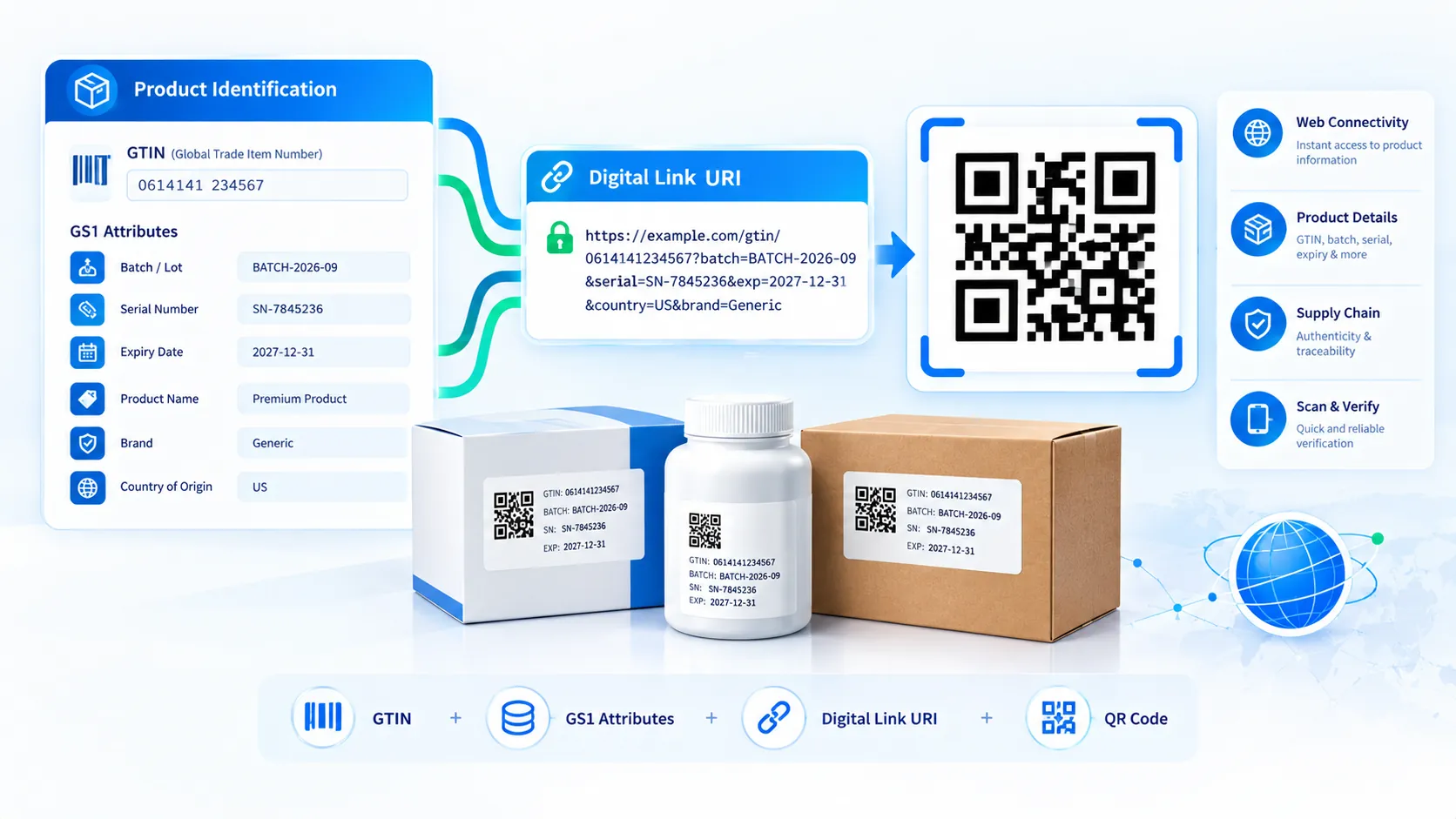
The GS1 Digital Link QR Generator creates GS1 Digital Link URIs and turns them into QR Codes directly in your browser. Enter a GTIN, choose your HTTPS domain, add supported GS1 Application Identifier qualifiers such as batch, serial, production date, packaging date, expiry date, or count, and the tool builds the URI and QR preview live. You can export the QR as SVG or high-resolution PNG and copy or download the structured JSON configuration.
GS1 Digital Link QR Generator
Build a standards-oriented GS1 Digital Link URI from a GTIN, optional key qualifiers, and web domain, then generate a scannable QR Code in your browser.
Primary Identifier
Key Qualifiers
Additional GS1 Data
Live GS1 Digital Link URI
LIVEQR Code Preview
Validation & Workflow Checks
How to Use the GS1 Digital Link QR Generator in Simple Steps
- Enter the product’s GTIN. The tool validates the identifier and normalizes it to the required GTIN-14 representation where applicable.
- Enter your HTTPS domain and add any required GS1 qualifiers, such as batch/lot, serial number, production date, packaging date, expiry date, or count.
- Review the generated GS1 Digital Link URI and live QR Code. The tool updates the URI and QR preview automatically as you change the inputs.
- Copy the URI or JSON, download the JSON configuration, or export the QR Code as SVG or high-resolution PNG. Use Load Example to inspect a working configuration or Clear to start again.
Technical Breakdown: How the GS1 Digital Link QR Generator Works
GS1 Digital Link provides a web-address structure for representing GS1 identification keys and related attributes. A GS1 Digital Link URI can then be carried in a QR Code or another suitable data carrier.
The PKCapra generator builds the URI from the identification and qualifier fields supplied through the interface. The main product identifier is the GTIN, while optional fields add additional GS1 Application Identifier data to the Digital Link.
The tool validates the supplied GTIN and checks its check digit before generating the final URI. Where necessary, the identifier is normalized to a GTIN-14 representation so that the generated Digital Link follows the expected GTIN URI structure.
The domain field controls the HTTPS host used for the Digital Link. This allows an organization to use its own domain rather than requiring the QR Code to point directly to a PKCapra address.
Supported qualifier inputs include:
- AI (10) for batch or lot information
- AI (21) for serial information
- AI (11) for production date
- AI (13) for packaging date
- AI (17) for expiration date
- AI (37) for count
The tool builds the URI from these structured fields rather than asking users to manually assemble query parameters. This reduces common formatting mistakes such as incorrect parameter names, misplaced separators, or malformed identifier values.
The QR Code is generated from the resulting URI in the browser. The QR therefore contains the generated Digital Link URL as its encoded data.
A resolver is not inherently required for a Digital Link URI to exist. The URI can identify the GS1 key and qualifiers through its structure, while a resolver can provide additional web behavior such as routing the user to appropriate product information or services.
The generator does not operate as a complete GS1 resolver. It creates the Digital Link URI and QR representation; hosting, resolver behavior, application routing, product information, and organizational domain configuration remain separate implementation concerns.
SVG export preserves the QR’s vector geometry for design and print workflows. The high-resolution PNG export provides a raster alternative when an application requires PNG artwork.
Payload generation and QR creation are performed in the browser. The normal workflow does not require sending the entered GTIN, qualifiers, or domain to a PKCapra server.
For checking an existing Digital Link rather than creating one, use the GS1 Digital Link Validator when available. For standard QR creation without GS1 Digital Link structure, use the QR Code Generator. For compact rectangular QR applications, use the rMQR Code Generator.
Developer Snippets (Automate This Tool Offline)
The following examples show how to construct a basic GS1 Digital Link URI offline. They prepare the URI structure but do not provide a complete replacement for formal GS1 conformance testing.
Python: Build a Basic GS1 Digital Link URI
from urllib.parse import quote

domain = "https://example.com"
gtin = "09506000134352"
lot = "LOT123"
serial = "SN456"

uri = (
    f"{domain}/01/{gtin}"
    f"?10={quote(lot, safe='')}"
    f"&21={quote(serial, safe='')}"
)

print(uri)
PowerShell: Create a GS1 Digital Link URI
$domain = "https://example.com"
$gtin = "09506000134352"
$lot = [uri]::EscapeDataString("LOT123")
$serial = [uri]::EscapeDataString("SN456")

$uri = "$domain/01/$gtin`?10=$lot&21=$serial"

Write-Host $uri
Node.js: Build a GS1 Digital Link URI
const domain = "https://example.com";
const gtin = "09506000134352";
const lot = "LOT123";
const serial = "SN456";

const uri =
  `${domain}/01/${gtin}` +
  `?10=${encodeURIComponent(lot)}` +
  `&21=${encodeURIComponent(serial)}`;

console.log(uri);
For production systems, validate the GTIN check digit and apply the current GS1 Digital Link URI syntax rules before publishing generated identifiers. URI construction should not be treated as a substitute for GS1 conformance validation.
Native Software Workaround: Prepare GS1 Digital Link Data
Native spreadsheet software can prepare product records before they are converted into Digital Link URIs.
In Microsoft Excel, keep the GTIN, batch/lot, serial, production date, packaging date, expiry date, and count in separate columns. This makes it easier to generate one structured Digital Link per product or inventory record.
In Microsoft Access, store the GTIN as a dedicated identifier field and keep each GS1 qualifier in its own field. Queries can then select the required attributes for a particular Digital Link workflow.
In Visual Studio Code, save generated Digital Link records as JSON or CSV source data and validate the URI strings before passing them to your QR-generation pipeline.
In Adobe Illustrator or InDesign, use the exported SVG when placing the final QR artwork into packaging, labels, brochures, or product documentation. Keep the QR’s aspect ratio unchanged and avoid effects that soften or distort its modules.
For production packaging, test the final printed QR rather than relying only on the browser preview. Physical module size, contrast, printing quality, substrate, curvature, and scanner conditions can affect successful decoding.
Frequently Asked Questions
What is a GS1 Digital Link QR Code?
A GS1 Digital Link QR Code is a QR Code containing a GS1 Digital Link URI that represents a GS1 identification key and, where applicable, additional structured attributes.
What does the GTIN field do?
The GTIN field supplies the primary GS1 identification key used by the generated Digital Link URI. The tool validates the identifier’s check digit and normalizes it to the required GTIN-14 representation where applicable.
Why is the domain required?
The domain provides the HTTPS host portion of the Digital Link URI. Organizations can use their own domain to control the web destination and application behavior associated with the identifier.
Does the QR Code itself contain my product information?
The QR Code contains the generated Digital Link URI. The URI can contain the GS1 identifier and supported qualifiers, while additional product information can be provided through the web infrastructure associated with the URI.
Do I need a GS1 resolver?
A resolver is not inherently required to construct a valid Digital Link URI. A resolver can provide additional routing and web-service behavior when an organization chooses to deploy one.
Which GS1 qualifiers does the tool support?
The generator supports batch/lot, serial, production date, packaging date, expiry date, and count fields through the corresponding Application Identifier inputs exposed by the tool.
Does the tool validate my complete GS1 implementation?
The generator performs input and URI construction checks, but it is not a substitute for complete GS1 conformance testing, organizational identifier management, resolver configuration, or trading-partner requirements.
Can I use a custom company domain?
A custom HTTPS domain can be entered as the host for the generated Digital Link URI. The organization remains responsible for configuring that domain and any associated web or resolver infrastructure.
Can I download the generated QR Code?
The QR Code can be exported as SVG or high-resolution PNG. The tool also provides JSON and URI copy/download options for the underlying configuration.
Is the generation process browser-based?
The normal generation process runs in the browser. The entered GTIN, domain, and qualifiers do not need to be uploaded to PKCapra for URI or QR generation.
Can I use a Digital Link URI without a QR Code?
A Digital Link URI is a web-address representation and can be used independently of a QR Code. The QR Code is one way to encode and distribute that URI for scanning.
What should I do before using the QR Code on packaging?
Validate the Digital Link structure and GS1 data, test the generated QR with the intended scanners, and verify the final printed artwork at its actual production dimensions and physical conditions.