
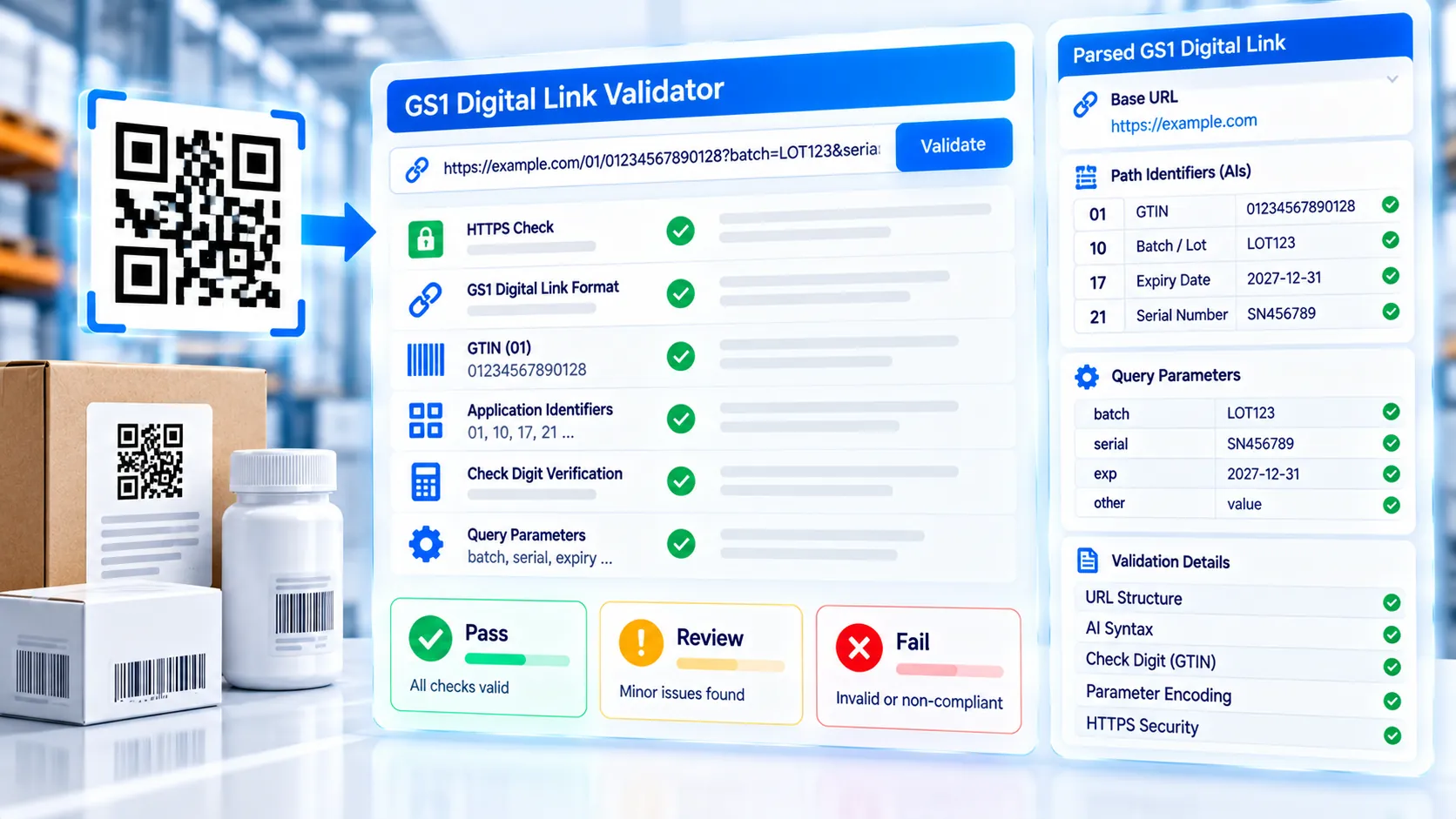
The GS1 Digital Link Validator checks a GS1 Digital Link URI directly in your browser and breaks the address into its important GS1 components. Paste a Digital Link URI to inspect the HTTPS structure, domain, primary GS1 identification key, GTIN-14 check digit, Application Identifiers, query parameters, date formats, numeric values, and potential structural issues. The validator produces a clear Pass, Review, or Fail assessment together with a structured JSON report.
GS1 Digital Link Validator
Validate a GS1 Digital Link URI in your browser and see which structural, identifier, and common GS1 data checks pass or need review.
GS1 Digital Link URI
LIVEURI Summary
Validation Results
Detected GS1 Data
Report
How to Use the GS1 Digital Link Validator in Simple Steps
- Paste your complete GS1 Digital Link URI into the validator input. The analysis runs automatically as you edit the URI.
- Review the validation summary for the HTTPS scheme, host, primary identification key, GTIN structure, Application Identifiers, and URI parameters.
- Inspect the detailed findings to distinguish confirmed validation failures from items that require additional GS1 or resolver-level review.
- Copy the report or JSON result, download the JSON report, use Load Example to test the interface with a sample URI, or select Clear to validate another Digital Link.
Technical Breakdown: How the GS1 Digital Link Validator Works
The GS1 Digital Link Validator performs browser-side structural analysis of a supplied Digital Link URI. It is designed to help identify formatting and identifier problems before a URI is passed into a larger GS1 Digital Link or QR workflow.
The validator first examines the URI structure, including the scheme and host. HTTPS is checked because GS1 Digital Link implementations commonly use web-address structures, while the domain itself remains the responsibility of the organization operating the URI.
The primary GS1 identification key is then examined from the Digital Link path. For GTIN-based Digital Links, the validator checks the GTIN representation and verifies the GTIN check digit.
The tool also inspects supported GS1 Application Identifier patterns and separates recognizable GS1 data from parameters that require further review. This is useful when troubleshooting manually assembled Digital Link addresses, where a typo in an AI, value, separator, or date can otherwise be difficult to spot.
Date-related fields are checked for expected GS1-style date formatting where the validator recognizes the corresponding Application Identifier. Numeric fields are also checked where their structure can be determined from the URI.
The validator identifies custom or unexpected query parameters so that users can distinguish recognized GS1 information from additional application-specific data. A parameter being unfamiliar to the validator does not automatically mean that a complete Digital Link implementation is invalid; it indicates that further review is appropriate.
The result is divided into Pass, Review, and Fail findings. A Pass indicates that the specific structural check succeeded. Review identifies an item that needs additional context or implementation-level verification. Fail identifies a structural or identifier condition that the validator can determine is invalid.
The validator is intentionally not presented as a complete replacement for formal GS1 conformance testing. A URI can pass local syntax and identifier checks while still pointing to an incorrectly configured domain, missing resolver behavior, incomplete product information, or an implementation that does not satisfy a particular business or trading-partner requirement.
Resolver behavior is therefore separate from URI validation. The validator checks the URI that you provide; it does not certify that the associated website, resolver, product database, or web service is correctly configured.
All normal validation takes place in the browser. The supplied URI does not need to be uploaded to PKCapra for the analysis.
After validating a URI, use the GS1 Digital Link QR Generator if you need to create a QR Code containing the validated Digital Link. For standard QR generation without GS1 Digital Link structure, use the QR Code Generator.
Developer Snippets (Automate This Tool Offline)
The following examples demonstrate basic offline checks that can complement a Digital Link validation workflow. They do not replace complete GS1 Digital Link conformance validation.
Python: Parse a GS1 Digital Link URI
from urllib.parse import urlparse, parse_qsl

uri = "https://example.com/01/09506000134352?10=LOT123&21=SERIAL456"

parsed = urlparse(uri)

print("Scheme:", parsed.scheme)
print("Host:", parsed.netloc)
print("Path:", parsed.path)

for key, value in parse_qsl(parsed.query, keep_blank_values=True):
    print(f"Query AI: {key} = {value}")
PowerShell: Inspect URI Components
$uri = [System.Uri]"https://example.com/01/09506000134352?10=LOT123&21=SERIAL456"

Write-Host "Scheme:" $uri.Scheme
Write-Host "Host:" $uri.Host
Write-Host "Path:" $uri.AbsolutePath
Write-Host "Query:" $uri.Query
Node.js: Parse a Digital Link
const uri = new URL(
  "https://example.com/01/09506000134352?10=LOT123&21=SERIAL456"
);

console.log("Scheme:", uri.protocol);
console.log("Host:", uri.host);
console.log("Path:", uri.pathname);

for (const [key, value] of uri.searchParams.entries()) {
  console.log(`${key} = ${value}`);
}
These snippets inspect the URI structure but do not independently implement GS1’s complete Digital Link URI Syntax specification. Production validation should account for the current GS1 syntax and the requirements of the intended application.
Native Software Workaround: Inspect a GS1 Digital Link URI
Native software can help developers and data teams inspect Digital Link addresses before they enter a production QR workflow.
In Google Chrome or Microsoft Edge, paste the Digital Link into the address bar to inspect whether the URI is syntactically recognized as a web address. Browser navigation alone should not be treated as GS1 conformance validation.
In Visual Studio Code, place Digital Link records in a text or JSON file and use the editor’s search and formatting tools to inspect repeated GTINs, qualifiers, or query parameters across a dataset.
In Microsoft Excel, keep the complete Digital Link in one column while separating GTIN, batch/lot, serial, production date, packaging date, and expiry information into additional columns. This makes it easier to identify inconsistent source data before generating the final URIs.
In Postman, enter a Digital Link as a request URL when you need to test the behavior of the associated web endpoint. A successful HTTP response tests the endpoint behavior; it does not by itself prove GS1 Digital Link URI conformance.
For production workflows, validate both the URI and the actual resolver or web destination. A structurally correct Digital Link can still lead to an incorrectly configured service.
Frequently Asked Questions
What is a GS1 Digital Link Validator?
A GS1 Digital Link Validator is a tool that checks the structure and recognizable GS1 data within a Digital Link URI and reports detected problems or items requiring further review.
What does the validator check?
The validator checks URI structure, HTTPS usage, host information, primary GS1 identification data, GTIN formatting and check digits, recognized Application Identifiers, supported value formats, date fields, and query parameters exposed by the validator.
Does a Pass result mean my entire GS1 implementation is compliant?
A Pass result means the specific checks performed by the validator succeeded. It does not certify resolver configuration, product data, organizational processes, trading-partner requirements, or complete GS1 conformance.
Does the validator check my GTIN check digit?
GTIN check-digit validation is performed when the validator recognizes a GTIN-based identification key in the Digital Link.
Can the validator detect an incorrect Application Identifier?
Recognized Application Identifier structures can be checked by the validator. Unknown or custom parameters may instead be reported for review because not every application-specific parameter is necessarily invalid.
Does the validator test my resolver?
Resolver operation is separate from local URI validation. The validator analyzes the supplied URI but does not certify that an associated resolver or web application is correctly configured.
Can I validate a Digital Link without uploading it?
Browser-side validation allows the URI to be analyzed locally without requiring the URI to be uploaded to PKCapra.
What does Review mean?
Review means the validator found an item that requires additional context or implementation-level verification rather than identifying it as a definite structural failure.
What does Fail mean?
Fail means the validator detected a structural or identifier condition that it can determine is invalid according to the checks implemented by the tool.
Can I export the validation results?
Validation results can be copied as a report or JSON and downloaded as a JSON file.
Can I use the validator before creating a QR Code?
Validation before QR generation can help catch URI and identifier problems before the Digital Link is encoded. After validation, the GS1 Digital Link QR Generator can encode the resulting URI into a QR Code.
Is a GS1 Digital Link the same as a normal URL?
A GS1 Digital Link is a URI structure designed to represent GS1 identification keys and related information in a web-address format. It can function as a URL while following additional GS1-specific syntax rules.
What should I do if the URI fails validation?
Inspect the specific failure first, correct the affected identifier or URI component, then validate the complete URI again. After structural validation succeeds, test the actual resolver and final QR artwork separately.