
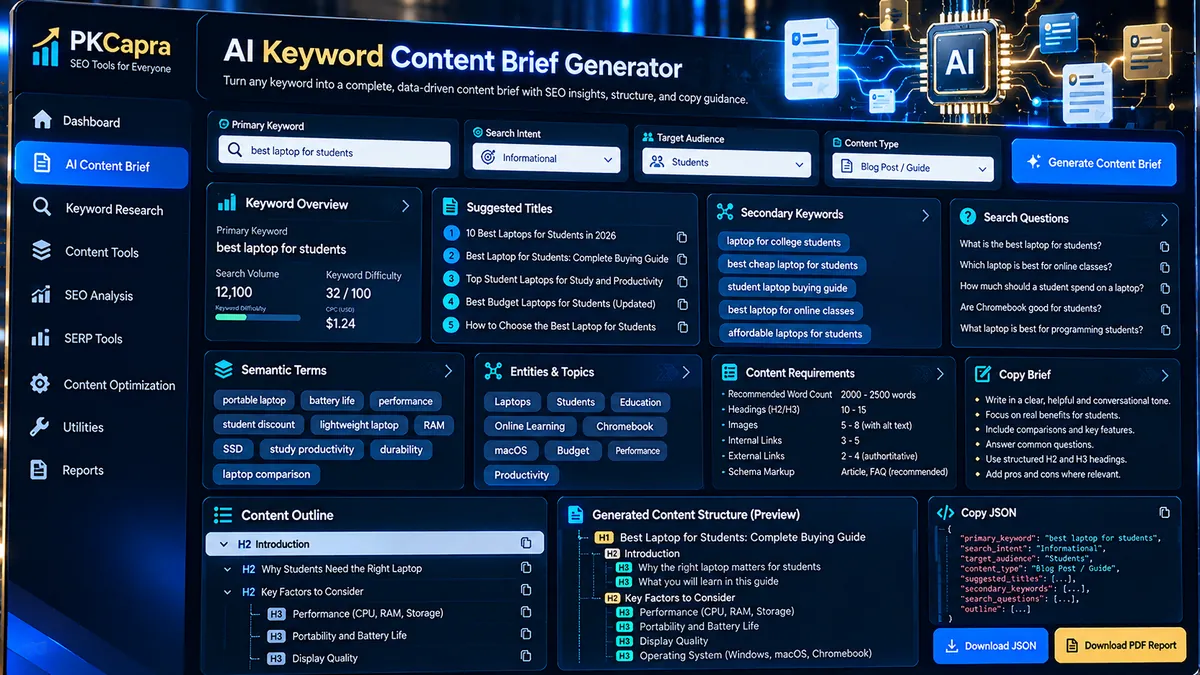
The AI Keyword Content Brief Generator creates a structured content plan from your topic, primary keyword, target audience, search intent, content type, tone, target word count, business goal, and additional editorial requirements. The generation process runs locally in the browser and does not call an external AI API.
Content Brief Generator
Build a structured content brief from a topic, primary keyword, audience, intent, content type, tone, target length, business goal, and editorial context. Generation runs locally in the browser and does not call an external AI API.
JSON report
Planning signals are generated locally from deterministic patterns. This tool does not fetch live search volume, keyword difficulty, SERP, competitor, traffic, or ranking data.
How to Use the AI Keyword Content Brief Generator in Simple Steps
- Enter your topic and primary keyword. Add the subject of the page and the main keyword you want the content brief to support.
- Define the audience and search intent. Enter the target audience and select Informational, Commercial Investigation, Transactional, Navigational, or Local intent.
- Set the content requirements. Choose the content type, writing tone, target length, business goal, and any additional angles, exclusions, locations, products, or editorial requirements.
- Generate and export the brief. Click Generate Content Brief to create the structured plan. You can then use Copy Brief, Copy JSON, Download JSON, or Download PDF Report to move the output into your content workflow.
Technical Breakdown of the AI Keyword Content Brief Generator
Local Browser-Based Generation
The core content-brief generation runs locally in the user’s browser. The tool does not send the entered planning data to an external AI API for generation.
This architecture keeps the generation workflow lightweight and avoids requiring an external AI API key, paid AI service, or third-party keyword platform.
Structured Content Planning Signals
The generator transforms the supplied inputs into a structured planning document containing sections such as summary information, suggested titles, secondary keyword ideas, semantic or related terms, search questions, entities and topics, content outline, content requirements, and planning notes.
The output is designed to give writers and SEO teams a defined content structure before drafting begins.
Deterministic Keyword and Question Suggestions
Keyword ideas, related terms, and search questions are generated from the supplied topic and primary keyword using deterministic planning patterns. The tool can therefore create a repeatable starting point without depending on an external AI generation service.
For deeper keyword organization, the generated keyword ideas can be moved into Keyword Clustering or Keyword Grouping.
Content-Type-Aware Outlines
The generator adapts its planning structure to the selected content type, including Article / Blog Post, How-To Guide, Ultimate Guide, Listicle, Comparison, Product / Tool Page, Landing Page, and Local Service Page.
This helps prevent the same generic outline from being applied to every page format.
Export and Copy Functions
The tool provides four practical output actions: Copy Brief for the formatted planning document, Copy JSON for structured data, Download JSON for a reusable machine-readable file, and Download PDF Report for a shareable report.
No Live Search or Ranking Data
This generator does not fetch live search volume, keyword difficulty, SERP results, competitor data, traffic estimates, or ranking predictions. Its planning signals are generated locally from the information entered into the tool.
For technical site analysis after the brief is created, you can use tools such as Full SEO Site Audit, Technical SEO Checker, and Crawlability Checker.
Developer Snippets (Automate This Tool Offline)
Python — Generate a Basic Local Content Brief
import json

keyword = "technical SEO audit"
audience = "SEO managers and website owners"
intent = "informational"

brief = {
    "primary_keyword": keyword,
    "target_audience": audience,
    "search_intent": intent,
    "suggested_titles": [
        f"How to Perform a {keyword}",
        f"{keyword}: A Practical Guide",
        f"Technical Guide to {keyword}"
    ],
    "questions": [
        f"What is {keyword}?",
        f"How does {keyword} work?",
        f"Why does {keyword} matter?",
        f"What are common mistakes with {keyword}?"
    ],
    "outline": [
        f"What Is {keyword}?",
        f"Why {keyword} Matters",
        "Key Benefits and Use Cases",
        "Important Factors to Consider",
        "Practical Examples and Best Practices",
        "Common Mistakes and Limitations",
        "Frequently Asked Questions",
        "Key Takeaways"
    ]
}

with open("content-brief.json", "w", encoding="utf-8") as file:
    json.dump(brief, file, indent=2, ensure_ascii=False)

print("Content brief saved to content-brief.json")
PowerShell — Create a Reusable Brief File
$keyword = "technical SEO audit"
$audience = "SEO managers and website owners"
$intent = "informational"

$brief = [ordered]@{
    primary_keyword = $keyword
    target_audience = $audience
    search_intent = $intent
    outline = @(
        "What Is $keyword?"
        "Why $keyword Matters"
        "Key Benefits and Use Cases"
        "Important Factors to Consider"
        "Practical Examples and Best Practices"
        "Common Mistakes and Limitations"
        "Frequently Asked Questions"
        "Key Takeaways"
    )
}

$brief | ConvertTo-Json -Depth 5 | Set-Content -Path "content-brief.json" -Encoding UTF8
Node.js — Build a JSON Content Brief
const fs = require("fs");

const keyword = "technical SEO audit";
const audience = "SEO managers and website owners";

const brief = {
  primary_keyword: keyword,
  target_audience: audience,
  search_intent: "informational",
  suggested_titles: [
    `How to Perform a ${keyword}`,
    `${keyword}: A Practical Guide`,
    `Technical Guide to ${keyword}`
  ],
  outline: [
    `What Is ${keyword}?`,
    `Why ${keyword} Matters`,
    "Key Benefits and Use Cases",
    "Important Factors to Consider",
    "Practical Examples and Best Practices",
    "Common Mistakes and Limitations",
    "Frequently Asked Questions",
    "Key Takeaways"
  ]
};

fs.writeFileSync(
  "content-brief.json",
  JSON.stringify(brief, null, 2),
  "utf8"
);

console.log("Content brief saved to content-brief.json");
Native Software Workaround: Build Long-Tail Content Data with Microsoft Excel Power Query
Step 1: Prepare the Source Data
Create an Excel worksheet containing columns for Primary Keyword, Topic, Audience, Search Intent, Content Type, and Business Goal.
Step 2: Convert the Range into an Excel Table
Select the dataset and use Insert → Table. Give the table a descriptive name such as ContentBriefInput.
Step 3: Open Power Query
In Excel, select Data → From Table/Range. Power Query will open the table as a query for transformation.
Step 4: Create Search Question Variations
Use Add Column → Custom Column to create reusable question patterns from the primary keyword. For example, a keyword stored in the Primary Keyword column can be combined with question templates such as:
- What is [Primary Keyword]?
- How does [Primary Keyword] work?
- Why does [Primary Keyword] matter?
- What are the benefits of [Primary Keyword]?
- What mistakes should be avoided?
Step 5: Clean and Export the Dataset
Remove duplicates, standardize capitalization, filter empty rows, and select Home → Close & Load to return the structured dataset to Excel.
This workflow is useful when a content team needs to process many keywords and planning inputs without depending on a separate paid keyword-processing platform.
Frequently Asked Questions
What is the AI Keyword Content Brief Generator?
The AI Keyword Content Brief Generator is a browser-based planning tool that creates structured content briefs from user-provided SEO and editorial inputs.
Does the tool use an external AI API?
The tool does not call an external AI API for its core generation process; planning signals are generated locally using deterministic patterns.
Does it provide live keyword search volume?
Live keyword search volume is not provided by this generator.
Does it calculate keyword difficulty?
Keyword difficulty is not calculated by this generator.
Does it analyze Google SERPs or competitors?
Live SERP and competitor analysis are not performed by this tool.
What information can I enter?
The generator accepts a topic, primary keyword, target audience, search intent, content type, tone, target length, business goal, and additional editorial context.
Can I copy the generated brief?
The generated brief can be copied directly using the Copy Brief button.
Can I export the content brief?
The content brief can be copied as JSON, downloaded as a JSON file, or exported as a PDF report.
Can I use the generated brief for different page types?
The generator supports articles, how-to guides, ultimate guides, listicles, comparisons, product or tool pages, landing pages, and local service pages.
Is the generated brief a replacement for live SEO research?
The generated brief is a planning framework rather than a live keyword-research or SERP-analysis system, so live SEO research should be performed separately when current market data is required.