
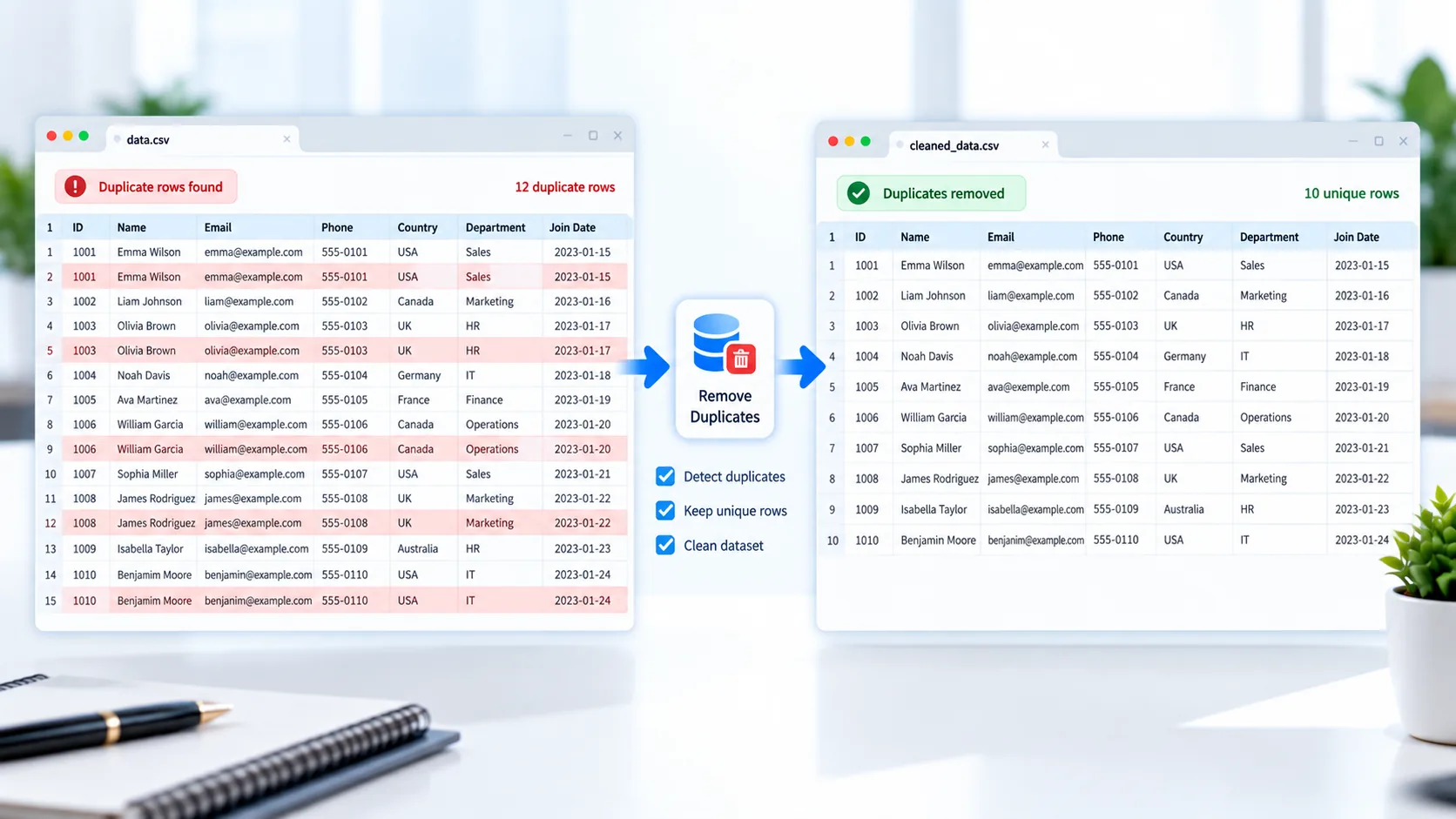
Remove Duplicate Rows from CSV Files
Duplicate records can make a dataset larger than necessary and may affect reporting, analysis, imports, and other data workflows. PKCapra Duplicate Row Remover helps you find and remove duplicate rows from a CSV file directly in your browser.
Upload your CSV, choose how duplicate rows should be compared, review the results, and download a cleaned CSV.
The tool keeps the first occurrence of a duplicate record and removes subsequent matching rows.
Duplicate Row Remover
Find and remove duplicate rows from a CSV file while keeping the first occurrence.
How to Remove Duplicate Rows from a CSV
Using the Duplicate Row Remover is simple:
- Upload your CSV file or drag and drop it into the tool.
- Review the CSV preview.
- Choose whether to compare all columns or selected columns.
- Start the duplicate-removal process.
- Review the number of unique and duplicate rows.
- Download the cleaned CSV.
This provides a quick way to clean repeated records without manually searching through a large spreadsheet.
What Is a Duplicate Row?
A duplicate row is a record that matches another record according to the columns being compared.
For example:
ID,Name,Email
001,Ali Khan,ali@example.com
002,Sara Ahmed,sara@example.com
001,Ali Khan,ali@example.com
If all columns are selected for comparison, the third row is a duplicate of the first row.
After cleaning, the duplicate record is removed while the first occurrence remains.
Compare All Columns
The simplest way to identify duplicates is to compare every column in the CSV.
When all columns are selected, a row is considered a duplicate when its complete set of values matches another row.
This is useful when the entire record needs to be identical before it is considered a duplicate.
Compare Selected Columns
Sometimes two records should be considered duplicates based on only a few important fields.
For example, a customer dataset might contain:
- Customer ID
- Name
- Phone
- City
You may want to identify duplicates based only on Email rather than requiring every field to match.
The selected-column comparison option gives you more control over how duplicate records are identified.
Keep the First Occurrence
When duplicate records are found, PKCapra Duplicate Row Remover keeps the first occurrence and removes later matching records.
This means the cleaned CSV maintains one copy of each detected record according to your selected comparison fields.
See How Many Duplicates Were Removed
The tool provides useful processing information after the CSV has been analyzed.
You can see the relationship between the original dataset and the cleaned result, including the number of duplicate rows removed.
This makes it easier to confirm that the cleaning operation produced the expected result.
Clean CSV Data Before Importing
Duplicate records can create unnecessary problems when importing data into another system.
Cleaning your CSV first can be useful for:
- Customer databases
- Product catalogs
- Contact lists
- Sales records
- Inventory data
- Marketing lists
- Survey results
- Database exports
If your CSV also contains blank rows or unnecessary columns, you can use the CSV Cleaner before or after removing duplicates.
Process Your Data in Your Browser
PKCapra Duplicate Row Remover is designed for browser-side processing. Your CSV data is processed directly in your browser instead of requiring the file to be uploaded to a remote processing server.
This can be useful when working with business datasets or records that you prefer to keep on your own device.
Handle Standard CSV Formatting
CSV files can contain quoted values, commas inside fields, and multiline values. A CSV cleaning tool needs to recognize those structures correctly rather than treating every comma or line break as a separate field.
PKCapra uses CSV-aware processing for common CSV structures.
For more information about the standard CSV format, see the RFC 4180 CSV specification.
Merge and Clean CSV Data
If you have several CSV files that need to be combined first, you can use the CSV Merger and then run the combined dataset through the Duplicate Row Remover.
For example:
Multiple CSV files → CSV Merger → Duplicate Row Remover → Clean CSV
This can be a useful workflow when separate exports contain overlapping records.
If you need to divide a large CSV after cleaning, use the CSV Splitter.
Features
Remove Duplicate Rows
Find and remove repeated CSV records.
Compare All Columns
Use the complete row to determine whether records are duplicates.
Compare Selected Columns
Choose specific columns when only certain fields should determine duplication.
Keep First Record
The first occurrence is retained while later duplicates are removed.
Duplicate Count
See how many duplicate rows were identified and removed.
CSV Preview
Review your data before processing.
Header Preservation
The CSV header remains part of the cleaned file.
CSV-Aware Processing
Supports standard quoted fields, commas, and multiline values.
Browser-Based Processing
Process the CSV directly in your browser.
Easy Download
Download the cleaned CSV after processing.
FAQ
What is a duplicate row remover?
A duplicate row remover is a tool that identifies repeated records in a dataset and removes unwanted duplicate rows.
Can I remove duplicate rows from a CSV?
Yes. Upload your CSV and choose how the rows should be compared.
Does the tool keep the first duplicate?
Yes. PKCapra keeps the first occurrence and removes later matching records.
Can I compare only selected columns?
Yes. You can select specific columns to determine whether rows should be treated as duplicates.
Can I compare all CSV columns?
Yes. Select all columns when the complete row should match before it is considered a duplicate.
Will the CSV header be preserved?
Yes. The header is preserved in the cleaned CSV.
Is my CSV uploaded to a server?
The tool is designed for browser-side processing, so the CSV data is processed locally in your browser.
Is the Duplicate Row Remover free?
Yes. PKCapra provides the tool as a free online CSV utility.
Can I clean other CSV problems too?
Yes. For empty rows, empty columns, whitespace, and header cleanup, use the CSV Cleaner.