
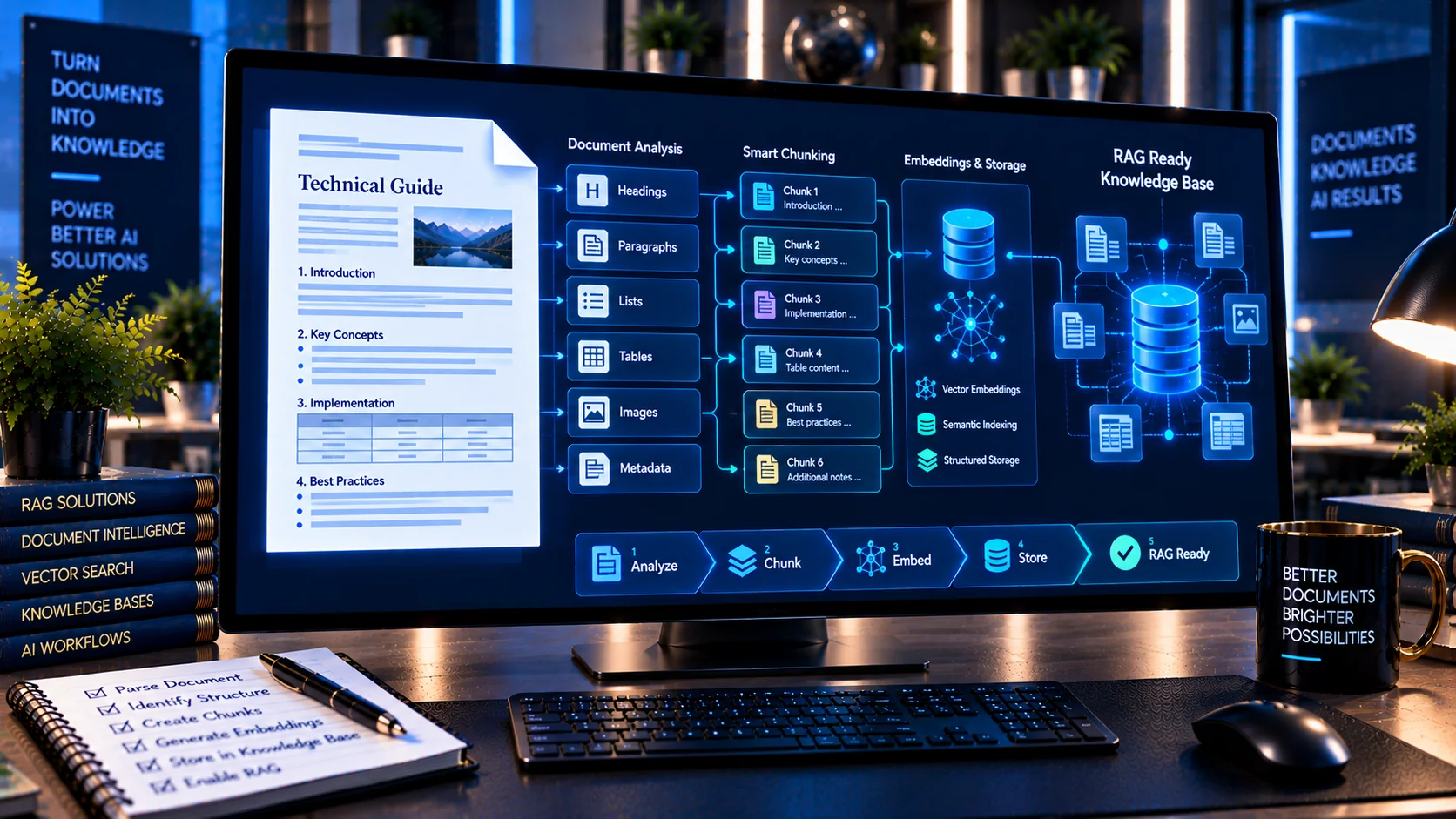
A document may contain useful information but still be difficult for a Retrieval-Augmented Generation (RAG) system to process effectively. PKCapra’s RAG Document Readiness Checker analyzes headings, sections, paragraphs, duplication, noisy text, lists, tables, and document structure to identify potential issues before a document is prepared for retrieval and AI processing.
Assess document readiness for retrieval-augmented generation (RAG) by checking headings, chunk-friendly sections, duplication, noisy text, paragraph length, lists, tables, and basic retrieval structure.
What Is a RAG Document Readiness Checker?
A RAG Document Readiness Checker is a diagnostic tool for reviewing whether a document has characteristics that can support downstream retrieval workflows.
The checker examines structural and textual indicators including:
- Headings and sections
- Heading hierarchy
- Paragraph length
- Very short or fragmented paragraphs
- Duplicate content
- Noisy or malformed text
- Lists
- Tables
- Section word counts
- Overall document statistics
- Retrieval-readiness indicators
The results provide a practical starting point for cleaning and preparing documents before they enter a RAG pipeline.
Why Document Readiness Matters for RAG
RAG systems commonly retrieve relevant pieces of source documents and provide those pieces as context to an AI model.
The quality of the source material can therefore affect how information is organized and retrieved.
Documents containing unclear sections, excessive duplication, noisy text, or poorly organized content may require additional preparation before ingestion.
A readiness check helps identify these characteristics before the document becomes part of a retrieval workflow.
Analyze Headings and Sections
Headings provide important boundaries between topics.
The checker analyzes headings and sections to help determine whether the document has a recognizable structure.
For example:
Introduction
Product Overview
Technical Specifications
Installation
Troubleshooting
A clear structure can make it easier to understand where individual topics begin and end.
The checker also evaluates heading hierarchy so unusual structural patterns can be reviewed before document ingestion.
Check Heading Hierarchy
Heading levels can provide additional context about relationships between sections.
For example:
Main Topic
├── Subtopic A
│   ├── Detail A1
│   └── Detail A2
└── Subtopic B
The checker identifies heading-level patterns and highlights potential hierarchy issues.
These findings are diagnostic rather than absolute rules. A document may intentionally use a particular structure depending on its purpose.
Analyze Paragraph Length
Paragraph size can matter when documents are prepared for retrieval and chunking.
Very large paragraphs may contain several ideas that could be difficult to separate cleanly.
The checker analyzes paragraph lengths and identifies unusually long paragraphs that may deserve review.
This can help document owners find sections where additional structure or editing could improve clarity.
Detect Very Short or Fragmented Paragraphs
Extremely short paragraphs can also create unnecessary fragmentation.
Examples include:
- Single-word lines
- Broken sentences
- Fragmented text
- Isolated labels
- Unnecessary line breaks
The checker identifies very short or fragmented paragraph patterns so they can be reviewed before ingestion.
Not every short paragraph is problematic. Headings, labels, captions, and intentional formatting can naturally produce short text blocks.
Detect Duplicate Content
Duplicate information can increase document noise.
Examples include:
- Repeated paragraphs
- Duplicate sections
- Repeated explanations
- Copy-and-paste content
- Repeated boilerplate
The checker identifies duplicate-content indicators so unnecessary repetition can be reviewed.
Reducing unnecessary duplication can help keep the source material cleaner for retrieval workflows.
Identify Noisy or Malformed Text
Documents can contain text that was produced through imperfect extraction, OCR, conversion, or copy-and-paste operations.
Examples may include:
- Broken characters
- Unusual spacing
- Fragmented text
- Repeated symbols
- Extraction artifacts
- Malformed text patterns
The checker looks for noisy or malformed text indicators that may require cleanup before RAG processing.
For PDF-based workflows, OCR PDF can be useful when image-based documents require text recognition.
Analyze Lists
Lists can contain structured information that should remain logically grouped.
Examples include:
- Procedures
- Requirements
- Features
- Rules
- Steps
- Checklists
The checker identifies list-related structures and includes them in the readiness analysis.
This can help reveal whether important information is represented as organized lists rather than disconnected text fragments.
Analyze Tables
Tables often contain information that has relationships between rows and columns.
Examples include:
- Product specifications
- Pricing
- Comparisons
- Schedules
- Financial information
- Technical data
The checker detects table-related indicators so documents containing significant tabular content can receive additional review before RAG ingestion.
Section Word Counts
The checker analyzes section-level word counts to help identify unusually small or large sections.
Large sections may contain multiple topics that could benefit from clearer organization.
Very small sections may represent:
- Headings
- Labels
- Incomplete content
- Fragmented extraction
- Intentional short sections
Section-level statistics provide useful context when reviewing the overall document structure.
Retrieval-Readiness Findings
The checker combines structural and textual indicators to identify potential retrieval-related issues.
Findings may point toward areas such as:
- Weak heading structure
- Excessively long paragraphs
- Fragmented paragraphs
- Duplicate content
- Noisy text
- Unusual section sizes
- Heavy table usage
- List-heavy content
These findings help document owners determine where manual cleanup may be useful.
RAG Readiness Score
The tool produces a RAG readiness score based on the document characteristics it analyzes.
The score is intended as a diagnostic signal, not as a guarantee of retrieval quality.
A high score does not guarantee that every RAG system will retrieve the document correctly.
Likewise, a lower score does not necessarily mean that the document is unusable.
The detailed findings and recommendations should be reviewed alongside the score.
Prepare Documents Before RAG Ingestion
A practical document-preparation workflow can be:
Inspect → Clean → Structure → Chunk → Index → Retrieve
The RAG Document Readiness Checker focuses primarily on the inspection stage.
Before ingestion, you can review:
- Heading hierarchy
- Section boundaries
- Paragraph lengths
- Fragmented text
- Duplicate content
- Noisy text
- Lists
- Tables
- Section sizes
This creates a cleaner starting point for subsequent chunking and indexing.
RAG Readiness and Chunking
Document readiness and chunking are related but different tasks.
The readiness checker examines the source document for structural and textual characteristics.
A chunking tool can then determine how that content should be divided into retrieval units.
A practical workflow is:
RAG Readiness Check → Chunking Analysis → Chunk Configuration → RAG Ingestion
PKCapra’s Document Structure Analyzer for AI can also be used to inspect document hierarchy before chunking.
Useful for Knowledge Bases
The checker can be useful when preparing documents for:
- Internal knowledge bases
- Customer-support knowledge systems
- Technical documentation
- Product documentation
- Company policies
- Research collections
- Business reports
- AI assistants
- RAG applications
Reviewing documents before ingestion can help identify structural issues before they become part of a larger document collection.
Browser-Based RAG Document Analysis
PKCapra’s RAG Document Readiness Checker is designed for browser-based analysis.
The diagnostic process does not require an external AI API.
This allows documents or text to be reviewed as part of a preliminary preparation workflow before sending material to an AI or RAG platform.
Important Limitations
Document readiness is not a universal measurement.
Different RAG systems use different:
- Parsers
- Chunking strategies
- Embedding models
- Retrieval algorithms
- Metadata systems
- Ranking methods
As a result, a document that performs well in one RAG implementation may behave differently in another.
The readiness score should therefore be treated as a diagnostic aid rather than a prediction of actual retrieval performance.
RAG Document Preparation Workflow
For a more complete AI-document workflow, PKCapra tools can be used in stages.
Start with the AI Document Safety Scanner to review document-safety indicators.
Use the AI-Ready DOCX Checker for DOCX-specific structural and package checks.
Use the AI-Ready PDF Checker for PDF-specific AI-readiness analysis.
Then use the RAG Document Readiness Checker to review headings, sections, duplication, noisy text, paragraphs, lists, tables, and retrieval-oriented structure.
This creates a practical preparation sequence:
Safety → Format → Structure → RAG Readiness → Chunking → Retrieval
Frequently Asked Questions
What is a RAG Document Readiness Checker?
It is a diagnostic tool that analyzes document structure and text characteristics that may matter when preparing content for Retrieval-Augmented Generation workflows.
What does the checker analyze?
It analyzes headings, sections, heading hierarchy, paragraphs, duplicate content, noisy text, lists, tables, section sizes, and retrieval-readiness indicators.
Can it detect duplicate content?
Yes. It identifies duplicate-content patterns that may require review before RAG ingestion.
Does it check paragraph length?
Yes. It identifies unusually long paragraphs as well as very short or fragmented paragraph patterns.
Can it analyze headings?
Yes. Heading presence and hierarchy are part of the readiness analysis.
Does it check tables?
Yes. The checker identifies table-related structural indicators.
Does it use an AI API?
No external AI/API call is required for the browser-based analysis.
Does a high readiness score guarantee good RAG retrieval?
No. Retrieval performance depends on the complete RAG pipeline, including parsing, chunking, embeddings, retrieval, ranking, metadata, and model configuration.
Should every document be rewritten before RAG ingestion?
Not necessarily. The checker identifies potential areas for review. Whether changes are needed depends on the document’s purpose and the requirements of the target RAG system.
Related AI Document Tools
You can combine the RAG Document Readiness Checker with: