
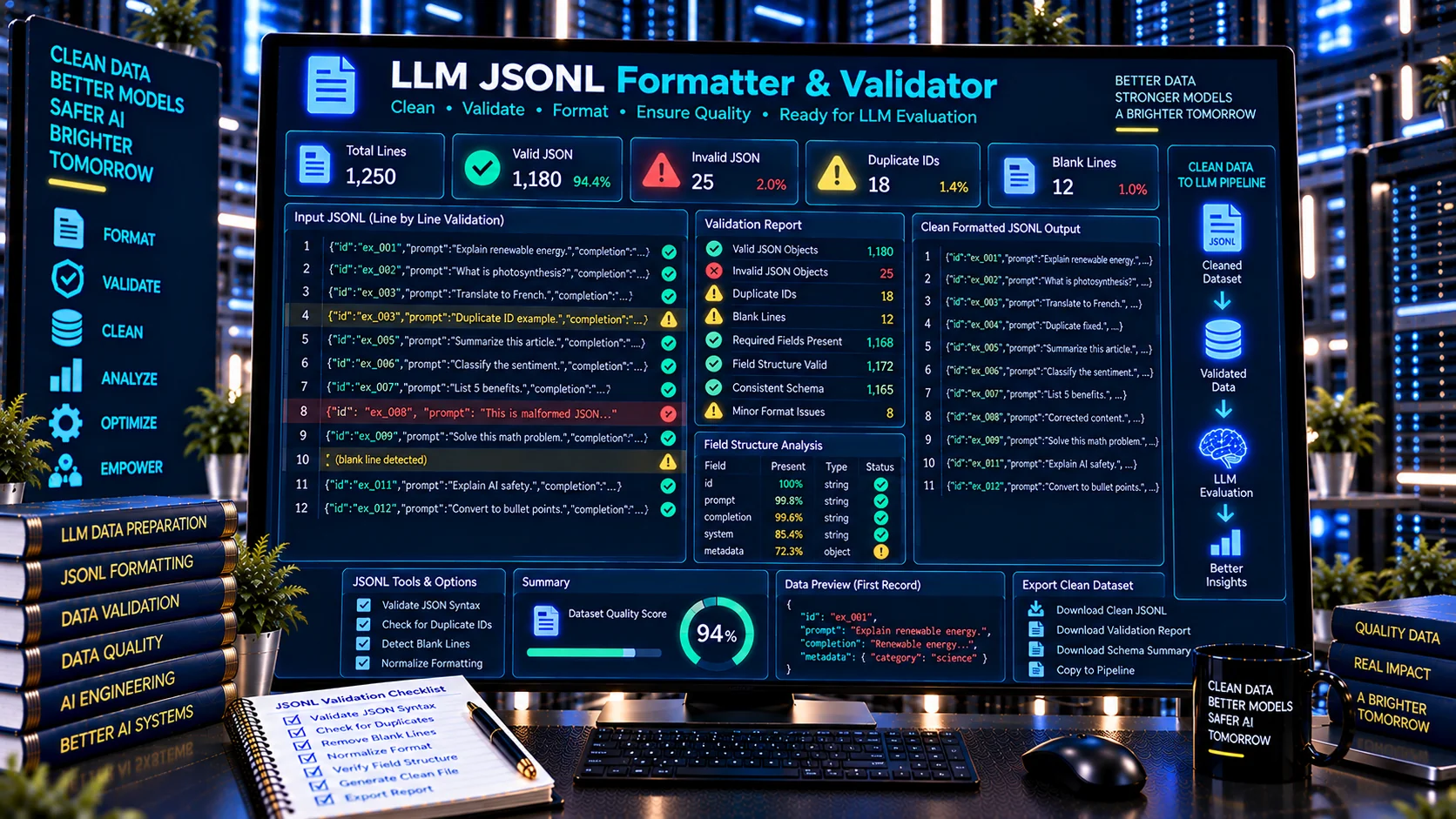
The LLM JSONL Formatter & Validator is a browser-based tool for formatting, validating, and reviewing JSON Lines data used in AI and LLM workflows. It checks JSONL records line by line, identifies malformed JSON, blank lines, duplicate identifiers, non-object records, and structural issues, then helps produce clean, consistent JSONL output.
JSONL is commonly used for machine-learning datasets, evaluation records, batch processing, and AI data pipelines because each line represents a separate JSON value. PKCapra’s tool provides a practical validation layer before JSONL data is passed into an LLM evaluation or processing workflow.
LLM JSONL Formatter & Validator
Validate newline-delimited JSON records, find malformed lines and duplicate identifiers, inspect structural consistency, and format clean JSONL for LLM evaluation and data workflows without sending your data to an external AI service.
Validation Findings
Record Structure
Formatted JSONL
Validation Report
What Is an LLM JSONL Formatter & Validator?
An LLM JSONL Formatter & Validator checks JSON Lines data for structural and formatting problems that can cause issues in AI and machine-learning workflows.
Instead of treating a JSONL file as one large JSON document, the tool processes each line independently. This makes it easier to identify exactly where malformed records, blank lines, duplicate IDs, or unexpected record structures occur.
The tool is designed especially for LLM datasets, evaluation datasets, test cases, prompts, responses, and other AI-related JSONL workflows.
What Does the LLM JSONL Formatter & Validator Check?
JSONL Line Validity
Each non-empty line is checked as an individual JSON value.
Invalid lines are reported with their line numbers so users can locate and correct formatting problems quickly.
Invalid JSON
Malformed JSON can prevent downstream systems from processing a JSONL dataset correctly.
The validator identifies lines that cannot be parsed as valid JSON and reports them separately from valid records.
Blank Lines
Blank lines can create unnecessary inconsistencies in a JSONL file.
The tool detects blank lines so users can decide whether they should be removed before using the dataset.
JSON Object Records
LLM datasets commonly use JSON objects as records.
PKCapra provides an option to require object records, allowing users to distinguish ordinary JSONL data from JSONL datasets intended to contain structured records.
Duplicate IDs
Dataset records may contain identifiers such as id, record_id, case_id, or similar fields.
Duplicate identifiers can make evaluation datasets harder to track and may create ambiguity in downstream processing. The tool can detect repeated IDs when an ID field is available.
Record Structure
The validator reviews the structure of valid records and reports useful information about the dataset, including record-level field patterns and structural consistency signals.
Why Validate JSONL Before Using It?
A JSONL file can look correct when opened as plain text while still containing individual records that are invalid JSON.
For example, a dataset may contain:
- Hundreds of valid records
- One malformed JSON line
- Several blank lines
- Duplicate record IDs
- A record with an unexpected value type
- A mixture of objects and primitive JSON values
One invalid record can create problems in a downstream workflow.
Line-level validation makes these issues easier to identify before the dataset is imported, evaluated, transformed, or processed.
How the LLM JSONL Formatter & Validator Works
A typical workflow is:
- Paste or load JSONL data into the tool.
- Validate each line independently.
- Review invalid JSON lines.
- Check blank-line findings.
- Review duplicate identifiers.
- Review record structure.
- Format valid JSONL records.
- Copy or download the cleaned output.
- Use the validated JSONL in the next AI workflow.
The tool is intended to make JSONL preparation faster and more transparent.
JSON vs JSONL
JSON and JSONL are related formats but are not interchangeable.
A standard JSON document commonly contains one complete JSON value, such as an object or array.
JSONL represents a sequence of JSON values separated by line breaks, with each line treated as an independent JSON value.
For example, a JSONL dataset can contain separate records like:
{"id":"001","prompt":"Question one"}
{"id":"002","prompt":"Question two"}
{"id":"003","prompt":"Question three"}
This line-oriented structure makes JSONL practical for datasets and streaming-oriented workflows.
JSONL for LLM Evaluation Datasets
JSONL is particularly useful for AI evaluation datasets because each test case can be represented as an individual record.
A record may contain fields such as:
- ID
- Prompt
- Input
- Expected output
- Reference answer
- Label
- Category
- Metadata
- Model output
- Evaluation result
The exact schema depends on the evaluation framework or application using the dataset.
PKCapra’s LLM Evaluation Dataset Validator can be used for deeper evaluation-dataset structure checks after the JSONL formatting layer.
LLM JSONL Formatter vs LLM Evaluation Dataset Validator
These tools address different stages of an AI dataset workflow.
The LLM JSONL Formatter & Validator focuses on JSONL syntax, line-level validity, formatting, blank lines, duplicate identifiers, and basic record structure.
The LLM Evaluation Dataset Validator focuses more specifically on evaluation-dataset fields and consistency.
A practical workflow can therefore be:
Format JSONL → Validate JSONL → Validate Evaluation Dataset
This separation makes it easier to identify whether a problem comes from the JSONL format itself or from the dataset’s intended evaluation structure.
LLM JSONL Formatter vs AI Evaluation Dataset Cleaner
The AI Evaluation Dataset Cleaner is designed to identify dataset-quality issues such as duplicates, missing fields, malformed records, inconsistent structures, and label problems.
The LLM JSONL Formatter & Validator concentrates specifically on JSONL representation and line-level validity.
Use the JSONL validator when the immediate question is:
Is this JSONL file structurally valid and consistently formatted?
Use the dataset cleaner when the question is:
Is this evaluation dataset clean and internally consistent?
LLM JSONL Formatter vs LLM Test Case Formatter
The LLM Test Case Formatter is focused on transforming test-case data into a standardized testing structure.
The JSONL Formatter & Validator focuses on validating the JSONL representation itself.
A useful workflow is:
Raw Test Data → Test Case Formatting → JSONL Formatting → JSONL Validation
This allows test-case structure and file-format integrity to be checked as separate stages.
Common JSONL Problems
Malformed JSON
A missing quote, comma, bracket, or escaped character can make a JSONL record invalid.
Multiple JSON Objects on One Line
Each JSONL record should occupy its own line. Combining separate records onto one line can break line-oriented processing.
Broken Quoting
Unescaped quotation marks inside JSON strings can make an otherwise valid-looking record invalid.
Blank Lines
Unnecessary blank lines can make datasets less consistent and may cause problems in workflows that expect one record per line.
Duplicate IDs
Repeated identifiers make it difficult to uniquely reference individual records.
Mixed Record Types
A JSONL file may technically contain different JSON value types, while a specific LLM pipeline may expect every record to be an object.
Inconsistent Fields
Records can be valid JSON while still using different field structures. JSON syntax validation alone does not guarantee that a dataset follows its intended schema.
Valid JSONL Does Not Mean Valid AI Data
An important distinction is that syntactic validity is only one layer of dataset quality.
A JSONL file can be completely valid while containing:
- Incorrect prompts
- Missing expected fields
- Wrong labels
- Incorrect reference answers
- Duplicate semantic examples
- Inconsistent evaluation criteria
- Unexpected data types
- Poorly designed test cases
Therefore, JSONL validation should be combined with dataset-specific validation and quality checks.
Preparing JSONL for LLM Testing
When preparing an LLM testing dataset, consider validating the workflow in stages.
First, ensure that each JSONL line contains valid JSON.
Next, confirm that the expected record fields are present.
Then check identifiers, labels, prompts, expected outputs, metadata, and other fields required by the evaluation system.
Finally, review the actual content of the dataset for quality and correctness.
The LLM JSONL Formatter & Validator provides the initial format and structure layer.
JSONL for Batch AI Workflows
JSONL is also useful in workflows where many independent records need to be processed.
Examples include:
- Prompt datasets
- Evaluation cases
- Classification records
- Extraction tasks
- Question-answer datasets
- RAG evaluation data
- Batch inference inputs
- Model comparison datasets
- AI testing records
Before processing large datasets, validating the file can help prevent avoidable failures caused by malformed records.
Browser-Based JSONL Validation
PKCapra’s LLM JSONL Formatter & Validator is designed for browser-side processing.
The tool does not require an external AI API to parse and validate JSONL. This provides a convenient way to perform an initial structural check without sending the dataset to an external AI service.
Users should still follow their own privacy, security, and organizational data-handling requirements when working with sensitive datasets.
JSONL Validation for AI Developers
Developers can use the tool before committing datasets to repositories, uploading evaluation files, or feeding records into AI pipelines.
It can be useful during:
- Dataset development
- Prompt testing
- Evaluation setup
- Batch-processing preparation
- Debugging
- QA
- Data migration
- AI application development
Line-level errors can be easier to troubleshoot before they become downstream processing errors.
JSONL Validation for Researchers
Researchers working with LLM evaluation datasets can use the validator as an initial data-quality checkpoint.
A typical research workflow can include:
Collect → Format → Validate → Clean → Evaluate → Analyze
JSONL syntax validation does not replace methodological review, but it can remove basic file-format problems before analysis begins.
Privacy and Local Processing
The LLM JSONL Formatter & Validator is designed to process submitted JSONL directly in the browser.
No external AI API is required for the core validation process.
This can be useful when working with datasets that should remain within the user’s browser during initial formatting and structural checks.
Always review your organization’s requirements before processing confidential, proprietary, personal, or regulated information.
Frequently Asked Questions
What is an LLM JSONL Formatter & Validator?
It is a tool for formatting and validating JSON Lines data used in LLM, AI, machine-learning, and evaluation workflows.
What does JSONL mean?
JSONL means JSON Lines. It is a line-oriented format where each line contains a separate JSON value.
Can it find invalid JSON lines?
Yes. The tool validates JSONL line by line and identifies malformed records with their line numbers.
Can it detect blank lines?
Yes. Blank lines can be identified during validation so they can be reviewed or removed.
Can it detect duplicate IDs?
Yes. When records contain an identifier field, the tool can detect repeated IDs.
Does valid JSONL mean the dataset is correct?
No. Valid JSONL confirms that the data follows the required JSON syntax at the line level. It does not prove that the dataset’s content, labels, prompts, or expected answers are correct.
Can it validate an LLM evaluation dataset?
It can provide the JSONL and basic structural validation layer. For evaluation-specific validation, use the LLM Evaluation Dataset Validator.
Does it use an AI API?
No external AI API is required for the core browser-based validation.
Can it clean JSONL?
It can help produce formatted, valid JSONL output from the records that pass validation. Dataset-quality cleaning is a separate task.
Is JSONL better than JSON for LLM datasets?
JSONL can be convenient for datasets because records are separated line by line, making individual examples easier to process. Whether it is appropriate depends on the application or evaluation framework.
Build a Reliable LLM Dataset Workflow
Reliable AI evaluation starts with clean and structurally valid data.
A practical PKCapra workflow is:
Clean → Format Test Cases → Format JSONL → Validate JSONL → Validate Dataset → Run Evaluation
The LLM JSONL Formatter & Validator provides the JSONL-specific validation layer in that workflow.
By checking each line independently, identifying malformed records, reviewing blank lines and duplicate identifiers, and producing clean formatted output, it helps prepare AI datasets for the next stage of development, testing, and evaluation.