
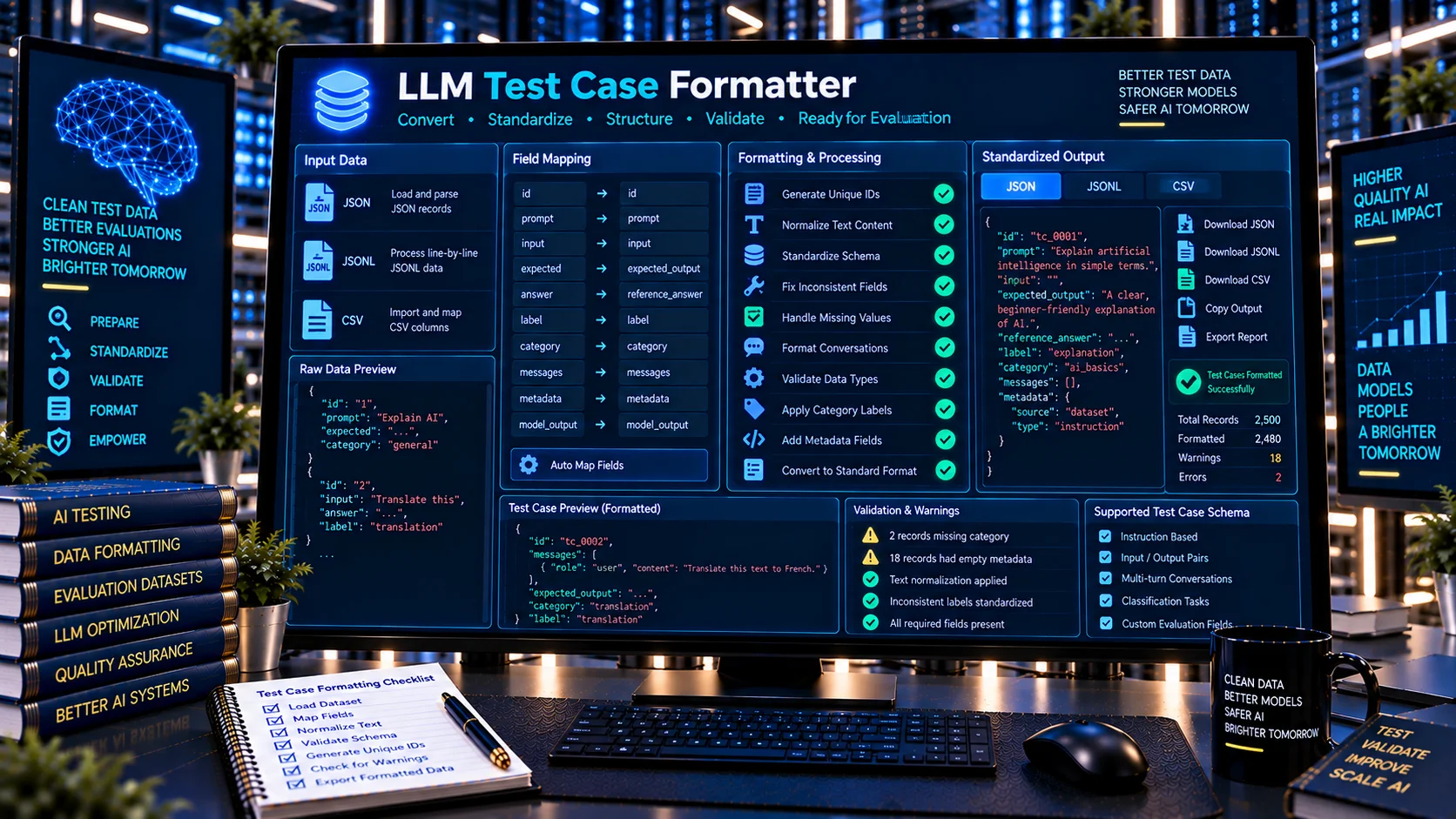
LLM test cases can become difficult to manage when prompts, inputs, expected outputs, labels, metadata, and model responses come from different sources or follow different field conventions. The LLM Test Case Formatter helps standardize these records into a more consistent format for AI testing and evaluation workflows.
PKCapra’s browser-based LLM Test Case Formatter supports JSON, JSONL, and CSV datasets, provides field mapping and formatting checks, and can produce standardized JSON or JSONL output without sending the dataset to an external AI API.
LLM Test Case Formatter
Convert inconsistent LLM test cases into a consistent, reviewable structure for evaluation workflows. Map common input, expected-output, label, category, ID, messages, and metadata fields without sending your data to an external AI service.
Formatting Findings
Field Mapping
Formatted Dataset
Formatting Report
What Is an LLM Test Case Formatter?
An LLM Test Case Formatter is a tool for organizing and standardizing structured test cases used to evaluate large language models.
An LLM test case may contain an identifier, prompt or input, expected answer, reference value, label, category, conversation messages, metadata, or model output. Different datasets may use different names or structures for these fields.
For example, one dataset might use prompt, another input, and another question for the primary model input.
A test case formatter helps bring these variations into a more predictable structure so the resulting dataset is easier to inspect, process, and reuse.
What Does the LLM Test Case Formatter Do?
Formats JSON Test Cases
The formatter can process structured JSON test-case datasets and organize their fields into a standardized output structure.
This is useful when test cases have been manually created, exported from another system, or assembled from multiple sources.
Formats JSONL Test Cases
JSONL is commonly used for datasets where each line represents an individual record.
The formatter can process JSONL test cases and produce standardized JSONL output for downstream evaluation or testing workflows.
Formats CSV Test Cases
CSV files can be useful when test cases are maintained in spreadsheets or exported from data-management systems.
The formatter can map CSV columns into common LLM test-case fields and generate structured output.
Maps Common Test-Case Fields
Different datasets may use different field names for similar concepts.
The formatter supports common mappings such as:
- ID
- prompt
- input
- question
- expected output
- reference answer
- ground truth
- label
- category
- messages
- metadata
- model output
This makes it easier to convert differently structured test cases into a more consistent representation.
Generates Missing IDs
Test cases are easier to reference when they have stable identifiers.
Where required, the formatter can generate IDs for records that do not already contain one.
Generated IDs should still be reviewed when test cases need to maintain a specific external naming convention.
Normalizes Text Formatting
Test datasets can accumulate unnecessary leading or trailing whitespace and inconsistent text formatting.
The formatter can apply basic text cleanup such as trimming and whitespace normalization to improve consistency.
Reports Formatting Warnings
The formatter identifies formatting conditions that may require attention before the resulting dataset is used.
This provides a review layer rather than silently assuming that every source record is already correctly structured.
Why Format LLM Test Cases?
Consistent test cases make AI testing workflows easier to maintain.
A test suite may contain hundreds or thousands of cases collected from different contributors, applications, benchmark sources, or development workflows. Without consistent formatting, downstream systems may need special handling for different record structures.
Formatting can help with:
- standardizing test-case structures
- simplifying dataset processing
- mapping inconsistent field names
- preparing JSONL evaluation files
- preparing JSON test suites
- converting spreadsheet-based test cases
- improving dataset portability
- making test cases easier to inspect
- reducing repetitive preprocessing work
Formatting does not determine whether a test case is logically correct or whether its expected answer is valid. It prepares the structure for more consistent downstream use.
LLM Test Case Formatting Workflow
1. Prepare the Source Dataset
Start with the JSON, JSONL, or CSV file containing your LLM test cases.
The source can contain prompts, questions, expected outputs, labels, metadata, model responses, or other test-case information.
2. Load the Dataset
Open the LLM Test Case Formatter and provide the dataset for processing.
The tool identifies available fields and prepares them for mapping.
3. Map Test-Case Fields
Map source fields to the corresponding standardized test-case concepts.
For example:
question→ inputexpected→ expected outputgold_answer→ reference answerclass→ label
The exact mapping depends on the structure of the source dataset.
4. Review Formatting Findings
Review field mappings, missing identifiers, formatting warnings, and other detected conditions.
This helps ensure that the standardized output represents the source data as intended.
5. Generate Standardized Output
Generate the formatted dataset in JSON or JSONL form.
The resulting output can then be reviewed or incorporated into a broader AI testing or evaluation workflow.
6. Download or Copy the Result
The formatted dataset can be copied or downloaded for further processing.
A JSON formatting report is also available to document the transformation and warnings.
Common LLM Test Case Formatting Problems
Different Names for the Same Field
One dataset may use prompt, another input, and another question.
Field mapping helps standardize these variations.
Missing Test Case IDs
A dataset without identifiers can make individual cases difficult to reference.
Generating IDs can provide a consistent way to identify records.
Mixed Expected-Answer Fields
Expected results may appear under names such as:
- expected
- expected_output
- reference
- reference_answer
- ground_truth
- target
These fields may need to be mapped into a consistent representation.
Inconsistent Text Whitespace
Manually maintained datasets can contain unnecessary spaces or inconsistent formatting.
Basic normalization can reduce these differences.
Mixed Dataset Sources
A test suite assembled from several sources can contain different schemas and naming conventions.
Formatting provides a preprocessing step before the records are passed into a common testing workflow.
CSV-to-Structured-Test Conversion
Spreadsheet-based test cases are convenient for editing but are not always the preferred structure for automated evaluation systems.
Mapping CSV columns into structured test-case fields can make those datasets easier to use programmatically.
JSON, JSONL, and CSV for LLM Test Cases
Each format can be useful at a different stage of an AI testing workflow.
JSON is useful when the complete test suite is represented as a structured document.
JSONL is useful when individual test cases are represented as separate JSON records, making it practical for record-oriented processing.
CSV is useful for spreadsheet-based test-case authoring and review.
A common workflow can therefore be:
CSV authoring → structured field mapping → JSON/JSONL test suite
The appropriate format depends on the testing framework and downstream processing requirements.
LLM Test Case Formatter vs AI Evaluation Dataset Cleaner
These tools address different stages of dataset preparation.
The AI Evaluation Dataset Cleaner focuses on identifying and cleaning dataset-quality problems such as duplicates, malformed records, missing fields, inconsistent structures, and label inconsistencies.
The LLM Test Case Formatter focuses on transforming and standardizing test-case fields into a more consistent representation.
A practical workflow can use both:
Clean → Format → Validate
This allows data-quality cleanup to happen before the test cases are standardized and validated.
LLM Test Case Formatter vs LLM Evaluation Dataset Validator
The LLM Evaluation Dataset Validator is designed to check whether evaluation records satisfy expected structural and evaluation-related requirements.
The LLM Test Case Formatter is designed to transform test cases into a consistent structure before they are used in downstream testing or evaluation.
In practice, formatting can come before validation:
Format the records → Validate the resulting dataset → Run evaluation
This separation helps distinguish transformation from quality validation.
LLM Test Case Formatter vs AI Structured Output Validator
An LLM test case is an input record used to test or evaluate model behavior.
An AI structured output validator focuses on checking whether generated AI data conforms to an expected structure.
PKCapra’s AI Structured Output Validator therefore addresses generated structured data, while the LLM Test Case Formatter prepares the test cases used to exercise AI systems.
Preparing Test Cases for LLM Evaluation
A well-organized test case generally needs enough information to reproduce the intended test.
Depending on the evaluation design, this may include:
- unique test-case ID
- model input
- expected output
- reference answer
- evaluation label
- category
- conversation messages
- metadata
- model output
Not every test requires every field.
The appropriate structure depends on the evaluation methodology and the system being tested.
Preparing Conversation-Based LLM Test Cases
Some LLM tests use multi-message conversations rather than a single prompt.
For these cases, a test record may contain a messages structure representing system, user, assistant, or other conversation roles.
Keeping these records consistently structured is important when they are later passed into an evaluation framework or testing harness.
The formatter can help organize message-based test cases alongside simpler prompt-and-response records.
Formatting Does Not Change Test Meaning
Formatting should preserve the underlying intent of the test case.
A formatter can standardize field names, generate identifiers, and normalize basic text formatting, but it should not be treated as an automatic authority on the semantic meaning of a test.
For important evaluation datasets, review the transformed output before replacing the original source.
Keeping the original dataset also provides a useful reference if a transformation needs to be audited or reversed.
Privacy-Friendly LLM Test Case Formatting
PKCapra’s LLM Test Case Formatter is designed for browser-side processing and does not require an external AI API to perform the formatting operation.
This can be useful when preparing development or evaluation datasets that should not be unnecessarily transmitted to an external AI service.
Users should still follow their organization’s own data-handling, privacy, and security requirements when working with sensitive test data.
Who Can Use an LLM Test Case Formatter?
The tool can be useful for:
- LLM developers
- AI engineers
- ML engineers
- evaluation engineers
- QA engineers
- AI researchers
- benchmark developers
- dataset curators
- RAG developers
- AI agent developers
- testing teams
- developers maintaining automated LLM test suites
It is particularly useful when test cases come from multiple sources and need to be standardized before entering a common evaluation pipeline.
Frequently Asked Questions
What is an LLM Test Case Formatter?
It is a tool for organizing and standardizing structured test cases used for testing and evaluating large language models.
What formats does it support?
The PKCapra LLM Test Case Formatter supports JSON, JSONL, and CSV input.
Can it map different field names?
Yes. It can map common variations such as prompt, input, question, expected output, reference answer, ground truth, labels, messages, and metadata.
Can it generate IDs?
Yes. The formatter can generate missing test-case IDs when required.
Can it format JSONL test cases?
Yes. JSONL is supported as both an input and standardized output format.
Can it format CSV test cases?
Yes. CSV columns can be mapped into common LLM test-case fields and converted into structured output.
Does it validate whether an expected answer is correct?
No. Formatting and semantic correctness are different tasks. The formatter organizes the data but does not independently determine whether an expected answer is factually or logically correct.
Does it use an external AI API?
No external AI API is required for the formatting process.
Can I download the formatted dataset?
Yes. The standardized dataset can be copied or downloaded after processing.
Does the tool provide a report?
Yes. The formatter provides a JSON formatting report containing field-mapping information and relevant warnings.
Standardize Your LLM Testing Workflow
LLM testing becomes easier to maintain when test cases follow predictable structures.
The LLM Test Case Formatter provides a practical preprocessing layer for converting JSON, JSONL, and CSV test cases into standardized representations. It can map common fields, generate missing IDs, normalize basic text formatting, identify formatting warnings, and produce JSON or JSONL output.
For a broader dataset workflow, use the tools in sequence:
Clean the dataset → Format the test cases → Validate the structure → Run the evaluation
This gives AI development teams a clearer separation between data cleanup, test-case transformation, structural validation, and model evaluation.