
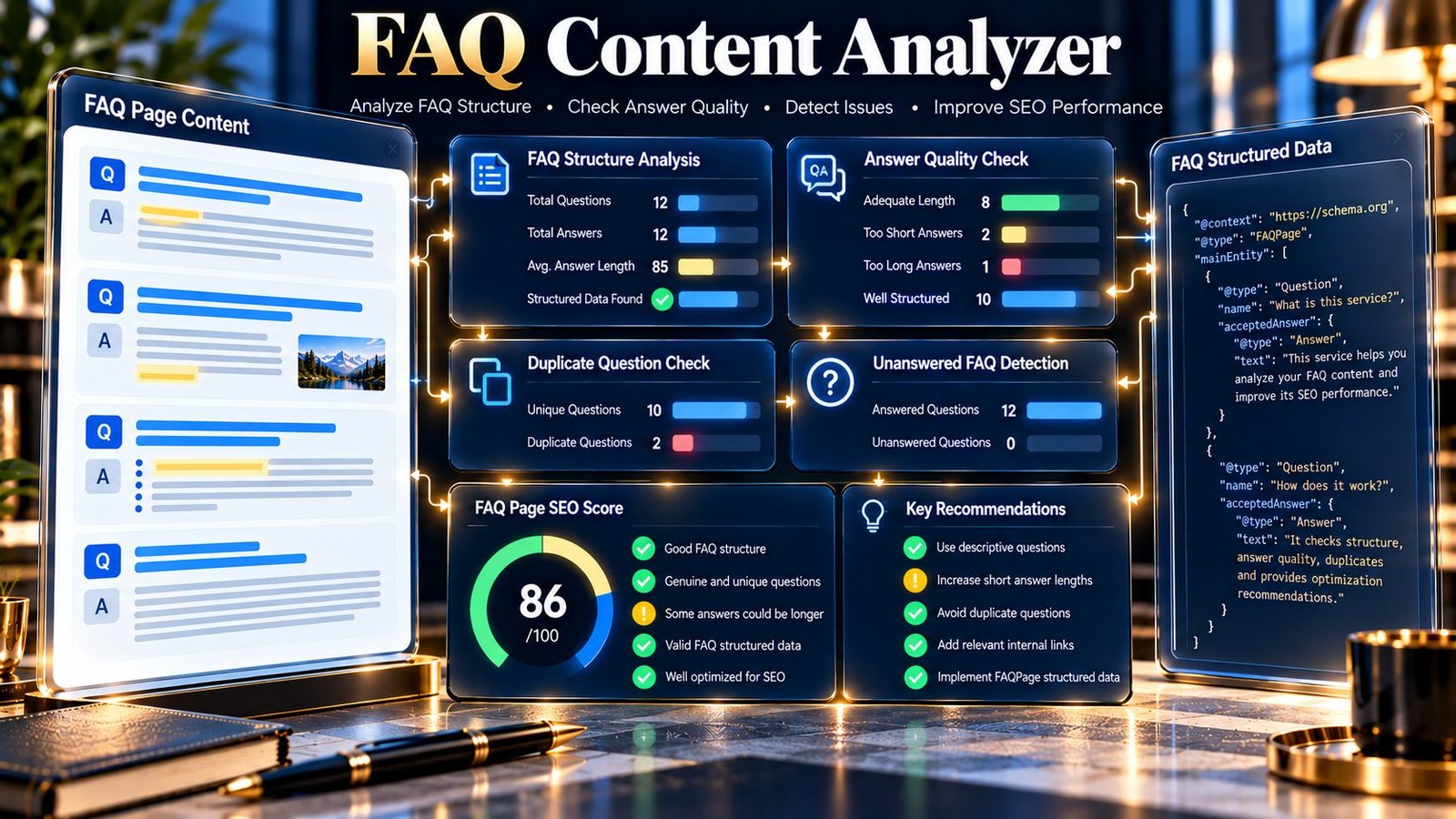
The FAQ Content Analyzer is a practical content-analysis tool for reviewing frequently asked questions and their answers within a webpage or supplied HTML/text. It identifies FAQ questions, evaluates answer coverage and structure, detects duplicate or unanswered questions, checks available FAQPage structured data, and provides measurable findings to help you improve the quality and consistency of an FAQ section.
FAQ Content Analyzer
Analyze FAQ questions and answers for structure, completeness, duplication, answer length, and FAQPage structured-data signals.
| Signal | Result | Meaning |
|---|
| # | Question | Answer words | Status |
|---|
The score is a PKCapra diagnostic heuristic. FAQPage schema detection describes supplied source data; it does not guarantee rich results or search visibility.
When a public URL is supplied, the page HTML is fetched by the PKCapra WordPress endpoint for analysis. Pasted content is sent to the same endpoint. Do not submit confidential, personal, or sensitive material.
What Is an FAQ Content Analyzer?
An FAQ Content Analyzer examines FAQ-style content and helps identify structural and content issues that may otherwise be difficult to spot manually.
The PKCapra FAQ Content Analyzer can analyze either a public webpage URL or pasted HTML/text. It looks for question-and-answer patterns, evaluates the detected answers, identifies duplicate questions, checks for unanswered FAQ items, and inspects FAQPage JSON-LD when it is present in the analyzed source.
The tool produces a score, grade, findings, detailed FAQ information, and structured analysis data.
It is designed to help you answer practical questions such as:
- How many FAQ questions were detected?
- Does each question have an answer?
- Are any answers unusually short?
- Are any answers unusually long?
- Are questions duplicated?
- Are questions formatted consistently?
- Is FAQPage structured data present?
- How many FAQ items are represented in the detected JSON-LD?
- Which FAQ items deserve manual review?
What Does the FAQ Content Analyzer Check?
The current tool evaluates several measurable FAQ signals.
| Check | What it measures |
|---|---|
| FAQ questions | Questions detected in the supplied content |
| FAQ answers | Answers associated with detected questions |
| Unanswered questions | FAQ questions without meaningful answer content |
| Duplicate questions | Repeated or duplicate FAQ questions |
| Answer length | Word count and answer-length signals |
| Very short answers | Answers that may provide insufficient information |
| Long answers | Answers that may require editorial review |
| Question formatting | Question-style formatting and question-mark signals |
| FAQPage JSON-LD | Whether FAQPage structured data is detected |
| JSON-LD question count | Number of questions represented in detected FAQPage data |
| FAQ item details | Detected question/answer information |
| Findings | Prioritized issues identified by the analysis |
| Score and grade | Summary of the implemented analysis signals |
These checks describe what the analyzer detects in the supplied source. They are not a reproduction of Google’s internal ranking or search systems.
Why Analyze FAQ Content?
FAQ sections can help organize answers to questions that are relevant to a page’s subject.
A useful FAQ section should make the questions easy to understand and provide answers that actually address those questions.
Problems such as unanswered questions, duplicated questions, extremely short answers, or inconsistent FAQ structure can make an FAQ section less useful to readers.
The FAQ Content Analyzer provides measurable signals that can help you find these issues before reviewing the content manually.
How the FAQ Content Analyzer Works
1. Provide a source
You can provide either:
- a public webpage URL; or
- pasted HTML/text.
For URL analysis, the tool retrieves the publicly accessible source and analyzes the available content.
For pasted analysis, the supplied material is processed directly.
2. Detect FAQ content
The analyzer examines the supplied source for FAQ-style questions and associated answer content.
It records the detected FAQ items so you can inspect what the tool found rather than relying only on the final score.
3. Analyze answers
The tool evaluates answer coverage and answer length.
It can identify situations such as:
- a question without an answer;
- an unusually short answer;
- an unusually long answer;
- or an answer that requires closer editorial review.
4. Check for duplicate questions
Repeated FAQ questions can make an FAQ section unnecessarily repetitive.
The analyzer checks detected FAQ questions for duplicate content and reports relevant findings.
5. Inspect FAQPage structured data
When FAQPage JSON-LD is available in the analyzed source, the tool can detect it and report the FAQ questions represented within the structured data.
This allows you to compare the visible FAQ content with the FAQPage structured-data information that is actually present in the source.
6. Produce the analysis
The tool summarizes its findings through:
- FAQ metrics;
- detected FAQ items;
- structured-data information;
- prioritized findings;
- score;
- grade;
- JSON output;
- and PDF reporting.
How to Use the FAQ Content Analyzer
- Open the FAQ Content Analyzer.
- Enter a public webpage URL or paste HTML/text.
- Start the analysis.
- Review the detected FAQ questions and answers.
- Check unanswered or incomplete FAQ items.
- Review duplicate-question findings.
- Inspect answer-length signals.
- Check whether FAQPage JSON-LD was detected.
- Review the prioritized findings.
- Make editorial or structural changes where appropriate.
- Analyze the revised source again if you want to compare the result.
Understanding FAQ Questions and Answers
A useful FAQ item normally contains two connected pieces:
Question: the specific question a reader wants answered.
Answer: a direct response that addresses that question.
For example:
Question: What is technical SEO?
Answer: Technical SEO focuses on technical aspects of a website that affect accessibility, crawling, indexing, and how search engines process its pages.
The analyzer helps identify whether detected questions have corresponding answer content.
The tool does not determine whether an answer is factually correct simply from its length or structure. Content accuracy still requires human review.
Unanswered FAQ Detection
An FAQ question without meaningful answer content is an important structural issue to investigate.
For example:
What is an XML sitemap?
followed by an empty answer area creates an incomplete FAQ item.
The analyzer can flag such cases so you can return to the source and provide an appropriate answer or remove the incomplete question.
Very Short Answers
An answer can technically exist while providing very little useful information.
For example:
Question: What is an XML sitemap?
Answer: A file.
The answer is present, but it provides very limited context.
The tool can identify short-answer signals for editorial review.
This does not mean every short answer is incorrect. Some questions genuinely require only a concise response.
Long Answers
FAQ sections are often intended to provide direct answers to specific questions.
An unusually long answer may deserve review to determine whether:
- the answer can be made more direct;
- supporting details belong elsewhere on the page;
- the question should be divided into more specific questions;
- or the additional detail is genuinely necessary.
The analyzer reports the signal; the final editorial decision should be based on the subject and reader intent.
Duplicate FAQ Questions
Duplicate questions can occur when an FAQ section is expanded over time or when similar questions are written separately.
For example:
- What is technical SEO?
- What does technical SEO mean?
These questions may address essentially the same subject.
The analyzer identifies duplicate question patterns so that you can manually determine whether they should be consolidated, rewritten, or intentionally retained.
Question Formatting
The tool also evaluates question-style formatting.
Clear FAQ questions make it easier for readers to understand what each item is intended to answer.
Examples include:
- What is technical SEO?
- Why is crawlability important?
- How does an XML sitemap work?
- When should I perform a technical SEO audit?
The question-mark signal is descriptive. An FAQ does not become useful merely because every line contains a question mark.
FAQPage JSON-LD Detection
The analyzer can detect FAQPage structured data when it is present in the analyzed source.
For example, a source may contain FAQPage JSON-LD representing several questions and answers.
The tool reports whether FAQPage JSON-LD was detected and provides the detected question count.
This is useful when reviewing whether structured FAQ information exists in the source alongside the visible FAQ content.
Structured-data detection should not be interpreted as a guarantee of search-result appearance or enhanced search visibility.
Visible FAQ Content vs Structured Data
When reviewing an FAQ page, it is useful to distinguish between:
- FAQ content visible in the page source; and
- FAQ information represented in JSON-LD.
The analyzer can report information from both where available.
If the visible FAQ section contains five questions but the detected FAQPage data represents a different set of questions, that difference deserves manual investigation.
The tool reports the detected information; it does not claim that every discrepancy is automatically an implementation error.
Understanding the Score
The FAQ Content Analyzer provides a score out of 100 and a corresponding grade.
The score summarizes the implemented FAQ-content signals.
It should be treated as a diagnostic indicator rather than a Google ranking score.
A high score does not guarantee search visibility, rich results, rankings, or structured-data eligibility.
Likewise, a lower score does not automatically mean that an FAQ section is unusable.
The individual findings and detected FAQ items provide more useful context than the score alone.
Common FAQ Problems
A question has no answer
Check the source for empty or missing answer content.
Either provide a useful answer or remove the question if it is not needed.
Several answers are extremely short
Review whether the answers actually address the questions.
Where additional explanation is genuinely useful, expand the answer naturally rather than adding words solely to satisfy a length signal.
FAQ questions are duplicated
Compare the duplicated questions and determine whether they should be combined or rewritten to address genuinely different user needs.
FAQ content is inconsistent
Review whether questions use a consistent structure and whether answers directly follow their corresponding questions.
Structured data does not match visible FAQ content
Compare the detected visible FAQ items with the FAQPage JSON-LD information.
Investigate missing, extra, or outdated structured-data entries.
The FAQ section contains too much information
Consider whether long explanations belong in the main article instead of the FAQ section.
The FAQ can remain focused on concise answers while linking or referring readers to deeper explanations where appropriate.
Practical FAQ Optimization Workflow
A useful review process is:
- Identify the questions the page genuinely needs to answer.
- Remove redundant questions.
- Ensure every remaining question has an answer.
- Make answers directly address their corresponding questions.
- Review very short answers for missing context.
- Review unusually long answers for unnecessary repetition.
- Check question formatting for consistency.
- Analyze the page with the FAQ Content Analyzer.
- Review the detected FAQ items and findings.
- Check FAQPage structured-data detection where applicable.
- Compare structured data with the visible FAQ content.
- Make corrections based on the actual content.
- Re-run the analysis after substantial changes.
Example FAQ Structure
A practical FAQ section might contain:
What is technical SEO?
Technical SEO covers technical aspects of a website that affect accessibility, crawling, indexing, and how search engines process pages.
Why is crawlability important?
Crawlability helps search-engine crawlers discover and access pages that are available for processing.
What is an XML sitemap?
An XML sitemap is a file containing URLs that can help search engines discover important pages on a website.
This structure makes each question distinct and gives each question a corresponding answer.
FAQ Content and On-Page SEO
FAQ analysis is only one part of an overall on-page review.
An FAQ can be well structured while the surrounding page still has issues with titles, headings, content structure, links, indexability, or other technical elements.
For broader page analysis, use the On-Page SEO Checker.
For content structure, the Content Structure Analyzer can provide additional structural information.
The SEO Heading Analyzer can help review heading structure, while the SEO Content Readability Analyzer can provide broader readability analysis.
JSON and PDF Results
The FAQ Content Analyzer provides structured JSON output that can be copied from the results interface.
It also provides a direct PDF download for the analysis report.
JSON is useful when you need structured result data, while PDF can be useful for reviewing or sharing a human-readable analysis report.
Privacy and Processing
For URL analysis, the tool retrieves the publicly accessible webpage source required for the analysis.
For pasted analysis, the supplied HTML/text is processed for the requested FAQ analysis.
The tool does not claim access to private website databases, Google Search Console data, Google Analytics data, or Google’s internal systems.
Avoid submitting confidential content unless you are comfortable processing that content through the tool’s normal analysis workflow.
Important Limitations
The FAQ Content Analyzer should be interpreted within the limits of its implementation.
- It analyzes the source supplied through the URL or pasted content.
- It does not reproduce Google’s internal ranking systems.
- The score and grade are heuristic diagnostic signals.
- Answer-length signals do not determine whether an answer is factually correct.
- A short answer is not automatically a bad answer.
- A long answer is not automatically a bad answer.
- Duplicate-question detection should be manually reviewed for context.
- FAQPage JSON-LD detection does not guarantee rich-result appearance.
- Detected structured data should be compared with the actual visible FAQ content.
- Dynamically generated content that is not available in the analyzed source may not be represented.
- Human editorial and technical review remains important.
Frequently Asked Questions
What is an FAQ Content Analyzer?
It is a tool that analyzes FAQ-style content and reports questions, answers, answer-length signals, duplicate questions, unanswered items, question formatting, and FAQPage JSON-LD information when detected.
Can I analyze a public URL?
Yes. The tool accepts a public webpage URL for analysis.
Can I paste HTML instead?
Yes. You can analyze pasted HTML/text without providing a public URL.
Does the tool detect unanswered FAQ questions?
Yes. It checks detected FAQ questions for missing or insufficient answer content.
Does the tool detect duplicate FAQ questions?
Yes. Duplicate question patterns are reported as findings for manual review.
Does it check answer length?
Yes. The analyzer reports answer-length information and can identify very short or unusually long answers for review.
Does the tool detect FAQPage JSON-LD?
Yes. It can detect FAQPage JSON-LD in the analyzed source and report the detected FAQ question count.
Does FAQPage JSON-LD guarantee Google rich results?
No. Detection of structured data by this tool is not a guarantee of search-result appearance, rankings, or enhanced results.
Is the score a Google SEO score?
No. The score is generated from PKCapra’s implemented FAQ analysis signals.
Should every FAQ answer be long?
No. The appropriate answer length depends on the question and the information required. The tool’s length signals are prompts for review rather than universal requirements.
What should I do when duplicate questions are detected?
Review the questions together. If they address the same intent, consider consolidating or rewriting them. If they genuinely address different questions, retaining both may be appropriate.
Can I download the analysis?
Yes. The tool provides JSON copying and a direct PDF download.
Related PKCapra Tools
For broader SEO and content analysis, you can also use:
- On-Page SEO Checker
- Content Structure Analyzer
- SEO Content Readability Analyzer
- SEO Heading Analyzer
- Paragraph Optimization Checker
- Schema Markup & Structured Data Analyzer
- Internal Links & Crawl Path Analyzer
- All Free Online Tools
The FAQ Content Analyzer works best as part of a wider content-review workflow: inspect the FAQ structure, review individual questions and answers, investigate the findings, verify structured-data consistency where applicable, and make changes based on the needs of the actual page and its readers.