
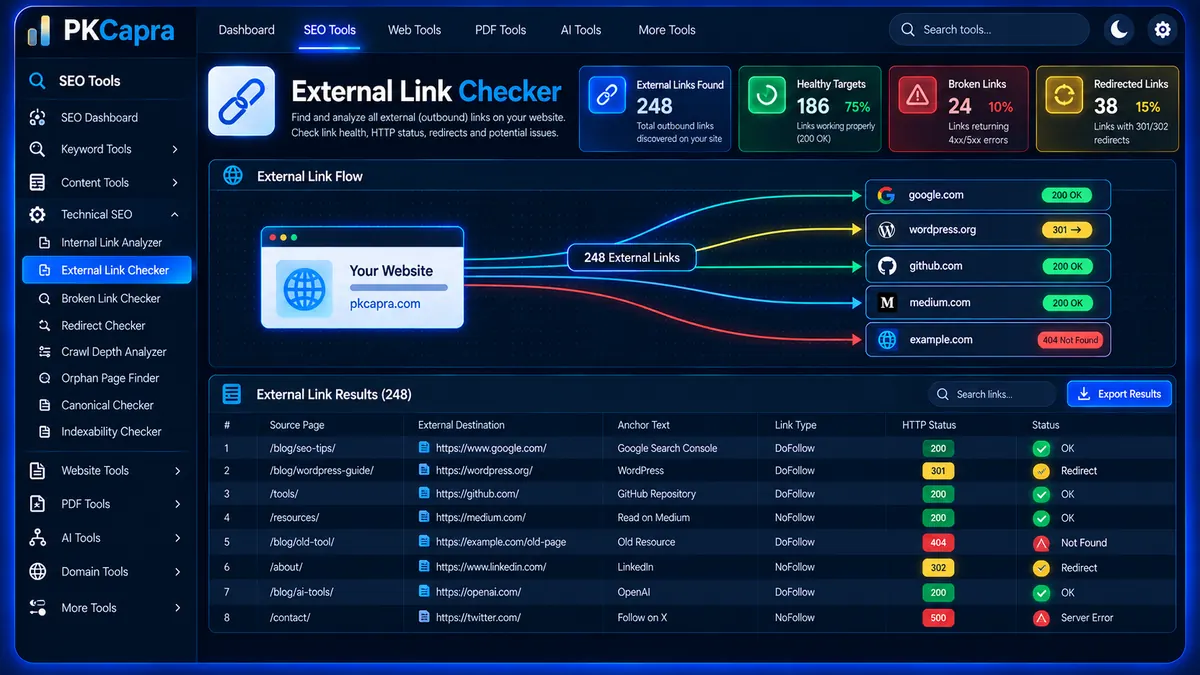
Find and validate external links across your website with PKCapra’s External Link Checker. Discover outbound links pointing to other domains, check their live HTTP response status, inspect anchor text and rel attributes, and identify broken, redirected, or unreachable external destinations from one convenient dashboard.
External Link Checker
Discover external destinations, validate live HTTP responses, and inspect rel attributes with an asynchronous local crawl.
External Link Health Matrix
Review the source page, external destination, anchor text, rel profile, and live HTTP status for every discovered external link.
| # | Source Page | External Destination | Anchor Text | Link Type | HTTP Status |
|---|
What Is an External Link?
An external link is a hyperlink from your website to a URL hosted on another domain.
For example, if your website contains a link to https://example.com/, that destination is external because it is hosted outside your own website domain.
External links can be useful when they provide supporting references, cite authoritative resources, recommend useful services, or direct visitors to relevant information.
However, external destinations can change over time. Pages may be deleted, URLs may move, servers may become unavailable, or links may begin returning error responses.
The External Link Checker helps you discover these outbound links and review their current response status.
Why Check External Links?
Websites often accumulate external links as content grows.
An article published several years ago may still contain links to resources that have since changed or disappeared.
Broken external links can create several practical problems:
- Visitors may reach unavailable resources.
- References may become outdated.
- Redirect chains may replace the original destination.
- External resources may return server errors.
- Previously valid URLs may become unavailable.
- Large websites can accumulate external-link problems that are difficult to find manually.
Regular external-link analysis helps you identify destinations that deserve review.
How PKCapra’s External Link Checker Works
The analyzer starts from the website URL you provide and discovers external links in the HTML pages it processes.
The analysis follows a crawl-and-validation workflow:
- The seed URL is fetched.
- HTML is parsed to identify links.
- Links pointing outside the target website are identified as external.
- External URLs are collected with their source page and anchor text.
- Unique internal pages can be processed progressively to discover additional external links.
- External destinations are sent to the validation engine in small batches.
- HTTP responses are recorded for each destination.
- Link attributes such as
nofollow,sponsored, andugcare analyzed. - Results are displayed in the dashboard.
The batch-based approach helps keep processing manageable on standard WordPress hosting environments.
What Does the External Link Checker Analyze?
The tool focuses on several important properties of outbound external links.
External Destination URL
The destination URL identifies where the external link points.
This allows you to review exactly which third-party resources are referenced by your website.
Source Page
The source page shows where the external link was discovered.
This is particularly useful when a broken external destination needs to be corrected because you can identify the page containing the problematic link.
Anchor Text
The analyzer records the visible text used for each external hyperlink.
For example:
- Official documentation
- Research study
- Learn more
- Visit the resource
Reviewing anchor text can help you understand how external resources are referenced throughout your content.
HTTP Response Status
The checker validates external destinations and records their HTTP response.
Common responses include:
- 200 — Successful response
- 301 — Permanent redirect
- 302 — Temporary redirect
- 404 — Destination not found
- 500 — Server-side error
- Connection failure — The destination could not be successfully reached
Understanding the Dashboard Metrics
The dashboard provides four key metrics.
Total External Links Found
This metric shows the number of external links discovered during the analysis.
It gives you a high-level view of how many outbound external references were identified.
Healthy Outbound Targets
This metric represents external destinations that returned a successful 200 response.
These destinations responded successfully during validation.
Broken External Links
This metric highlights external destinations returning problematic responses such as 404 or 500 errors, along with applicable connection failures.
These URLs should be reviewed to determine whether they should be replaced, removed, or updated.
Redirected External Links
This metric identifies external URLs returning 301 or 302 responses.
A redirected destination may still work, but the original URL no longer responds directly with the expected destination content.
Understanding HTTP Status Codes
200 OK
A 200 response indicates that the external server successfully responded to the request.
A 200 response does not necessarily mean that the linked resource is still the best reference, but it indicates that the destination responded successfully.
301 Redirect
A 301 indicates that the requested URL has been permanently redirected.
If the redirect is intentional and stable, the link may continue to function. However, reviewing important redirected links can help keep outbound references current.
302 Redirect
A 302 indicates a temporary redirect.
The destination may have changed temporarily or may use redirects as part of its normal URL handling.
404 Not Found
A 404 response generally indicates that the requested external resource could not be found.
These links should be reviewed because visitors following them may reach an unavailable page.
500 Server Error
A 500 response indicates that the external server reported a server-side error.
The issue may be temporary, so repeated validation may sometimes be appropriate before permanently removing the reference.
Connection Failure
A connection failure means the external destination could not be successfully validated during the request.
Possible causes include:
- Server unavailability
- Network problems
- Request blocking
- DNS problems
- Connection timeout
- External server restrictions
A connection failure should not automatically be treated as proof that the destination is permanently broken.
Rel Attribute Analysis
External links can use different rel attributes to describe the relationship between your website and the linked destination.
PKCapra’s External Link Checker identifies commonly used attributes including:
nofollowsponsoredugc- Standard links without these attributes
Nofollow
The nofollow attribute can indicate that the publisher does not want the link to be treated as a normal editorial link signal.
Sponsored
The sponsored attribute is commonly used for links associated with advertisements, sponsorships, or other paid relationships.
UGC
The ugc attribute identifies links associated with user-generated content, such as comments or forum contributions.
Do-Follow
When none of the supported restrictive rel attributes is present, the analyzer can identify the link as a standard link profile.
Review the context of each link before changing its attributes.
How to Use the External Link Checker
Step 1: Enter Your Website URL
Enter the website you want to analyze.
The URL acts as the starting point for discovering external links.
Step 2: Start the Analysis
Click Analyze External Links to begin.
The crawler starts processing the supplied website and identifying outbound destinations.
Step 3: Monitor Progress
The dashboard displays live crawl progress while discovered URLs and external destinations are processed in manageable batches.
Step 4: Review the Summary
Check the four primary metrics:
- Total External Links Found
- Healthy Outbound Targets
- Broken External Links
- Redirected External Links
These metrics provide an immediate overview of external-link health.
Step 5: Inspect Individual Links
Use the results table to review:
- Source Page
- External Destination URL
- Anchor Text
- Link Type
- HTTP Status
This makes it easier to identify exactly where problematic external links occur.
Understanding the Color Coding
The dashboard uses color indicators to make important results easier to identify.
Green — Healthy
Green results generally indicate:
- 200 OK responses
- Successfully reachable external destinations
- Normal link conditions
Yellow — Review
Yellow results can indicate:
- 301 redirects
- 302 redirects
- Sponsored links
- UGC links
- Other conditions that may deserve review
A yellow status does not automatically mean that a link is incorrect.
Red — Critical
Red results can indicate:
- 404 responses
- 500 responses
- Connection failures
- Link validation failures
These destinations should be investigated.
Broken External Links
A broken external link points to a destination that is unavailable or returns an error response during validation.
Common causes include:
Deleted External Pages
The destination website may have removed the referenced resource.
Changed URLs
The resource may have moved to a new URL.
Expired Resources
Temporary campaigns, documents, event pages, and other resources can disappear after their intended lifespan.
External Server Problems
The destination server may temporarily return an error.
Incorrect URLs
A typo or malformed destination can prevent visitors from reaching the intended resource.
What Should You Do With a Broken External Link?
When a broken external link is discovered, review the source page and determine whether the reference is still useful.
Possible actions include:
- Replace it with the current URL.
- Find a suitable alternative resource.
- Remove the reference if it is no longer necessary.
- Update the surrounding content.
- Keep it temporarily if the external server appears to be experiencing a short-term outage.
Do not automatically remove every link that temporarily fails validation.
External Links and Redirects
External websites frequently change URLs.
A 301 or 302 response therefore does not automatically mean that a link is unusable.
However, if an important reference consistently redirects, consider updating your page to point directly to the current destination when an appropriate stable URL is available.
This can simplify the user journey and reduce unnecessary redirect steps.
External Link Anchor Text
Anchor text should help visitors understand where a link leads.
For example:
Descriptive:
- Google Search documentation
- WordPress developer documentation
- Technical SEO guidelines
Generic:
- Click here
- Read more
- Visit this page
Generic anchor text is not automatically wrong, but descriptive wording can provide clearer context when it fits naturally.
Do not force keywords into external anchor text simply to manipulate link signals. The anchor should accurately describe the destination.
External Links and Nofollow
Not every external link needs the same rel attribute.
The appropriate relationship depends on the nature of the link and why it exists.
For example, sponsored or paid relationships may require different treatment from normal editorial references, while user-generated content can have its own link attributes.
Review each link in context rather than applying one attribute to every external destination.
External Links and Sponsored Content
Links associated with paid placements, advertisements, sponsorships, or other commercial relationships may require appropriate link attributes.
The External Link Checker can help identify links containing the sponsored attribute so you can review how these outbound references are implemented.
External Links and User-Generated Content
Comments, forums, reviews, and other user-generated sections can create large numbers of external links.
The ugc attribute can help distinguish these links from normal editorial references.
Reviewing UGC links can be especially useful on websites with active comment sections or community-generated content.
External Links After a Website Migration
Website migrations can change external links as templates, content, and page structures are moved.
An external-link audit after migration can help identify:
- Missing outbound references
- Broken external URLs
- Changed source pages
- Unexpected link attributes
- Redirected destinations
Combining external-link analysis with broader technical checks can provide a more complete post-migration review.
External Links and Content Audits
External references are often part of long-form articles, guides, research content, and resource pages.
During a content audit, external-link analysis can help identify references that are:
- Outdated
- Broken
- Redirected
- No longer relevant
- Missing appropriate link attributes
Keeping important references current can improve the usefulness of the content for visitors.
External Links vs Internal Links
Internal links point to pages within your own website.
External links point to destinations outside your website’s domain.
For example:
Internal link:
Your website → another page on your website
External link:
Your website → another website
PKCapra provides separate tools for these two areas.
Use the Internal Link Analyzer to analyze your site’s internal linking structure and the External Link Checker to investigate outbound destinations.
External Links and Crawl Depth
Internal architecture and external references provide different types of information.
The Crawl Depth Analyzer examines how many internal link steps are required to discover pages from the starting URL.
The External Link Checker instead focuses on destinations outside the analyzed website.
Using both tools can help separate internal structural issues from external-reference problems.
External Links and Orphan Pages
Orphan-page analysis focuses on pages within your own website that have no detected internal inbound links.
External-link analysis focuses on destinations outside your website.
These are separate technical concepts, but they can both be useful during a broader website audit.
Use the Orphan Page Finder to investigate potentially disconnected internal pages.
Best Practices for External Links
Follow these general practices when reviewing outbound references:
- Link to useful and relevant resources.
- Check important external references periodically.
- Replace permanently broken destinations.
- Review redirects on important outbound links.
- Use descriptive anchor text.
- Apply appropriate
relattributes based on the link relationship. - Review sponsored and UGC links separately.
- Avoid linking to irrelevant or low-quality destinations.
- Keep references aligned with the purpose of the content.
The goal is to maintain useful outbound references rather than simply minimizing the number of external links.
How Often Should You Check External Links?
There is no single schedule that applies to every website.
External-link checks may be particularly useful after:
- Large content updates
- Website migrations
- Major publishing campaigns
- Content audits
- Removal of old pages
- Changes to external resources
- Technical SEO audits
Large websites with substantial amounts of external references may benefit from more frequent reviews.
Who Can Use the External Link Checker?
PKCapra’s External Link Checker can be useful for:
- SEO professionals
- Technical SEO specialists
- Website owners
- WordPress developers
- Content teams
- Bloggers
- Ecommerce teams
- SEO agencies
- Editorial websites
It can be especially useful for large content websites where manually checking every outbound reference is impractical.
Export External Link Results
After completing the analysis, use Copy JSON to copy the detected external-link dataset for further processing or documentation.
The Download PDF Report function provides a report-friendly version of the analysis that can be retained for technical audits, content reviews, or client reporting.
External Link Checker as Part of a Technical SEO Audit
External links are only one part of a complete website audit.
A broader technical review can also examine:
- Internal linking
- Crawl depth
- Orphan pages
- Crawlability
- Indexability
- HTTP status codes
- Redirects
- XML sitemaps
- Canonical URLs
For a broader website-level review, use the Full SEO Site Audit.
You can also use the Technical SEO Checker to investigate additional technical areas.
Frequently Asked Questions
What is an external link?
An external link is a hyperlink from your website to a destination hosted on another domain.
What does an External Link Checker do?
It discovers external links from your website and validates their destination URLs, HTTP responses, anchor text, and supported rel attributes.
What does a 404 external link mean?
A 404 response generally means that the external destination could not be found at the requested URL.
Is a 301 external link broken?
No. A 301 is a permanent redirect rather than a typical broken-link response. However, you may want to review important redirected links and update them when an appropriate direct destination is available.
What is the difference between nofollow and sponsored?
nofollow and sponsored describe different link relationships. sponsored is intended for links associated with sponsorships, advertisements, or similar paid relationships, while nofollow is a broader relationship attribute.
What is a UGC link?
A UGC link is associated with user-generated content. The ugc rel value can be used for links in areas such as comments, forums, and community contributions.
What is a dofollow link?
In common SEO terminology, a standard link without supported restrictive rel attributes is often described as a “dofollow” link. The HTML specification does not define dofollow as a required rel value.
Can external links affect SEO?
External links can be useful parts of content and provide references to relevant resources. Their value depends on context, destination quality, relevance, and implementation.
Should I remove all broken external links?
Not necessarily. First determine why the link is failing and whether the referenced resource is still needed. You may be able to replace it with a current destination instead.
Can the tool check 301 and 302 redirects?
Yes. The validator records redirect responses such as 301 and 302 so they can be reviewed separately from successful 200 responses.
Can the tool find external links across multiple pages?
Yes. The analyzer progressively processes discovered site pages and collects external destinations in batches.
Is the External Link Checker free?
Yes. PKCapra’s External Link Checker is designed for local WordPress execution without requiring premium API keys, paid proxy services, or a VPS.
Conclusion
PKCapra’s External Link Checker helps you maintain healthier outbound references by discovering external destinations and validating their current HTTP responses.
Use the results to identify broken links, review redirects, inspect anchor text, examine nofollow, sponsored, and UGC attributes, and keep important external references useful and accessible.
For a broader technical SEO workflow, combine external-link analysis with internal-link, crawl-depth, orphan-page, crawlability, indexability, and website audit tools.