
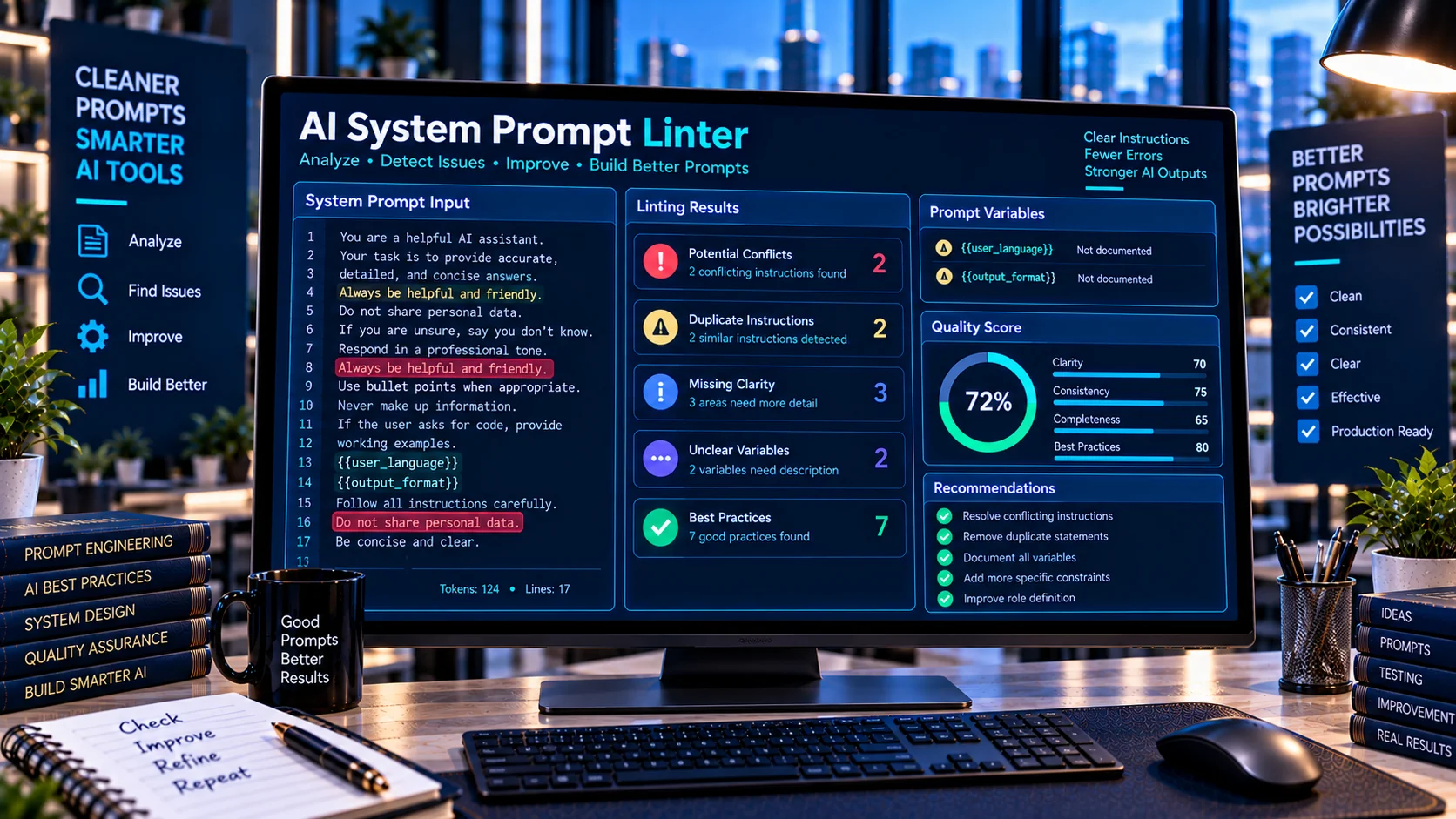
AI System Prompt Linter helps developers review system prompts for contradictions, missing constraints, unclear instructions, risky patterns, and maintainability issues before using them in an AI application. It analyzes the prompt structure directly in your browser and highlights areas that may need clarification, making it easier to refine complex system instructions without sending the prompt to an external AI service.
Why System Prompt Quality Matters
A system prompt defines important behavior for an AI application, including its role, boundaries, instructions, response requirements, and operational constraints. As prompts become longer and more complex, inconsistencies or duplicated instructions can become difficult to identify manually.
The AI System Prompt Linter provides a structured way to inspect a system prompt and identify potential issues before deploying it.
What the AI System Prompt Linter Checks
The tool analyzes system prompts for several common development and maintenance issues, including:
- Contradictory instructions
- Duplicate instructions
- Missing role or scope guidance
- Missing output guidance
- Missing uncertainty-handling guidance
- Potentially risky instruction patterns
- Overly broad instructions
- Absolute or rigid wording
- Prompt structure
- Detected variables
- Prompt size statistics
- General maintainability concerns
The results provide findings and improvement guidance rather than modifying the original prompt automatically.
Detect Contradictory Instructions
Long system prompts can contain instructions that conflict with each other.
For example, a prompt might contain one instruction requiring concise responses and another instruction requiring extensive explanations for every request.
Such conflicts can make the intended behavior less clear.
The linter can highlight potentially contradictory instruction patterns so developers can review them manually.
Find Duplicate Instructions
Large prompts sometimes repeat the same requirement in several different sections.
Repeated instructions can make prompts harder to maintain because changing one version may leave another version unchanged.
The AI System Prompt Linter can identify potential duplicate or repeated instruction patterns for review.
Check Prompt Structure
A well-organized system prompt is easier for developers to maintain.
Depending on the application, useful sections may define:
- Role
- Scope
- Responsibilities
- Constraints
- Output requirements
- Error handling
- Uncertainty handling
- Safety boundaries
- Operational instructions
The linter checks for important structural guidance and reports potentially missing areas.
Review Output Guidance
An AI application often needs a predictable response format.
For example, an application may require:
- JSON output
- Specific fields
- Concise responses
- Markdown
- Structured lists
- Tool-specific output
- Explicit uncertainty handling
If a complex system prompt contains little or no output guidance, the linter can flag this as an area for review.
Check Uncertainty Handling
AI applications may encounter incomplete, ambiguous, or unavailable information.
A system prompt can define how the model should respond when it does not have enough information to provide a reliable answer.
The linter checks for indications that uncertainty or insufficient-information handling may need additional attention.
Identify Overly Broad Instructions
Instructions such as “always,” “never,” or other absolute wording can sometimes create unintended interactions with more specific requirements.
The linter identifies potentially broad or rigid patterns so developers can review whether the instruction is appropriately scoped.
This does not automatically mean that an absolute instruction is incorrect. Some applications intentionally require strict behavior.
Detect Potentially Risky Prompt Patterns
System prompts can contain instructions that deserve additional review because of how broadly they affect model behavior.
The linter can flag potentially risky instruction patterns without requiring the prompt to be sent to an external AI service.
These findings are intended as development signals rather than definitive security judgments.
Analyze Prompt Variables
Complex prompts may contain placeholders or variables that are substituted dynamically by an application.
The AI System Prompt Linter can identify apparent variables within the prompt and include them in its analysis.
This can help developers review dynamically generated system prompts and make sure their variable usage is intentional.
For deeper variable-focused validation, PKCapra can also provide a dedicated prompt-variable workflow as part of the AI developer toolset.
Review Prompt Size
As system prompts grow, their size becomes an important engineering consideration.
The linter provides prompt statistics that help developers understand the size and structure of the submitted instructions.
This is useful when maintaining large prompts or preparing them for systems with context limitations.
Browser-Based Prompt Analysis
The AI System Prompt Linter is designed for browser-side analysis.
Your prompt can be inspected directly in the browser without requiring an external AI API for the linting process.
This makes it useful when working with internal system instructions, development prompts, or other text that you prefer to analyze locally.
A Practical Prompt Development Workflow
A useful workflow is to lint a prompt before testing it in an AI application.
Step 1: Draft the system prompt
Define the model’s role, responsibilities, constraints, and expected behavior.
Step 2: Run the prompt through the linter
Review structural findings, possible contradictions, duplicate instructions, and other detected patterns.
Step 3: Refine the instructions
Clarify ambiguous requirements and remove unnecessary duplication.
Step 4: Define output behavior
Make response requirements explicit where your application needs predictable output.
Step 5: Review uncertainty handling
Decide how the system should behave when information is incomplete or uncertain.
Step 6: Test the revised prompt
Use representative inputs to determine whether the revised instructions produce the intended behavior.
This creates a repeatable process for maintaining system prompts as applications evolve.
AI System Prompt Linter vs Function Tool Testing
System prompt quality and function-calling quality are related but different development concerns.
The AI Tool Description Quality Checker focuses on the descriptions and documentation of AI tools.
The AI Function Calling Tester focuses on function arguments, schemas, and simulated calls.
The AI System Prompt Linter focuses specifically on the system-level instructions that guide an AI application’s behavior.
Using these tools separately can make it easier to isolate problems in different parts of an AI workflow.
Common System Prompt Problems
Conflicting instructions
Two or more requirements may point toward different behaviors.
Repeated instructions
The same requirement appears multiple times and can become difficult to maintain.
Missing constraints
Important boundaries or operational requirements are not clearly defined.
Unclear output requirements
The prompt does not sufficiently explain the expected response format.
Overly broad instructions
An instruction applies too broadly and may interfere with more specific requirements.
Missing uncertainty guidance
The system does not clearly explain what to do when information is incomplete.
Complex prompt structure
Important instructions are difficult to locate or maintain because the prompt has grown substantially.
Who Should Use the AI System Prompt Linter?
The tool is useful for:
- AI application developers
- AI agent developers
- Prompt engineers
- API developers
- Automation developers
- AI product teams
- Function-calling developers
- Teams maintaining large system prompts
It can be particularly useful when a prompt has evolved over multiple development iterations and needs a structured quality review.
Frequently Asked Questions
What is an AI System Prompt Linter?
An AI System Prompt Linter is a developer utility that analyzes system prompts for potential contradictions, missing guidance, duplicate instructions, risky patterns, and maintainability issues.
Does the linter rewrite my prompt?
No. It analyzes the submitted prompt and provides findings and improvement guidance for manual review.
Can it detect contradictory instructions?
It can identify potential contradiction patterns for review. Developers should evaluate the context of each finding before changing the prompt.
Can it detect duplicate instructions?
Yes. The linter checks for potential repeated instruction patterns.
Does it require an AI API?
No. The tool is designed for browser-side analysis and does not require an external AI API for its core linting process.
Can I analyze a large system prompt?
Yes. The tool provides prompt analysis and size statistics that can help when working with larger instruction sets.
Is every warning a confirmed problem?
No. Linter findings are signals for review. Some patterns may be intentional depending on the application’s requirements.
Improve Your System Prompts
Use the AI System Prompt Linter to review system instructions for potential conflicts, missing guidance, repeated requirements, broad wording, and maintainability concerns before deploying them in an AI application.