
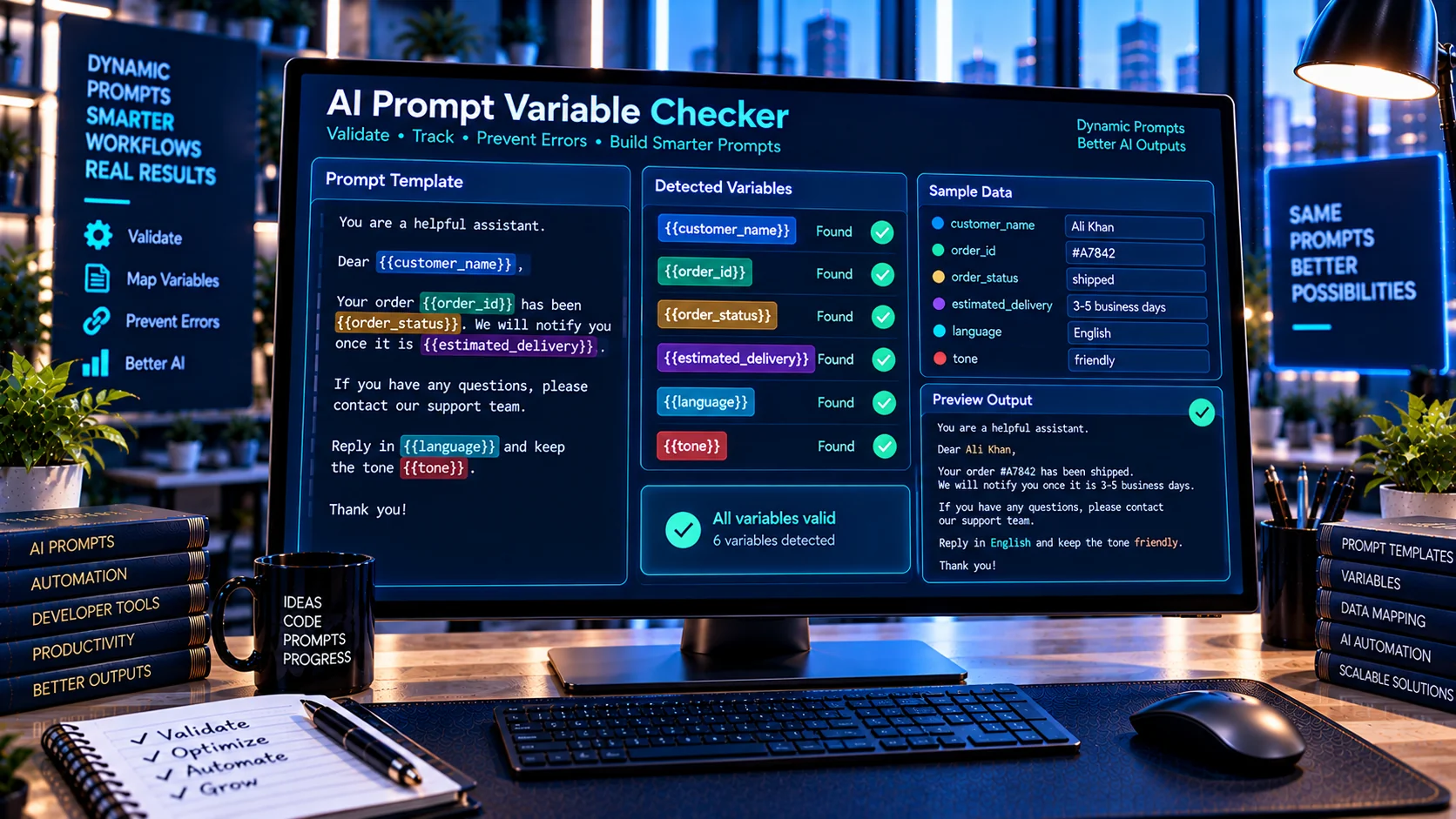
AI Prompt Variable Checker helps developers find and review variables inside AI prompt templates before using them in applications, agents, APIs, or automation workflows. It detects common variable syntaxes, identifies unique and repeated references, highlights naming inconsistencies, and provides a normalized variable list directly in the browser. This makes it easier to maintain dynamic prompts and catch variable-related issues before a template is used in production.
What Is an AI Prompt Variable Checker?
AI prompts often contain dynamic values that are inserted at runtime.
For example, a prompt template might contain:
You are assisting {{customer_name}}.
The customer's order number is {{order_id}}.
Their preferred language is {{language}}.
These placeholders allow the same prompt template to be reused with different data.
As templates become larger, it can become difficult to keep track of every variable, especially when variables are repeated or written using inconsistent syntax.
The AI Prompt Variable Checker provides a quick way to inspect those variables.
Common Prompt Variable Formats
Different applications and prompt systems use different placeholder conventions.
The tool can detect common formats such as:
{{variable}}{variable}${variable}%variable%[[variable]]
This makes the checker useful for reviewing prompt templates that use different variable styles.
Why Prompt Variables Matter
Variables connect a static prompt template with dynamic application data.
A production prompt might receive information such as:
- Customer name
- Product name
- User question
- Account information
- Order number
- Language
- Date
- Location
- API response values
- Tool results
If a variable is misspelled, inconsistently named, or referenced incorrectly, the resulting prompt may not contain the data the application expects.
Reviewing variables before deployment can therefore help identify template-maintenance issues.
How the AI Prompt Variable Checker Works
Paste your prompt template into the checker and the tool analyzes the text directly in your browser.
It can identify:
- Total variable references
- Unique variables
- Repeated variables
- Variable naming patterns
- Possible naming inconsistencies
- Variable syntax
- Variables appearing only once
- A normalized variable list
The result provides a structured overview of the variables detected in the prompt.
Find Duplicate Variable References
A variable may intentionally appear several times in a prompt.
For example:
Customer: {{customer_name}}

Hello {{customer_name}}, your account for {{customer_name}} is ready.
The repeated references are not necessarily an error. However, identifying them can be useful when reviewing a large template.
The checker reports repeated references so developers can distinguish intentional reuse from accidental duplication.
Detect Variable Naming Inconsistencies
Variable naming consistency becomes particularly important in large prompt templates.
For example, a template might accidentally use:
{{customer_name}}
{{customerName}}
{{customer-name}}
These may represent the same conceptual value while technically being different variable names.
The checker can highlight naming patterns and inconsistencies so developers can review whether the template follows a consistent convention.
Review Dynamic AI Prompt Templates
The tool can be useful for templates used by:
- AI chat applications
- AI agents
- Customer-support systems
- Automation workflows
- API integrations
- Prompt libraries
- Internal AI tools
- Document-generation workflows
- Personalized AI assistants
Instead of manually searching through a large prompt, developers can get a consolidated view of the variables used.
Prompt Variables and Application Data
Prompt variables often correspond directly to application fields.
For example:
{{first_name}}
{{email}}
{{subscription_plan}}
{{support_ticket}}
A developer may map these variables to application data before sending the final prompt to an AI model.
The variable checker does not replace the application’s runtime mapping logic. It helps review the prompt template itself.
Use the Checker Before Deployment
A useful workflow is to review a prompt template before connecting it to production data.
Step 1: Create the template
Write the prompt with the variables required by your application.
Step 2: Run the variable checker
Paste the template into the AI Prompt Variable Checker.
Step 3: Review the detected variables
Check the unique variables, repeated references, and naming patterns.
Step 4: Compare against your application fields
Make sure the variable names correspond to the data your application actually provides.
Step 5: Test the final prompt
Populate the variables with realistic test values and verify the resulting prompt before deployment.
AI Prompt Variables and Prompt Versioning
Variables can change as a prompt evolves.
For example, an earlier version might use:
{{user_question}}while a revised version uses:
{{customer_question}}A variable review can help identify these changes.
You can also use the AI Prompt Diff Checker to compare two prompt versions and identify exactly what changed.
This is particularly useful when a prompt is maintained by multiple developers or undergoes frequent revisions.
Combine Variable Checking With Prompt Compression
Prompt maintenance often involves both variable management and text cleanup.
The AI Prompt Compression Tool can help clean supported redundancy and formatting, while the AI Prompt Variable Checker focuses specifically on dynamic placeholders.
Using both tools can help separate two different maintenance tasks:
- Variable checking: What dynamic fields does this template use?
- Prompt compression: Can unnecessary text or formatting be reduced?
Keep Variable Names Consistent
A consistent naming convention can make prompt templates easier to maintain.
For example, a project might choose:
{{customer_name}}
{{customer_email}}
{{customer_id}}
rather than mixing different naming styles.
Consistency can make it easier for developers to map application data into prompts and troubleshoot missing values.
The exact naming convention should depend on the application or prompt framework being used.
Browser-Based Prompt Variable Analysis
The AI Prompt Variable Checker performs its analysis directly in the browser.
This can be useful when reviewing:
- Internal prompt templates
- Proprietary AI instructions
- Customer-support workflows
- Business automation prompts
- Development templates
- Private application configurations
No external AI service is required for the variable-analysis process.
As always, follow your organization’s privacy and security requirements when handling sensitive prompt content.
Common AI Prompt Variable Problems
Variable spelling differences
A small spelling change can create a different variable name.
Mixed naming conventions
Using formats such as customer_name, customerName, and customer-name within one project can make maintenance harder.
Unexpected duplicate references
Repeated variables may be intentional, but they should be reviewed in large templates.
Missing runtime values
A prompt may contain a variable that the application does not provide.
Unused application fields
An application may provide data that the prompt template never references.
The checker focuses on variables present in the prompt. Runtime mapping should still be tested separately.
Frequently Asked Questions
What is an AI Prompt Variable Checker?
An AI Prompt Variable Checker analyzes an AI prompt template and identifies variables, repeated references, naming patterns, and common placeholder formats.
Which variable formats can it detect?
The tool supports common formats including {{variable}}, {variable}, ${variable}, %variable%, and [[variable]].
Can it find duplicate variables?
Yes. It can identify variables that appear multiple times within the same prompt.
Does it validate my application’s runtime data?
No. The tool analyzes the prompt template. Your application’s runtime mapping should still be tested separately.
Does the tool use an AI API?
No. The variable analysis is performed directly in the browser without requiring an external AI or API service.
Why should I check prompt variables?
Checking variables can help identify naming inconsistencies, unexpected repetitions, and template fields that may need review before a prompt is connected to an application workflow.
Conclusion
The AI Prompt Variable Checker provides a simple way to inspect dynamic placeholders inside AI prompt templates. By identifying common variable formats, repeated references, naming patterns, and normalized variable lists, it can make large prompt templates easier to review and maintain.
For a broader prompt-development workflow, combine variable checking with prompt comparison, compression, linting, and application testing. This helps ensure that changes to the template are visible, deliberate, and properly tested before production use.