
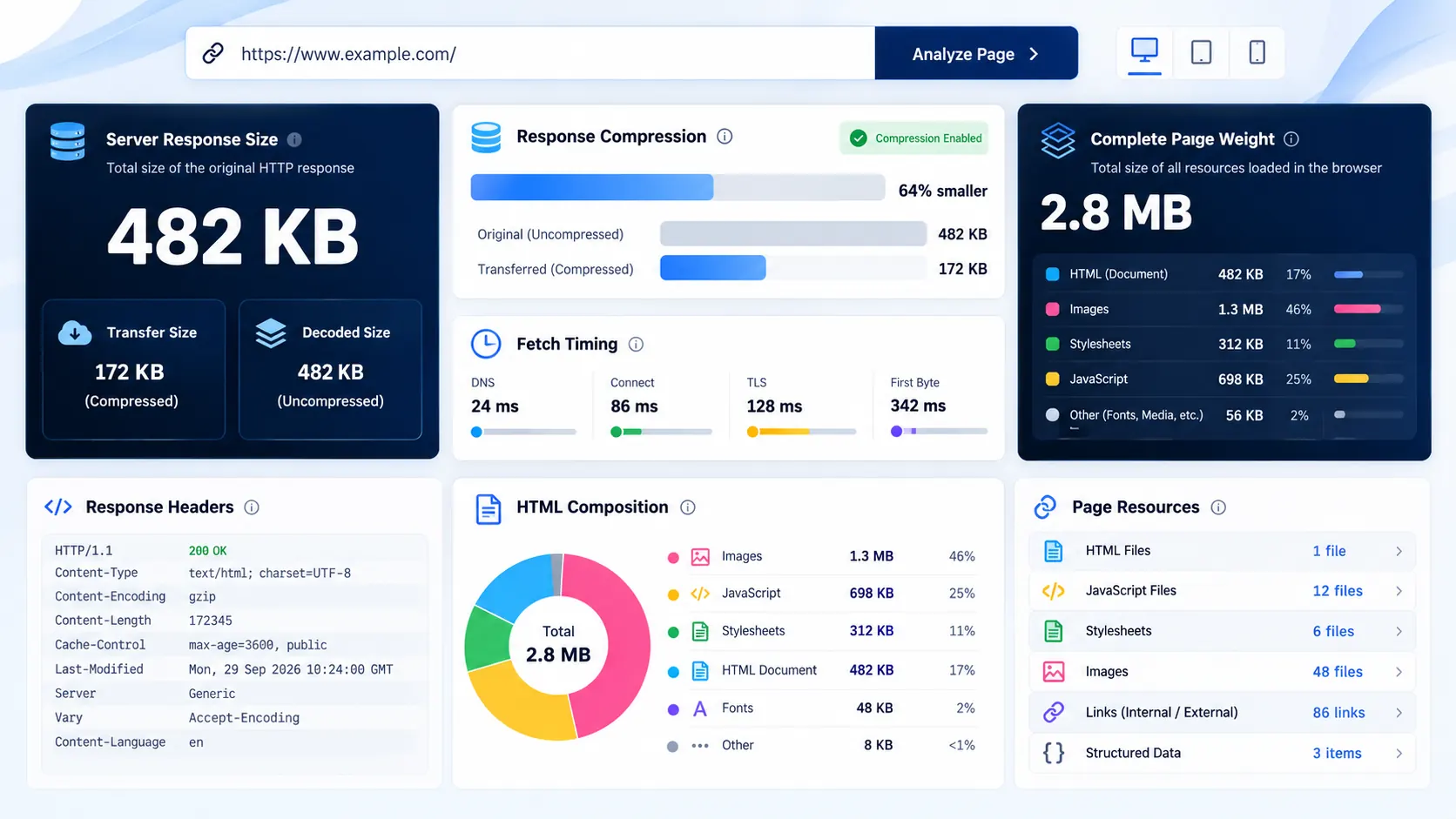
A webpage can look small in a browser while the HTML response behind it tells a different story. PKCapra’s Page Size Checker measures the HTTP response body returned by a public webpage and breaks it down into useful technical details, including transfer size, decoded source size, compression, response headers, and HTML composition.
Enter a public webpage URL and run the check to see what the server actually returned.
Page Size Checker
Measure the server response payload, compression, headers, and HTML composition of a public webpage without pretending a raw HTTP fetch is a full browser load.
Response weight measured
Compression & transfer accounting
What crossed the HTTP response boundaryHTML composition
What the returned document containsDiscovered resource map
Referenced resources are inventoried; they are not silently fetched or counted as downloaded bytesWhat Is a Page Size Checker?
A page size checker measures the amount of data associated with a webpage request.
But there is an important distinction between HTTP response size and complete browser page weight.
PKCapra focuses on the first one: the response body received by its server when it requests the URL.
This gives you a precise, reproducible measurement of the returned response instead of pretending that one number represents everything a browser might download afterward.
What Does PKCapra Measure?
The primary measurement is the HTTP response body received by the checker.
The report separates several measurements so they are not incorrectly mixed together.
Transfer Body
This is the number of response entity bytes received by the PKCapra server.
For an uncompressed HTML response, this represents the actual response body received.
Decoded Source
When response content is encoded, the tool can report the decoded source size separately.
This helps you understand the difference between the representation transferred over HTTP and the source size after decoding.
Content-Length
If the server supplies a Content-Length header, the tool reports it separately.
If the header is missing, PKCapra does not invent a value.
That distinction matters because a server-supplied Content-Length and an independently measured response body are not necessarily the same thing.
Response Headers
The report also provides an estimated response-header block size.
This is presented as an estimate rather than pretending to represent every byte involved in the underlying network connection.
It does not claim to measure TLS framing, HTTP/2 or HTTP/3 transport overhead.
Compression
The tool identifies the HTTP response encoding and reports compression information where applicable.
This lets you distinguish between:
- The transferred response representation
- The decoded source
- The amount saved through compression
If the response is not compressed, the compression-saving figure can remain unavailable rather than displaying a misleading percentage.
Why Page Size Matters
Page size matters because larger responses generally require more data to transfer before the browser can process that particular response.
A large HTML response can also indicate that a page is carrying unnecessary markup, excessive inline CSS, embedded JavaScript, duplicated components, or other avoidable content.
However, page size by itself is not a complete performance diagnosis.
A small HTML response can still lead to a heavy page if the browser subsequently downloads large images, fonts, scripts, stylesheets, videos, API responses, or other resources.
That is why PKCapra separates response size from the broader concept of browser page-load weight.
HTTP Response Size vs Complete Page Weight
This is one of the most important things to understand when using a page size checker.
A simplified request can look like this:
URL → HTTP response → HTML response body → browser parses page → additional resources load
The primary PKCapra measurement covers the HTTP response body returned to the checker.
A browser may then request additional resources such as:
- CSS files
- JavaScript files
- Images
- Fonts
- Videos
- API responses
- Lazy-loaded assets
- Third-party resources
Those additional downloads are not silently added to the primary response-body measurement.
This prevents the tool from presenting an invented “total page size” that it did not actually measure.
How to Check the Size of a Webpage
1. Enter the URL
Paste the public webpage URL into the URL field.
Use a complete HTTP or HTTPS URL.
2. Click Check Page Size
The tool starts the server-side request only after you submit the URL.
The measurement process then retrieves the public response and calculates the available byte-level metrics.
3. Review the response weight
Start with:
- Transfer body
- Decoded source
- HTTP status
- Content encoding
- Content-Length
- Response headers
- Fetch time
This gives you the basic response profile.
4. Inspect HTML composition
If the returned document is HTML, continue to the HTML composition section.
You can see information such as:
- HTML document detection
- Title
- H1 elements
- Script elements
- Style blocks
- Images
- Links
- Forms
- JSON-LD blocks
- Inline JavaScript
- Inline CSS
- HTML comments
- External stylesheets
- Preload links
- HTML doctype
5. Review discovered resources
PKCapra also inventories resource references discovered in the returned document.
These references are shown separately.
Their sizes are not automatically added to the primary response-body measurement because the tool has not silently downloaded every referenced resource.
What the HTML Composition Report Tells You
A page can have a relatively modest response size but still reveal useful optimization opportunities through its HTML structure.
Inline CSS
Large amounts of inline CSS can contribute significantly to the HTML response.
If a page contains substantial inline styles, investigate whether critical styles are intentional and whether unnecessary duplication can be removed.
Inline JavaScript
Inline JavaScript contributes directly to the returned HTML response.
A high amount does not automatically mean something is wrong, but it can be useful evidence when investigating unnecessarily large documents.
Scripts and styles
The number of script and style elements helps you understand the structure of the returned document.
It is a diagnostic signal—not a performance score by itself.
Images
The tool identifies image elements present in the returned HTML.
Remember that identifying an image reference is not the same as downloading and measuring the image file.
Links
Link counts can help you understand the complexity of the returned document and can be useful during technical SEO inspection.
JSON-LD
The tool detects JSON-LD blocks included in the returned document.
This can help you verify whether structured data is actually present in the HTML response.
Why Resource References Are Not Added to the Page Size
Suppose the HTML contains:
- 5 images
- 3 JavaScript files
- 2 CSS files
- Several font references
Simply adding guessed or cached sizes for those resources would create a misleading page-size number.
PKCapra instead reports them as discovered resource references.
This gives you two separate facts:
What the server returned: measured response-body bytes.
What the HTML references: an inventory of resources that may be requested separately.
That separation is intentional.
What Does a Large Page Size Mean?
There is no universal byte threshold that automatically makes every webpage “too large.”
A page’s appropriate size depends on its purpose, architecture, content, device audience, and how much work is being performed through the initial response versus subsequent requests.
A large HTML response deserves investigation when it appears unnecessarily inflated by things such as:
- Repeated markup
- Excessive inline CSS
- Large inline JavaScript
- Unnecessary embedded data
- Duplicate components
- Bloated templates
- Excessive HTML comments
- CMS-generated markup that is no longer useful
The right question is not simply:
“Is this page bigger than X KB?”
The better question is:
“What is making this response large, and does that size provide useful value?”
Does a Smaller Page Always Mean a Faster Website?
No.
This is a common oversimplification.
The initial HTML response is only one part of the browser’s work.
A website can have a small HTML response and still load substantial:
- JavaScript
- CSS
- Images
- Fonts
- Video
- Third-party scripts
- API data
Conversely, a content-heavy page may intentionally contain more HTML because that content is useful and directly available in the initial response.
Page size should therefore be treated as diagnostic evidence, not as a standalone performance score.
Page Size and SEO
Page size can be relevant to technical SEO because excessive data can contribute to slower experiences, especially when combined with poor resource delivery or inefficient implementation.
But Google rankings should not be reduced to a simple “smaller page = better SEO” formula.
Use page-size measurement alongside broader technical and performance investigation.
For example, after identifying a potentially heavy page, you can continue with PKCapra’s Page Speed Analyzer to investigate performance-related signals.
Page Size vs Page Speed
These terms are related but not interchangeable.
Page size asks:
How many bytes did this response contain?
Page speed asks:
How quickly and efficiently does the browser receive, process, render, and become able to interact with the page?
A page-size checker can therefore identify a potentially important input to performance analysis without pretending to replace a complete performance audit.
Common Reasons a Webpage Is Larger Than Expected
Excessive inline CSS
Large style blocks embedded directly into HTML can increase the response body substantially.
Large inline JavaScript
Application configuration, tracking code, serialized data, or framework-generated scripts can inflate HTML.
Repeated markup
Large navigation systems, product grids, menus, or repeated components can create substantial HTML.
Embedded data
Some applications embed JSON or other data directly inside the document.
CMS output
Themes, plugins, page builders, and templates can generate markup that is much larger than the visible content might suggest.
Unnecessary HTML
Comments, duplicated elements, hidden content, and legacy markup can all contribute to response size.
How to Reduce HTML Page Size
If your page-size check reveals an unexpectedly large response, investigate the source rather than blindly deleting content.
Remove unnecessary markup
Look for duplicated wrappers, obsolete components, unnecessary hidden elements, and repeated template output.
Reduce unnecessary inline CSS
Move reusable styles into appropriate stylesheets where that makes architectural sense.
Reduce unnecessary inline JavaScript
Review scripts embedded directly in HTML and determine whether they are required in the initial response.
Avoid embedding unnecessarily large datasets
If large application data is being serialized directly into HTML, investigate whether it genuinely needs to be delivered in the initial response.
Review CMS and plugin output
If a WordPress page is unexpectedly large, inspect which theme, plugin, widget, or page-builder component is generating the markup.
Compress responses
Compression can significantly reduce the transferred representation of text-based HTML.
The important point is to distinguish source size from transferred size rather than treating them as the same measurement.
When a Page Size Checker Is Most Useful
Use it when you want to:
- Compare two webpage implementations
- Investigate an unusually large HTML response
- Check whether compression is being used
- Inspect HTML composition
- Investigate inline CSS or JavaScript
- Examine response headers
- Verify HTTP status
- Review resource references
- Support a technical SEO investigation
- Establish a baseline before optimization
- Compare a page before and after changes
When You Need More Than a Page Size Checker
A response-size measurement cannot answer every performance question.
You may need additional analysis when investigating:
- Largest Contentful Paint
- Interaction responsiveness
- Cumulative Layout Shift
- Render-blocking resources
- Image optimization
- Font loading
- JavaScript execution
- Network waterfalls
- Browser-rendered DOM
- Third-party requests
- Core Web Vitals
For broader website performance investigation, use the Page Speed Analyzer.
If the investigation is specifically about image accessibility and markup, the Image Alt Text Checker can provide a more focused analysis.
Important Measurement Limitations
PKCapra’s primary page-size figure represents the HTTP response body received by the PKCapra server.
It does not claim to measure:
- TLS framing
- HTTP/2 or HTTP/3 transport overhead
- Browser-rendered page weight
- Every subsequent network request
- JavaScript-created requests
- Lazy-loaded resources
- API responses triggered after page load
- Server-side application source code
The discovered resource map is an inventory of references found in the returned document. Those resources are not silently fetched and added to the primary page-size figure.
This distinction is important because it keeps the measurement honest.
Privacy and Safety
The checker is designed for publicly accessible HTTP/HTTPS webpages.
Private or local network destinations are blocked, and the server-side request is subject to safety and resource limits.
Do not submit URLs containing sensitive information in query parameters or paths.
The tool is intended for legitimate webpage diagnostics and technical analysis, not for bypassing authentication or access controls.
Frequently Asked Questions
What is the size of a webpage?
There is no single definition of “webpage size.” It can refer to the HTML response, the compressed transfer representation, or the total collection of resources downloaded by a browser.
PKCapra’s primary figure specifically measures the HTTP response body received by the checker.
How can I check webpage size online?
Enter the public webpage URL into PKCapra’s Page Size Checker and select Check Page Size. The tool retrieves the response and reports its measured body size together with compression and HTML information.
Does page size include images and CSS files?
Not automatically. The primary measurement is the returned HTTP response body. Referenced images, stylesheets, scripts, fonts, and other resources are inventoried separately rather than silently added to the measured response.
What is the difference between page size and page speed?
Page size measures data volume. Page speed describes how efficiently the browser receives, processes, renders, and interacts with the page.
They are related but different measurements.
Does compression reduce page size?
Compression can reduce the amount of data transferred while leaving the decoded source substantially larger. That is why transfer body and decoded source are reported separately.
Why is Content-Length missing?
A server does not have to provide a Content-Length header in every response. When it is absent, PKCapra reports it as unavailable instead of calculating a fake header value.
Does this tool measure total browser page weight?
No. It measures the HTTP response body returned to the PKCapra server. A browser can subsequently download additional resources.
Does a large HTML response mean the website is slow?
Not necessarily. It is a useful diagnostic signal, but actual performance depends on many other factors, including resource loading, rendering, JavaScript execution, network conditions, caching, and browser behavior.
Can I compare page sizes?
Yes. Running the checker against different URLs can provide a consistent response-body measurement that you can compare before and after changes.
Is a smaller HTML response always better?
No. Removing useful content simply to reduce bytes can make a page worse. The objective should be efficient delivery of necessary content, not the smallest possible number.
A Practical Page-Size Investigation Workflow
For a useful technical investigation, don’t stop at the number.
First: measure the response.
Second: check whether compression is being used.
Third: inspect the HTML composition.
Fourth: identify unusually large inline CSS or JavaScript.
Fifth: review discovered resources separately.
Sixth: investigate broader browser performance if the page still appears slow.
Finally: run the same measurement again after optimization and compare the results.
This gives you a measurable before-and-after workflow instead of relying on assumptions.
Conclusion
A page-size number is useful only when you know exactly what that number represents.
PKCapra’s Page Size Checker measures the HTTP response body received by the server, separates transfer and decoded measurements, identifies compression and response information, and shows what the returned HTML contains.
It does not pretend that one server-side measurement represents the entire browser loading experience.
That distinction makes the result more useful for developers, SEO professionals, and website owners who need measurable evidence rather than an arbitrary page-size score.
For a broader performance investigation, continue with the Page Speed Analyzer.