
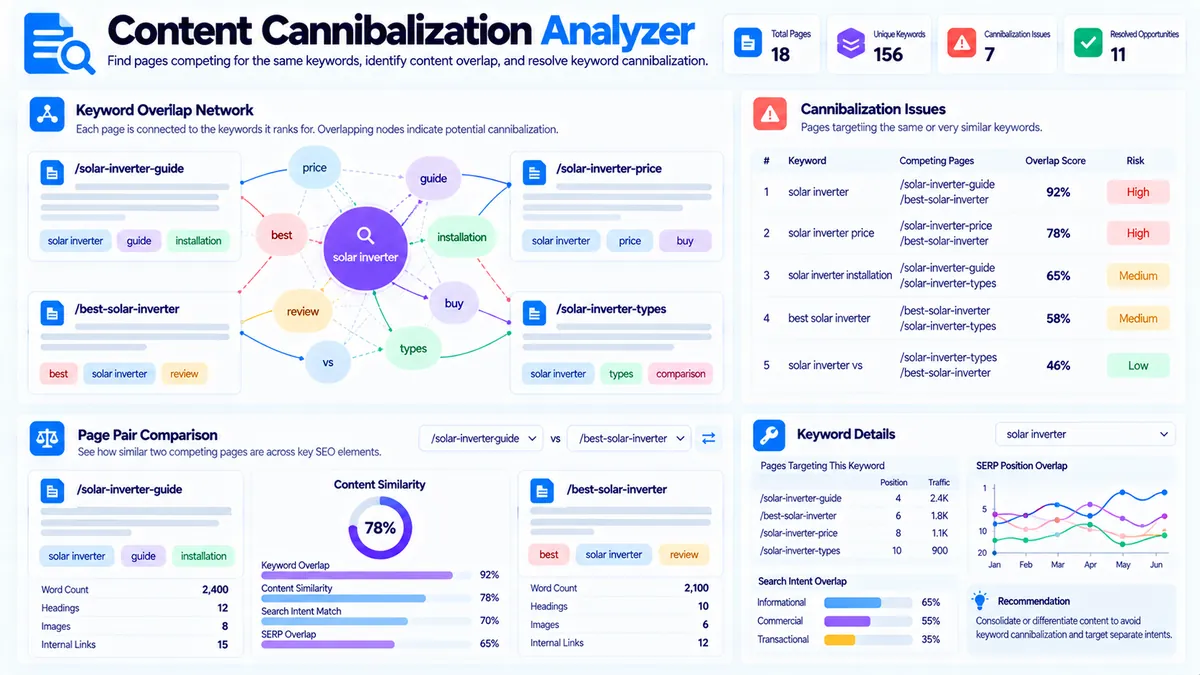
Content Cannibalization Analyzer helps you identify potential keyword and topic conflicts between your website pages. Enter your page URLs, primary keywords, secondary keywords, and page titles to compare page pairs for keyword overlap, exact primary-keyword conflicts, title similarity, search-intent overlap, and combined cannibalization risk.
The tool is designed to help you prioritize pages that deserve closer review. A detected conflict is not automatically a ranking penalty or proof that two pages are competing in search. Use the findings alongside the actual page content, search intent, internal links, traffic, conversions, backlinks, and search-performance data when making content decisions.
Content Cannibalization Analyzer
Compare pages targeting related topics and identify keyword overlap, title similarity, intent overlap, and page pairs that may compete for the same search demand.
Pages to compare
Cannibalization Assessment
Pair-level signals are calculated from the page metadata and keywords you supplied.
View JSON report
How to Use the Content Cannibalization Analyzer in Simple Steps
- Enter your page inventory. Add your website pages using the fields provided by the tool, including the URL, primary keyword, secondary keywords, and page title.
- Choose your analysis settings. Select the sensitivity level and minimum shared-keyword threshold you want the analyzer to use.
- Run the analysis. The tool compares the supplied page data and identifies keyword overlap, primary-keyword conflicts, title similarity, search-intent overlap, and combined risk signals.
- Review the results. Start with the highest-risk page pairs, inspect the shared signals, and use the suggested action as a starting point for manual review.
What the Content Cannibalization Analyzer Checks
The analyzer looks at several signals together rather than treating one matching keyword as automatic cannibalization.
Keyword Overlap
The tool compares the primary and secondary keywords supplied for each page and identifies shared keyword signals.
Some overlap is normal. Related pages can legitimately share terminology because they belong to the same topic. The important question is whether the overlap is strong enough that the pages appear to have the same targeting and purpose.
Exact Primary-Keyword Conflicts
The analyzer identifies cases where multiple pages use the same primary keyword.
This is one of the clearest targeting signals to review because deliberately assigning the same primary keyword to several URLs can create unnecessary competition between pages with similar purposes.
An exact match does not automatically mean that one page should be removed. Review the intent and purpose of each URL first.
Title Similarity
Similar titles can indicate that multiple pages are targeting closely related subjects.
The analyzer uses title similarity as one component of the overall assessment. Similar titles alone are not enough to establish content cannibalization.
For example, these titles may be related but still have different purposes:
- SEO Audit Guide
- Technical SEO Audit
- SEO Audit Checklist
The actual content and search intent determine whether the distinction is meaningful.
Search-Intent Overlap
Pages can target different keyword phrases while still answering the same underlying user need.
The analyzer therefore considers search-intent overlap as part of the combined assessment. This helps surface cases where changing the wording of a keyword may not create enough separation between two pages.
Combined Cannibalization Risk
The tool combines the available signals into page-pair risk findings.
Results are presented using:
- High
- Medium
- Low
These labels help prioritize manual review. They should not be interpreted as Google penalties, ranking guarantees, or direct measurements of search-engine behavior.
Understanding the Analysis Settings
The Content Cannibalization Analyzer includes sensitivity controls so you can decide how aggressively potential conflicts should be surfaced.
Focused
Focused analysis is useful when you want to concentrate on stronger overlap signals and reduce the number of weaker potential matches.
Balanced
Balanced analysis provides a general-purpose review for most content inventories.
Broad
Broad analysis is useful when you want to discover more possible relationships and are comfortable reviewing additional lower-confidence overlaps manually.
The minimum shared-keyword threshold can further control how much keyword overlap is required before a relationship becomes part of the analysis.
How to Interpret a Cannibalization Finding
Do not change your website structure simply because two pages share keywords.
For each flagged page pair, review:
- Primary keyword
- Secondary keywords
- Page title
- Search intent
- Topic scope
- Audience
- Content purpose
- Internal links
- Existing organic performance
- Backlinks and historical value
- Conversion purpose
Then ask whether both pages provide a genuinely different answer or resource.
For example, consider:
/seo-audit/— SEO audit/technical-seo-audit/— technical SEO audit/seo-audit-checklist/— SEO audit checklist
These URLs share a strong topic relationship. However, they may still serve different purposes. A broad audit guide, a technical audit resource, and a practical checklist can each have a legitimate role if their content and search intent are clearly differentiated.
The analyzer can surface the relationship. Your content review determines whether the relationship requires action.
Common Content Cannibalization Patterns
Multiple Pages Target the Same Primary Keyword
When several pages deliberately target the same primary keyword, review whether separate URLs are actually necessary.
Possible actions include:
- Differentiate the pages.
- Assign a clearer primary topic to each URL.
- Reposition one page around a narrower or different intent.
- Consolidate substantially overlapping pages.
- Redirect a redundant page when consolidation is appropriate.
Do not automatically delete or redirect pages based only on the analyzer result.
Broad Topic and Narrow Topic Overlap
A broad page and a specialist page can coexist when their purposes are clear.
For example, a general keyword research guide can explain the complete research process while a separate keyword clustering page focuses specifically on grouping related terms.
For keyword organization, you can also use Keyword Clustering to identify related keyword groups before assigning them to individual pages.
Different Keywords but Similar Intent
Changing the wording of a keyword does not necessarily create a separate content opportunity.
For example:
- best SEO tools
- top SEO tools
- SEO tools list
may represent closely related search intent.
If multiple pages on the same site separately target these variations without a meaningful difference in purpose, they deserve closer review.
Similar Titles Across Multiple Pages
Titles such as:
- SEO Audit Guide
- SEO Audit Checklist
- SEO Audit Tutorial
can indicate overlapping targeting.
However, titles alone do not prove cannibalization. Review the actual content and intended user journey.
Using the Analyzer Before Publishing New Content
Run a cannibalization review before creating another page around a topic that your site already covers.
A practical workflow is:
- Collect your existing URLs covering the topic.
- Record their primary keywords.
- Add their important secondary keywords.
- Add the current page titles.
- Run the analyzer.
- Review the strongest overlaps.
- Decide whether the new page has a genuinely distinct purpose.
- Create the page only when the content opportunity is sufficiently differentiated.
This can help prevent unnecessary URL duplication before it becomes part of a larger content audit.
For broader keyword organization, Keyword Grouping can help organize keywords by topic and intent before assigning them to pages.
Using the Analyzer During a Content Audit
The analyzer can also be used as part of an existing content audit.
A useful process is:
- Prepare your important page inventory.
- Add each page’s primary keyword.
- Add relevant secondary keywords.
- Add the current page title.
- Run the analysis.
- Sort your attention toward high-risk findings.
- Compare the actual pages manually.
- Record the action you want to investigate.
- Re-run the analysis after major targeting changes.
This creates a repeatable process for reviewing content overlap instead of relying only on memory or individual keyword searches.
What the Suggested Actions Mean
The tool provides action-oriented findings to help you decide what to investigate next.
These suggestions are analysis guidance rather than automatic instructions to modify your website.
Differentiate
Consider differentiation when two pages have legitimate separate purposes but their targeting is too similar.
Differentiation can involve:
- Primary keyword
- Search intent
- Topic scope
- Page title
- Content depth
- Audience
- Internal linking
- Supporting topics
Consolidate
Consider consolidation when two pages substantially cover the same topic and there is no strong reason to maintain both URLs.
Before consolidation, review organic traffic, conversions, backlinks, historical value, internal links, and the actual content of both pages.
Reposition
Repositioning can be useful when a page is valuable but its current topic or keyword focus overlaps too heavily with another URL.
A page may be repositioned around a more specific topic, audience, or search intent.
Review
Some findings require manual investigation because keyword and title data cannot establish the complete relationship between two pages.
A review finding means the relationship deserves attention, not that the pages are necessarily problematic.
Priority Page Signals
The analyzer can provide a priority-page signal within an overlapping page relationship.
Use this as a planning aid rather than as evidence that a search engine has selected a preferred ranking URL.
When deciding which page should become the main resource for a topic, consider:
- Actual content quality
- Search intent
- Organic traffic
- Conversions
- Backlinks
- Historical value
- Internal links
- Business purpose
- Existing search performance
The analyzer helps organize the review; it does not replace these signals.
Example: Finding and Resolving an Overlap
Imagine a website has these pages:
| Page | Primary Keyword | Purpose |
|---|---|---|
/seo-audit/ | seo audit | Complete SEO audit guide |
/technical-seo-audit/ | technical seo audit | Technical SEO audit resource |
/seo-audit-checklist/ | seo audit checklist | Practical audit checklist |
The analyzer may identify meaningful keyword and title overlap across these URLs.
Instead of immediately merging them, compare their actual purposes.
If the first page explains the complete audit process, the second focuses specifically on technical issues, and the third provides a practical checklist, the pages may have enough differentiation to remain separate.
If all three pages contain substantially the same information and target the same user need, consolidation may deserve consideration.
This illustrates why the analyzer should be used as a prioritization tool rather than an automatic decision engine.
Copy, JSON, and PDF Reports
After running an analysis, the tool provides export options for preserving the findings.
Copy Report lets you copy the human-readable analysis for use in content-audit notes or project documentation.
Copy JSON copies the structured analysis output.
Download JSON saves the structured result locally for later processing.
Download PDF creates a report that can be stored or shared as part of a content audit.
The exported information reflects the analysis generated from the data you supplied to the tool.
Browser-Based Processing
The Content Cannibalization Analyzer performs its core analysis in the browser using the information entered into the tool.
It does not require:
- A Google account
- Google Search Console access
- A search-volume API
- An external AI API
- A database connection for the core analysis
Because the analyzer works from supplied page data, it does not automatically crawl your complete website or independently verify the live content of every URL.
Limitations
The analyzer identifies potential cannibalization patterns from the page information you provide.
It does not directly measure:
- Actual Google ranking competition
- Historical ranking changes
- Search volume
- Backlink authority
- Google Search Console performance
- Live SERP competition
- Complete page-content similarity
- Search-engine-selected canonical behavior
- Conversion performance
A high-risk result means that the pages deserve closer investigation. It does not prove that a ranking problem exists.
For a more complete content audit, combine the tool’s findings with actual page review, analytics, Search Console data, backlink information, internal-link analysis, and SERP research.
Troubleshooting and Edge Cases
The analyzer reports too many overlaps
Use the Focused sensitivity setting or increase the minimum shared-keyword threshold.
Large content inventories naturally contain common terms, so broader settings can surface many relationships that require manual filtering.
Two pages are flagged even though their purposes are different
Review the actual search intent and content scope.
Related pages can legitimately share keywords when they answer different questions or serve different stages of a user journey.
Two pages use different primary keywords but still appear related
This can happen because their secondary keywords, titles, or intent signals overlap.
Review whether the difference between the pages is meaningful enough to justify separate URLs.
A page is flagged but you want to keep it separate
That is possible.
If the page provides a distinct user-focused resource, keep it separate and make the distinction clearer through its title, primary topic, content scope, internal links, and page structure.
Results change when I edit the page data
That is expected.
The analyzer evaluates the information and settings you provide. Changing keywords, titles, sensitivity, or thresholds can therefore change the detected relationships.
Developer Snippets (Automate This Tool Offline)
The following examples provide a simple offline starting point for comparing keyword overlap in a local content inventory. They are useful for preprocessing or auditing larger datasets before entering selected pages into the PKCapra tool.
Python
import re

STOP_WORDS = {
    "the", "a", "an", "and", "or", "of", "to", "in",
    "for", "on", "with", "is", "are", "how", "what", "your"
}

def normalize(text):
    words = re.findall(r"[a-z0-9]+", text.lower())
    return {
        word for word in words
        if word not in STOP_WORDS and len(word) > 1
    }

def overlap_score(left, right):
    if not left or not right:
        return 0.0

    shared = left & right
    return len(shared) / min(len(left), len(right))

pages = [
    {
        "url": "https://example.com/seo-audit/",
        "primary": "seo audit",
        "secondary": "website audit technical seo audit",
        "title": "SEO Audit Guide"
    },
    {
        "url": "https://example.com/technical-seo-audit/",
        "primary": "technical seo audit",
        "secondary": "technical SEO website crawl errors",
        "title": "Technical SEO Audit"
    }
]

for i in range(len(pages)):
    for j in range(i + 1, len(pages)):
        left = pages[i]
        right = pages[j]

        left_terms = normalize(
            left["primary"] + " " +
            left["secondary"] + " " +
            left["title"]
        )

        right_terms = normalize(
            right["primary"] + " " +
            right["secondary"] + " " +
            right["title"]
        )

        score = overlap_score(left_terms, right_terms)

        print(left["url"], "<->", right["url"])
        print("Shared terms:", sorted(left_terms & right_terms))
        print("Overlap:", round(score * 100, 1), "%")
PowerShell
function Get-Terms {
    param([string]$Text)

    $stopWords = @(
        "the","a","an","and","or","of","to","in","for",
        "on","with","is","are","how","what","your"
    )

    $words = [regex]::Matches($Text.ToLower(), "[a-z0-9]+") |
        ForEach-Object { $_.Value } |
        Where-Object {
            $_.Length -gt 1 -and $stopWords -notcontains $_
        }

    return $words | Sort-Object -Unique
}

$pages = @(
    [pscustomobject]@{
        Url = "https://example.com/seo-audit/"
        Primary = "seo audit"
        Secondary = "website audit technical seo audit"
        Title = "SEO Audit Guide"
    },
    [pscustomobject]@{
        Url = "https://example.com/technical-seo-audit/"
        Primary = "technical seo audit"
        Secondary = "technical SEO website crawl errors"
        Title = "Technical SEO Audit"
    }
)

for ($i = 0; $i -lt $pages.Count; $i++) {
    for ($j = $i + 1; $j -lt $pages.Count; $j++) {
        $leftText = "$($pages[$i].Primary) $($pages[$i].Secondary) $($pages[$i].Title)"
        $rightText = "$($pages[$j].Primary) $($pages[$j].Secondary) $($pages[$j].Title)"

        $leftTerms = @(Get-Terms $leftText)
        $rightTerms = @(Get-Terms $rightText)

        $shared = $leftTerms | Where-Object {
            $rightTerms -contains $_
        }

        Write-Output "$($pages[$i].Url) <-> $($pages[$j].Url)"
        Write-Output "Shared terms: $($shared -join ', ')"
    }
}
Node.js
const stopWords = new Set([
  "the", "a", "an", "and", "or", "of", "to", "in",
  "for", "on", "with", "is", "are", "how", "what", "your"
]);

function normalize(text) {
  return new Set(
    (text.toLowerCase().match(/[a-z0-9]+/g) || [])
      .filter(word => word.length > 1 && !stopWords.has(word))
  );
}

function overlap(left, right) {
  if (!left.size || !right.size) return 0;

  let shared = 0;

  for (const term of left) {
    if (right.has(term)) {
      shared++;
    }
  }

  return shared / Math.min(left.size, right.size);
}

const pages = [
  {
    url: "https://example.com/seo-audit/",
    primary: "seo audit",
    secondary: "website audit technical seo audit",
    title: "SEO Audit Guide"
  },
  {
    url: "https://example.com/technical-seo-audit/",
    primary: "technical seo audit",
    secondary: "technical SEO website crawl errors",
    title: "Technical SEO Audit"
  }
];

for (let i = 0; i < pages.length; i++) {
  for (let j = i + 1; j < pages.length; j++) {
    const left = pages[i];
    const right = pages[j];

    const leftTerms = normalize(
      `${left.primary} ${left.secondary} ${left.title}`
    );

    const rightTerms = normalize(
      `${right.primary} ${right.secondary} ${right.title}`
    );

    console.log(
      `${left.url} <-> ${right.url}`,
      `overlap=${(overlap(leftTerms, rightTerms) * 100).toFixed(1)}%`
    );
  }
}
Excel Power Query Workflow
Excel can be useful for maintaining the page inventory that you later analyze.
Create a table with columns such as:
| URL | Primary Keyword | Secondary Keywords | Page Title |
|---|---|---|---|
| https://example.com/seo-audit/ | seo audit | website audit, technical audit | SEO Audit Guide |
| https://example.com/technical-seo-audit/ | technical seo audit | crawl errors, technical SEO | Technical SEO Audit |
A practical workflow is:
- Keep one URL per row.
- Remove duplicate URLs.
- Standardize your URL format.
- Keep the primary keyword in its own column.
- Store secondary keywords consistently.
- Keep the current page title in a separate column.
- Review duplicate primary keywords.
- Clean the inventory with Power Query when necessary.
- Use the cleaned dataset as the source for your cannibalization review.
- Investigate the highest-priority page relationships manually.
For a large site, this workflow can make it easier to maintain a reusable content inventory instead of rebuilding the dataset for every audit.
Frequently Asked Questions
What is content cannibalization?
Content cannibalization is substantial overlap between multiple pages in keyword targeting, topic focus, or search intent that may make their purposes insufficiently distinct.
Does a high-risk result mean Google is penalizing my site?
No. The analyzer identifies potential content-targeting conflicts. It does not establish a Google penalty or directly measure a search-engine ranking problem.
Can the tool tell which page Google prefers?
No. It can provide a planning signal based on the supplied data, but it does not know which URL a search engine may prefer for a query.
Does the analyzer crawl my website?
No. The analysis is based on the page information you provide. It does not automatically crawl your complete website.
Can two pages target related keywords without being cannibalized?
Yes. Pages can legitimately share related keywords when they serve different search intents, audiences, topics, or levels of specificity.
Should every flagged page pair be merged?
No. A flagged relationship should be reviewed manually before deciding whether to differentiate, consolidate, reposition, or keep the pages unchanged.
What should I check before consolidating two pages?
Review the actual content, search intent, traffic, conversions, backlinks, historical value, internal links, and purpose of both URLs before making a consolidation decision.
Why are pages with different keywords sometimes flagged?
Different keywords can still represent the same underlying topic or search intent. The analyzer considers multiple signals rather than relying only on exact keyword matches.
Can I save my cannibalization analysis?
Yes. The tool provides Copy Report, Copy JSON, Download JSON, and direct PDF download options.
Does the tool require an API key?
No. The core analysis runs in the browser and does not require a Google API or external AI API.