
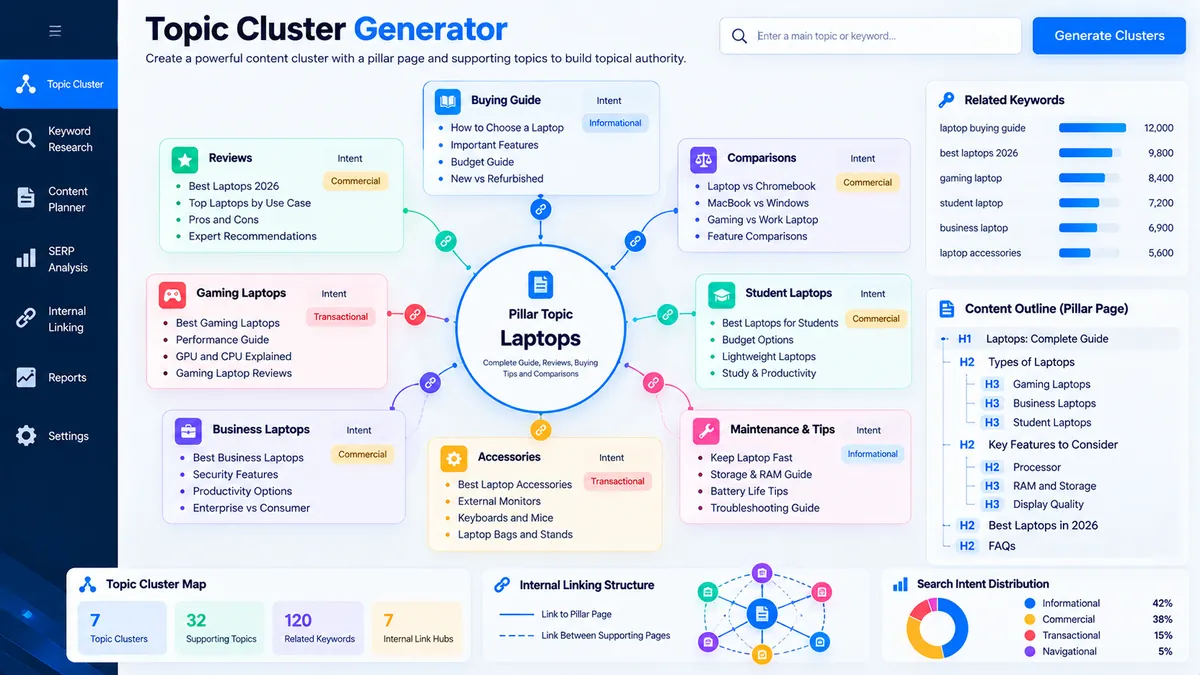
Topic Cluster Generator turns a core subject and related keywords into a structured pillar-and-supporting-topic plan. Enter a central topic, add related keywords or subtopics, choose the clustering sensitivity, and generate topic groups with search-intent signals, suggested content formats, URL paths, and an internal-linking blueprint.
Topic Cluster Generator
Turn a core subject and related keywords into a structured pillar topic, supporting clusters, search-intent signals, and an internal-linking plan.
Topic Cluster Blueprint
Generated from the topics and keywords you supplied.
View JSON report
How to Use the Topic Cluster Generator in Simple Steps
- Enter the core topic. Add the main subject that will serve as the pillar topic, such as “Technical SEO” or “Content Marketing”.
- Add related keywords and subtopics. Enter one keyword or subtopic per line. The tool also accepts the supplied keyword list as the source material for cluster generation.
- Choose cluster sensitivity. Select Focused, Balanced, or the available sensitivity setting that matches how tightly you want related topics grouped.
- Enable optional signals and generate. Use the stop-word and search-intent controls when needed, then select Generate Topic Clusters to create the pillar, supporting clusters, suggested paths, and internal-linking plan.
For keyword research that needs a different organization method, the Keyword Clustering Tool groups keywords using similarity thresholds, while the Keyword Grouping Tool focuses on practical topic and search-intent organization.
Technical Breakdown: Browser-Based Topic Clustering
The Topic Cluster Generator performs deterministic topic analysis in the browser using the keywords and subtopics supplied through its interface. It creates a pillar topic from the core subject, groups related terms using lexical signals, detects basic search-intent patterns, and generates a planning structure that connects supporting topics back to the pillar.
Core Topic and Pillar Structure
The core topic defines the central subject of the generated content architecture. The tool treats it as the primary resource and uses supporting topic clusters as related content that can link back to the pillar.
Lexical Topic Clustering
Topic clustering uses supplied wording and shared lexical signals to identify related terms. The generated clusters are planning signals rather than evidence that separate pages will perform for every keyword.
Search-Intent Signals
Search-intent detection provides a classification signal based on the supplied wording. It can help distinguish informational, commercial, transactional, and navigational patterns during content planning, but it does not replace manual SERP or search-intent validation.
Suggested Content Paths
Each supporting cluster can receive a suggested URL path and content format. These paths are planning outputs and should be reviewed against your existing site architecture before publishing new URLs.
Internal-Linking Blueprint
The internal-linking plan maps supporting cluster topics back to the pillar topic. This creates a practical hub-and-spoke planning model instead of treating every keyword as an isolated page.
The generated structure can then be reviewed alongside your existing keyword groups and URL planning workflow before assigning final page targets.
Developer Snippets (Automate This Tool Offline)
The same basic clustering workflow can be reproduced offline when keyword research is stored in a CSV file. The following Python script normalizes terms, detects shared lexical tokens, creates simple clusters, and exports the results for further editorial review.
import pandas as pd
import re
from collections import defaultdict

STOP_WORDS = {
    "a", "an", "and", "are", "as", "at", "for", "from",
    "in", "is", "of", "on", "or", "the", "to", "with"
}

def normalize(text):
    text = str(text).lower().strip()
    text = re.sub(r"[^a-z0-9\s-]", " ", text)
    words = [
        word for word in text.split()
        if word and word not in STOP_WORDS
    ]
    return words

def shared_terms(words_a, words_b):
    return set(words_a).intersection(words_b)

def build_clusters(topics):
    normalized = {
        topic: set(normalize(topic))
        for topic in topics
    }

    clusters = []
    assigned = set()

    for topic, words in normalized.items():
        if topic in assigned:
            continue

        cluster = [topic]
        assigned.add(topic)

        for candidate, candidate_words in normalized.items():
            if candidate in assigned:
                continue

            shared = shared_terms(words, candidate_words)

            if shared:
                cluster.append(candidate)
                assigned.add(candidate)

        clusters.append(cluster)

    return clusters

df = pd.read_csv("topics.csv")

if "topic" not in df.columns:
    raise ValueError("The CSV file must contain a 'topic' column.")

topics = (
    df["topic"]
    .dropna()
    .astype(str)
    .str.strip()
)

topics = topics[topics != ""].drop_duplicates().tolist()

clusters = build_clusters(topics)

rows = []

for index, cluster in enumerate(clusters, start=1):
    for topic in cluster:
        rows.append({
            "cluster": index,
            "topic": topic,
            "cluster_size": len(cluster)
        })

output = pd.DataFrame(rows)
output.to_csv("topic-clusters.csv", index=False)

print(f"Topics analyzed: {len(topics)}")
print(f"Clusters created: {len(clusters)}")
print("Exported: topic-clusters.csv")
This offline script demonstrates the clustering concept using the supplied dataset only. It does not query Google, Bing, keyword-volume APIs, competitor databases, or live SERP results.
Microsoft Excel Power Query Workflow
Excel Power Query can prepare keyword research before clustering by cleaning whitespace, normalizing capitalization, removing blank records, and creating a consistent topic dataset.
- Place your keyword or subtopic list in an Excel table with a Topic column.
- Select the table and choose Data > From Table/Range.
- Select the Topic column and choose Transform > Format > Trim.
- Apply Transform > Format > Clean to remove non-printing characters.
- Use Transform > Format > Lowercase when consistent capitalization is required.
- Filter out blank topics.
- Use Home > Remove Rows > Remove Duplicates to eliminate exact duplicate entries.
- Choose Home > Close & Load to return the cleaned dataset to Excel.
- Review the normalized topics manually before importing or pasting them into the Topic Cluster Generator.
A Power Query transformation for basic topic normalization can use:
let
    Source = Excel.CurrentWorkbook(){[Name="Topics"]}[Content],
    CleanTopics = Table.TransformColumns(
        Source,
        {
            {
                "Topic",
                each Text.Lower(Text.Trim(Text.Clean(Text.From(_)))),
                type text
            }
        }
    ),
    RemoveBlankTopics = Table.SelectRows(
        CleanTopics,
        each [Topic] <> null and [Topic] <> ""
    ),
    RemoveDuplicates = Table.Distinct(
        RemoveBlankTopics,
        {"Topic"}
    )
in
    RemoveDuplicates
Power Query is useful when keyword research is maintained in spreadsheets and needs repeatable cleanup before clustering. Final page decisions should still consider search intent, existing URLs, topical relevance, content quality, and the site’s current information architecture.
Frequently Asked Questions
What is a topic cluster?
A topic cluster is a group of closely related subjects organized around a central pillar topic and connected through a planned content structure.
What does the Topic Cluster Generator create?
The Topic Cluster Generator creates a pillar topic, supporting topic clusters, intent signals, suggested content formats, suggested paths, and an internal-linking plan.
What is the pillar topic?
The pillar topic is the central subject that acts as the main resource for the generated topic architecture.
How does the tool group related topics?
The tool groups related topics using lexical signals found in the keywords and subtopics supplied by the user.
Does the Topic Cluster Generator use Google search results?
The Topic Cluster Generator does not query live Google search results, search-volume databases, or external keyword APIs.
Does the tool guarantee that each cluster needs a separate page?
A generated cluster is a content-planning signal and does not automatically require a separate published URL.
What does cluster sensitivity control?
Cluster sensitivity controls how tightly supplied topics are grouped according to their shared lexical signals.
Can the generated clusters be used for internal linking?
The generated clusters can be used as an internal-linking planning structure by connecting supporting topics back to the pillar topic.
Should I review search intent before publishing cluster pages?
Search-intent review is necessary before publishing because generated intent signals are heuristic classifications rather than live SERP evidence.
What is the difference between topic clustering and keyword grouping?
Topic clustering focuses on similarity-based relationships between supplied topics, while keyword grouping is designed for practical topic and search-intent organization.
Use the Keyword Clustering Tool when the primary task is similarity-based keyword clustering, or use the Keyword Grouping Tool when the research needs practical topic and intent organization.