
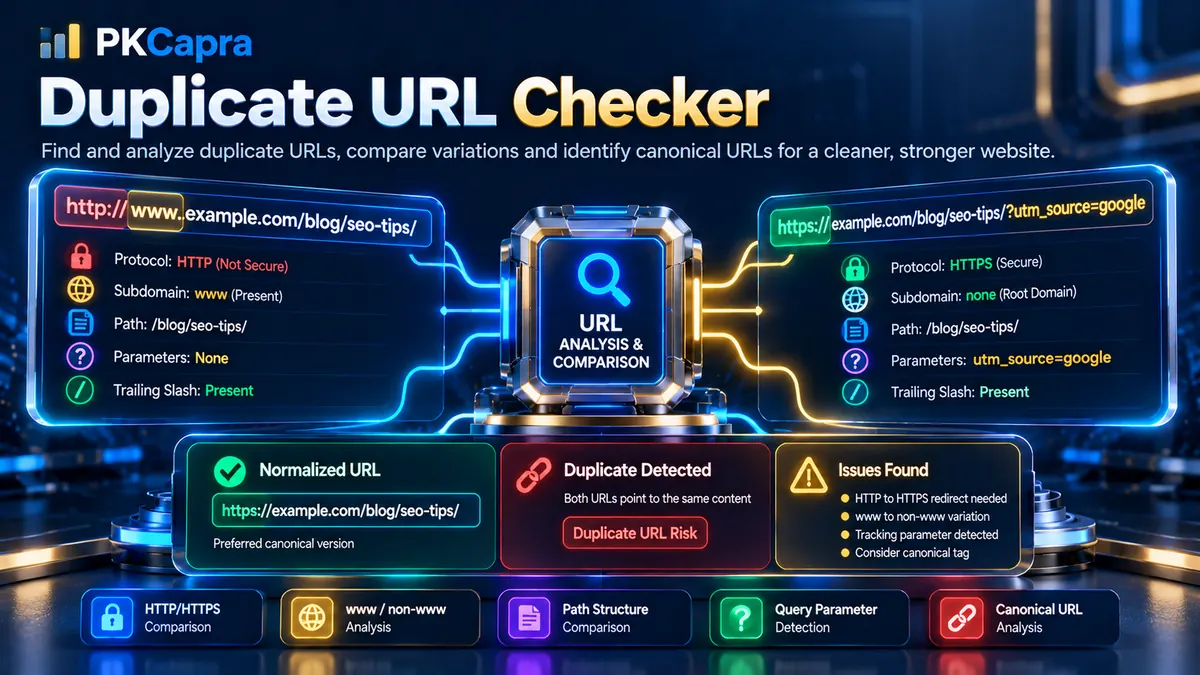
Duplicate URL Checker
Compare two URLs, normalize their structure, and identify protocol, hostname, path, and query-string duplication risks.
URL Comparison Matrix
Review each technical component, both extracted values, the normalization result, and the duplicate-risk status.
| Check | First URL | Second URL | Analysis | Status |
|---|
Duplicate URL Checker helps identify whether two different URL configurations can represent the same underlying webpage or create unnecessary URL variations.
Enter two URLs and compare their protocol, hostname, path, query parameters, fragments, and normalized structure. PKCapra’s Duplicate URL Checker separates technical differences from meaningful URL differences and provides a clear comparison matrix showing where the two URLs match, differ, or may require canonicalization review.
This is particularly useful when investigating HTTP/HTTPS variations, www versus non-www URLs, trailing slash differences, tracking parameters, dynamic query strings, and other URL configurations that can result in multiple addresses representing the same content.
What Is a Duplicate URL?
A duplicate URL is a different URL representation that can potentially point to the same underlying content.
For example, a website might expose the same page through variations such as:
and:
Another common variation is:
where the tracking parameter changes the URL but may not change the underlying page content.
Other examples include:
- HTTP vs HTTPS
- www vs non-www
- Different trailing-slash conventions
- Tracking parameters
- Dynamic query parameters
- URL capitalization differences
- Fragment variations
Not every difference means that two URLs are duplicates. The purpose of the Duplicate URL Checker is to break the URLs into their individual components so the difference can be evaluated accurately.
What Does the Duplicate URL Checker Compare?
PKCapra’s Duplicate URL Checker performs a component-level comparison of two submitted URLs.
The analyzer examines:
- Protocol
- Hostname
- www vs non-www structure
- Port
- Path
- Trailing slash
- Query parameters
- Tracking parameters
- Dynamic parameters
- Fragment
- Normalized URL structure
The result is displayed through a visual comparison dashboard and technical comparison matrix.
Two-URL Comparison
The tool provides two dedicated fields:
- First URL to Compare
- Second URL to Compare
This makes it possible to investigate two specific URL configurations rather than crawling an entire website.
For example, you can compare:
with:
Or:
with:
You can also compare parameterized and non-parameterized versions of the same resource.
URL Normalization
Before comparing individual components, the analyzer applies structural normalization.
Normalization allows the tool to distinguish formatting differences from meaningful architectural differences.
The normalization process considers:
- Path case
- Protocol representation
- Hostname representation
- Trailing slashes
- URL components
- Query strings
This is important because two URLs may look different as raw strings while pointing toward the same logical resource structure.
Why Normalization Matters
Consider these two URLs:
and:
A direct string comparison would identify them as different strings.
A normalized structural comparison can recognize that the primary path target is effectively the same while the trailing slash convention differs.
This allows the report to classify the difference separately instead of treating every character difference as a duplicate-content problem.
Protocol Alignment
The protocol identifies how the URL is accessed.
Common protocols include:
- HTTP
- HTTPS
For example:
http://example.com/page
and:
have the same hostname and path but different protocols.
If both URLs resolve to the same content, the protocol difference can represent an HTTP/HTTPS duplication or migration issue that should be addressed through consistent canonicalization and redirect configuration.
The Duplicate URL Checker identifies this difference as part of the comparison.
For a dedicated HTTPS inspection, use the HTTPS Checker.
Hostname Variation
The hostname identifies the website or host serving the URL.
A common variation is:
versus:
The www hostname and the non-www hostname are technically different hostnames even when they serve identical content.
If both versions remain accessible without a consistent canonical or redirect strategy, they can create unnecessary URL variants.
The Duplicate URL Checker highlights this hostname variation in the comparison matrix.
www vs Non-www
The www versus non-www distinction is one of the most common URL normalization issues.
Examples:
A website should generally establish a consistent preferred hostname.
The analyzer does not assume that www or non-www is universally correct. Instead, it identifies the variation so the site’s chosen architecture can be reviewed.
Path Equivalence
The path identifies the resource location after the hostname.
For example:
/blog/technical-seo/
The Duplicate URL Checker compares the path components of both URLs.
If both URLs contain the same normalized path, they may be different representations of the same target.
If their paths differ substantially, the URLs may represent separate resources even when the hostnames and protocols are identical.
Example
URL 1:
URL 2:
These URLs have different path structures.
The analyzer reports the difference instead of automatically treating them as duplicates.
Trailing Slash Comparison
Trailing slashes can produce URL variations such as:
and:
Different websites use different trailing-slash conventions.
The important consideration is consistency.
If both versions are accessible and return the same content, a website should have a clear preferred URL and appropriate redirect or canonical behavior.
The Duplicate URL Checker isolates this difference so it can be investigated separately from the rest of the URL architecture.
Query String Isolation
Query strings begin after the ? character.
For example:
The analyzer separates query parameters from the main path.
This is important because two URLs can have an identical page path while carrying different query parameters.
For example:
and:
may represent the same underlying page while the second URL contains additional tracking information.
Tracking Parameter Detection
Tracking parameters are commonly used in marketing and analytics.
Examples include:
utm_sourceutm_mediumutm_campaignutm_termutm_contentgclidfbclid
For example:
The parameter can provide useful attribution information without changing the underlying page.
However, when parameterized URLs are crawlable and indexable, they can create additional URL representations.
The Duplicate URL Checker identifies these parameters so you can assess whether they should be treated as tracking variations rather than separate canonical URLs.
Dynamic Parameter Detection
Some query parameters represent dynamic values.
Examples include:
idproduct_idpagesessiontokensortfilter
A dynamic parameter does not automatically mean that a URL is a duplicate.
For example, an ecommerce filter may legitimately generate a different content view.
The analyzer therefore reports the parameter structure rather than declaring every dynamic parameter invalid.
Query Overhead Status
The Query Overhead Status summarizes the additional query-string complexity between the two URLs.
A clean result indicates that the URLs do not introduce significant parameter differences.
A warning can indicate tracking or additional query variables.
A higher-risk result can indicate substantial dynamic query variation that deserves closer review.
The purpose is to help distinguish the primary page URL from additional parameterized representations.
Duplicate Verdict Status
The Duplicate Verdict Status provides the primary comparison result.
The tool can distinguish between conditions such as:
CLEAN
The two URLs represent distinct configurations without a strong structural indication that they are duplicate representations of the same target.
DUPLICATE DETECTED
The URLs have sufficiently similar structural components that they may represent alternate URL versions of the same underlying resource.
CRITICAL MISMATCH
A significant structural difference exists between the URL configurations, or a potentially important protocol/hostname split requires attention.
The verdict is a diagnostic result based on the URL components supplied to the tool. It is not a claim that search engines have actually indexed both URLs.
Protocol Alignment Status
The Protocol Alignment card summarizes whether the protocols match.
Possible conditions include:
- Secure Match
- Insecure Variance
For example:
and:
have aligned HTTPS protocols.
But:
http://example.com/page
and:
have a protocol variance.
The distinction helps identify HTTP/HTTPS normalization issues.
Domain Authority Level
The Domain Authority Level card focuses on hostname structure rather than a third-party domain authority score.
It identifies whether the compared URLs use:
- The same hostname
- www vs non-www
- Different hostnames
- Different subdomain structures
This metric should not be confused with external SEO metrics such as Domain Authority scores from third-party platforms.
Its purpose is architectural hostname comparison.
Visual Comparison Matrix
The Comparison Matrix provides the detailed technical view of both URLs.
Each row represents an individual component.
Typical rows include:
- Protocol
- Hostname
- Port
- Path
- Trailing Slash
- Query Parameters
- Tracking Parameters
- Dynamic Parameters
- Fragment
- Normalized Structure
The table shows the value detected in each URL and explains what the difference means.
Green Status
Green indicates that the compared component is aligned or represents a clean structural condition.
Yellow Status
Yellow identifies a difference that may be legitimate but deserves review.
Examples include:
- Trailing slash variation
- Tracking parameters
- Minor normalization differences
Red Status
Red indicates a stronger structural concern.
Examples include:
- HTTP/HTTPS duplication
- www/non-www separation
- Significant conflicting URL configurations
- Dynamic parameter patterns that may create duplicate representations
The status should always be interpreted alongside the actual values displayed for both URLs.
Search Engine Duplicate Risk
Two URLs can represent the same content while remaining technically different addresses.
If multiple URL versions are accessible, search engines may encounter several representations of the same resource.
Potential consequences can include:
- Duplicate URL discovery
- Indexation of unintended URL variants
- Signal fragmentation
- Confusing canonical signals
- Unnecessary crawling
- Parameter-related URL proliferation
The Duplicate URL Checker helps identify the URL-level conditions that deserve investigation.
It does not independently determine how Google or another search engine has crawled or indexed the URLs.
Canonicalization and Duplicate URLs
Canonicalization is an important part of managing duplicate URL variants.
If several URLs represent the same content, a website can establish a preferred canonical representation.
For example, a site might choose:
as the preferred URL while redirecting or canonicalizing alternative representations.
Use the Canonical URL Checker when you want to inspect the canonical signal on a live page.
Redirects and Duplicate URLs
Redirects can help consolidate alternate URL versions.
Common examples include:
- HTTP → HTTPS
- www → non-www
- Non-www → www
/page→/page/- Old URL → new URL
The correct redirect depends on the website’s chosen URL architecture.
Use the Redirect Checker to inspect redirect behavior separately.
For direct HTTP response analysis, use the HTTP Status Checker.
Duplicate URLs During Website Migrations
URL duplication becomes particularly important during migrations.
Common migration scenarios include:
- HTTP to HTTPS
- www to non-www
- Domain changes
- WordPress migrations
- CMS migrations
- Website redesigns
- Taxonomy restructuring
- Ecommerce platform migrations
Before and after a migration, compare representative URL pairs to identify unexpected differences.
Review:
- Protocol
- Hostname
- Path
- Query parameters
- Trailing slashes
- Redirect behavior
- Canonical URLs
Duplicate URLs in Ecommerce Websites
Ecommerce websites frequently use query parameters for:
- Filters
- Sorting
- Product variants
- Search
- Pagination
- Tracking
For example:
/products/shoes?color=black
and:
/products/shoes?color=blue
may legitimately represent different filtered views.
The presence of a parameter alone does not mean the URLs are duplicates.
The correct interpretation depends on whether the parameter changes the page’s meaningful content and how the website handles crawling, indexing, canonicalization, and navigation.
Duplicate URLs and Tracking Campaigns
Marketing campaigns often append tracking parameters.
For example:
and:
The tracking values differ, but the underlying service page may remain identical.
The analyzer isolates these query differences so you can identify parameterized variants without confusing them with completely different URL paths.
How to Use the Duplicate URL Checker
Step 1: Enter the First URL
Enter the first URL into the First URL to Compare field.
Step 2: Enter the Second URL
Enter the alternate or suspected duplicate URL into the Second URL to Compare field.
Step 3: Run the Comparison
Start the analysis.
The backend parses and normalizes both URL strings before comparing their individual components.
Step 4: Review the Verdict
Start with the Duplicate Verdict Status.
This provides a quick overview of the comparison.
Step 5: Review the Metric Cards
Check:
- Duplicate Verdict Status
- Protocol Alignment Status
- Domain Authority Level
- Query Overhead Status
These provide a quick summary of the main structural differences.
Step 6: Inspect the Comparison Matrix
Review the exact values from both URLs.
Pay particular attention to:
- Protocol
- Hostname
- Path
- Query parameters
- Tracking parameters
- Dynamic parameters
- Trailing slash
- Normalized structure
Step 7: Export the Result
Use Copy JSON when you need structured data for documentation or development workflows.
Use Download PDF Report when you need a portable comparison report.
Common Duplicate URL Scenarios
HTTP and HTTPS Versions
http://example.com/page
https://example.com/page