
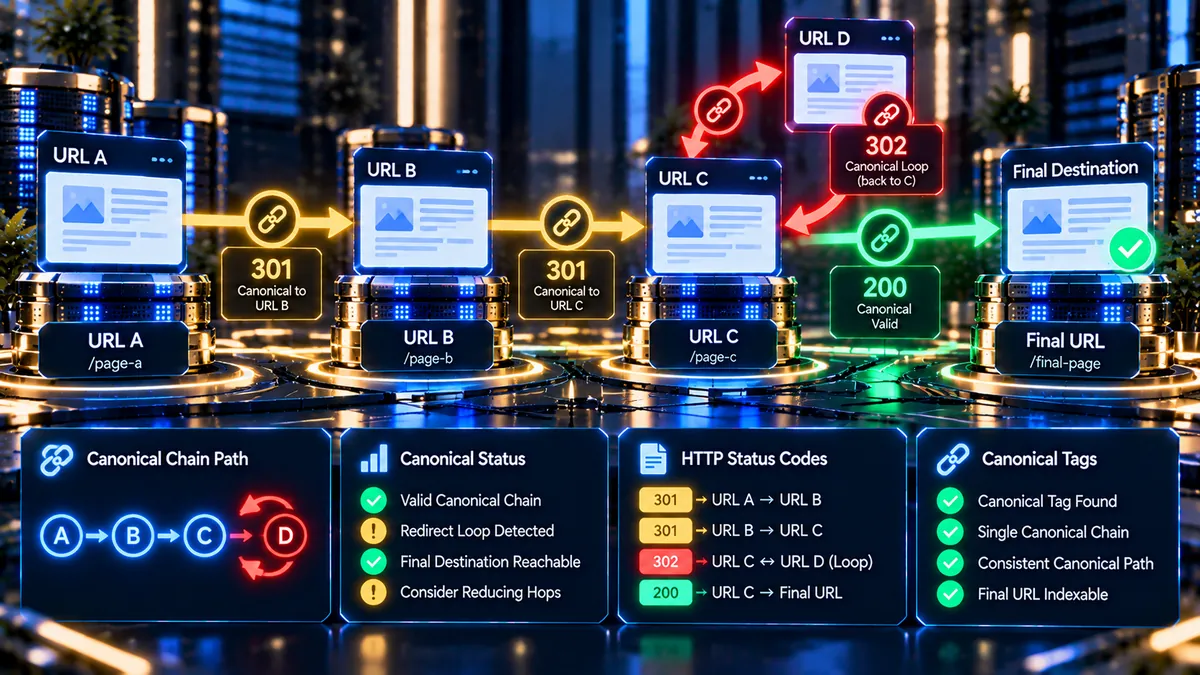
Use the Canonical Chain Checker to trace canonical references across pages, detect multi-hop canonical chains, identify canonical loops, and verify the HTTP status of every canonical destination. This free SEO tool helps you find canonical signals that point through multiple URLs instead of directly to the intended destination.
Canonical Chain Checker
Trace canonical references across pages, detect multi-hop chains and loops, and verify the HTTP status of every canonical destination.
| Step | URL | HTTP Status | Canonical Destination | Signal |
|---|
The result reflects responses returned to the local WordPress server at scan time. Same-host canonical references are followed for up to 5 hops; cross-domain references are recorded and safely treated as terminal targets.
Only submit public URLs that you are authorized to analyze. The checker uses the native WordPress HTTP engine with a local cURL fallback and does not require a paid proxy, premium API, or VPS.
What Is a Canonical Chain Checker?
A Canonical Chain Checker analyzes the canonical references between webpages and shows whether one canonical URL points to another page before reaching a final destination. This helps identify multi-step canonical relationships, canonical loops, broken targets, missing canonicals, and other canonical configuration issues.
PKCapra’s free Canonical Chain Checker follows canonical references step by step and presents the complete path in a visual timeline and detailed chain matrix. Each step shows the URL, HTTP status, canonical destination, and detected signal.
The tool is designed for technical SEO analysis when a page does not use a direct canonical relationship or when several canonical references create a longer path.
How Does Canonical Chain Detection Work?
The checker starts with the public HTTP or HTTPS URL that you enter. PKCapra requests the page and examines the HTML head for its canonical link.
If the canonical points to another page on the same hostname, the checker follows that canonical destination and analyzes the next page. This process continues one step at a time until a final condition is reached.
The analysis can follow up to five canonical hops. This limit helps prevent excessive server-side requests while still identifying meaningful canonical chains.
When a canonical points back to a URL that was already visited, PKCapra identifies a canonical loop and stops the analysis safely.
What Is a Canonical Chain?
A canonical chain occurs when a page points its canonical to another page, and that second page points its canonical to another destination instead of ending the relationship directly.
For example, a canonical relationship may look like:
Page A → Page B → Page C
In this example, Page A identifies Page B as its canonical, while Page B identifies Page C as its canonical. The checker records each relationship so you can see the complete canonical path.
Longer chains can make canonical signals harder to understand and may indicate configuration problems that should be reviewed during a technical SEO audit.
Canonical Chain vs Direct Canonical
A direct canonical relationship points straight to the intended canonical destination. A canonical chain contains additional canonical steps before reaching the final page.
For example, a direct relationship can look like:
Page A → Page A
A multi-step relationship can look like:
Page A → Page B → Page C
PKCapra shows these relationships separately so you can identify whether the tested URL is self-referential, follows another same-host canonical, reaches a cross-domain destination, or enters a problematic loop.
Canonical Chain Checker Results
After the analysis finishes, PKCapra displays the result in a premium dashboard rather than a plain text response. The dashboard summarizes the chain and provides detailed information for every analyzed step.
Chain Verdict
The Chain Verdict summarizes the overall canonical relationship detected during the scan. It helps you understand whether the path completed normally or requires technical review.
Chain Status
Chain Status shows the overall state of the canonical path, including direct, chained, looped, broken, or other detected conditions.
Canonical Hops
Canonical Hops shows how many canonical steps were analyzed before the checker reached a terminal condition or the five-hop safety limit.
Final HTTP Status
Final HTTP Status shows the HTTP response associated with the final analyzed destination. This helps identify successful responses as well as error conditions such as 404, 403, 500, or other HTTP responses.
Final Target
Final Target identifies the final URL reached by the canonical analysis, where applicable.
Canonical Chain Timeline
The Canonical Chain Timeline provides a visual representation of the canonical path. Each step is displayed in sequence so you can quickly understand how the canonical relationship moves from one URL to another.
The timeline makes multi-hop relationships easier to inspect than a basic list of URLs. It also helps highlight the point where a canonical loop, broken destination, missing canonical, or other issue appears.
Use the timeline when reviewing complicated canonical configurations across several related pages.
Canonical Chain Matrix
The Chain Matrix provides a detailed table for every analyzed step. It includes the step number, URL, HTTP status, canonical destination, and detected signal.
This detailed view is useful when you need to document a technical SEO issue or compare several canonical relationships during website maintenance.
The matrix also makes it easier to locate the exact URL where the canonical path changes or stops.
Canonical Loop Detection
A canonical loop occurs when a canonical path returns to a URL that has already been visited.
A simple example is:
Page A → Page B → Page A
A longer loop can contain several pages:
Page A → Page B → Page C → Page A
PKCapra keeps track of previously visited canonical destinations during the analysis. When a previously visited URL appears again, the checker identifies the repeated relationship and stops the chain safely.
Canonical loops should be reviewed carefully because they can make canonical signals difficult to interpret.
Broken Canonical Chain Targets
A canonical chain is not useful if one of its analyzed destinations returns an error response or cannot be successfully retrieved.
PKCapra records the HTTP status for each analyzed page and flags broken conditions when the response cannot provide a usable canonical path.
Common HTTP responses that may require investigation include 404 Not Found, 403 Forbidden, 500 Internal Server Error, 502 Bad Gateway, and 503 Service Unavailable.
Review the exact URL and HTTP status shown in the Chain Matrix before changing your canonical configuration.
Missing Canonical Tags
A canonical chain can only continue when the analyzed page contains a detectable canonical reference. If no canonical tag is found, the checker stops the chain and reports the missing canonical condition.
Missing canonicals should be reviewed in the context of the page type, indexing strategy, duplicate-content signals, and overall website architecture.
For a broader review of indexing signals, you can also use the Indexability Checker.
Multiple Canonical Tags
A page can contain more than one canonical link element. Multiple canonical references can create conflicting signals because search engines may receive more than one possible canonical destination.
PKCapra detects multiple canonical tags during the analysis and highlights the condition in the Priority Findings section.
Review the HTML head of the affected page and determine which canonical declaration should remain before removing or changing tags.
Same-Host Canonical Tracking
PKCapra follows canonical references on the same hostname so it can inspect the next page in the canonical relationship.
For example:
https://example.com/page-a/ → https://example.com/page-b/ → https://example.com/page-c/
The checker can analyze this type of same-host relationship step by step, subject to the five-hop analysis limit.
Same-host tracking provides a practical way to identify canonical chains without requiring a paid external SEO API.
Cross-Domain Canonical References
Some websites intentionally use a canonical URL hosted on another domain. PKCapra records cross-domain canonical references but does not continue following them as part of the same-host canonical chain.
For example:
https://example.com/article/ → https://another-domain.com/article/
The external destination is shown as a terminal canonical target so the result remains clear without creating an uncontrolled cross-domain crawl.
Cross-domain canonicals should be reviewed carefully to confirm that the external destination is intentional and represents the preferred version of the content.
Five-Hop Canonical Analysis Limit
The Canonical Chain Checker follows a maximum of five canonical hops during one analysis.
This safety limit prevents a single scan from generating an excessive number of server-side requests while still allowing the tool to identify common multi-step canonical relationships.
If the chain reaches the five-hop limit before reaching a final condition, PKCapra reports that the analysis limit was reached so the result is not mistaken for a complete unlimited crawl.
Canonical Chain Checker vs Canonical URL Checker
The Canonical URL Checker focuses on the canonical relationship of a page and helps inspect its canonical URL.
The Canonical Chain Checker goes further by tracing same-host canonical relationships across multiple pages. This makes it useful when the canonical destination itself contains another canonical reference.
Use the appropriate checker depending on whether you need a single-page canonical review or a multi-step canonical path analysis.
Canonical Chains and Indexability
Canonical signals are one part of a wider technical SEO system. A canonical relationship should be considered alongside indexability, robots directives, HTTP responses, redirects, XML sitemaps, and page content.
The Indexability Checker can help you review indexability signals such as meta robots directives, X-Robots-Tag, canonical alignment, and sitemap-related signals.
For a wider technical review, use the Technical SEO Checker.
Canonical Chains and Redirects
Canonical references and HTTP redirects are different signals, but they can interact during website migrations, URL restructuring, and content consolidation.
A canonical may point to a URL that redirects somewhere else. Reviewing both the canonical relationship and the redirect path can help identify configuration issues that are difficult to see from a single check.
Use the Redirect Chain Checker to inspect HTTP redirect sequences and identify unnecessary redirect hops.
You can also use the Redirect Loop Checker when a URL appears to cycle through repeated HTTP redirect destinations.
How to Use the Canonical Chain Checker
1. Enter a Public URL
Enter the complete HTTP or HTTPS URL that you want to analyze.
2. Start the Check
Click Check Canonical Chain to begin the analysis.
3. Review the Chain Verdict
Start with the Chain Verdict and summary metrics to understand the overall result.
4. Follow the Timeline
Review each canonical step in the visual timeline to see how the relationship moves between URLs.
5. Inspect the Chain Matrix
Check the exact URL, HTTP status, canonical destination, and signal for every analyzed step.
6. Review Priority Findings
Read the critical findings, warnings, and passed signals to identify the areas that require attention.
7. Export the Results
Use Copy Canonical JSON when you need structured result data, or use Download PDF Report to save the visual audit for documentation and technical review.
When Should You Check for Canonical Chains?
Run a canonical chain analysis after changing URL structures, migrating a website, consolidating pages, or updating canonical tags.
The tool is also useful when several related pages have been merged, when duplicate URLs are being consolidated, or when a canonical destination does not appear to be the final preferred page.
Include canonical chain checks in technical SEO investigations when indexing signals or preferred URLs do not behave as expected.
For a broader website-level review, use the Full SEO Site Audit.
How to Troubleshoot a Canonical Chain
Start with the first URL shown in the report and follow the canonical relationship step by step.
If the chain contains multiple hops, inspect why each page points to another canonical destination. Confirm that the final destination represents the intended preferred URL.
If a loop is detected, locate the URL where the canonical relationship returns to an earlier page. Review the canonical tags on each page involved in the cycle.
If a destination returns an error, investigate the HTTP response before changing the canonical tag. A broken destination can indicate a separate hosting, routing, access, or URL configuration problem.
If multiple canonical tags are detected, inspect the page source and identify the systems or templates that are generating the duplicate declarations.
Canonical Chain Analysis for Website Migrations
Website migrations often involve URL changes, domain changes, HTTPS transitions, content consolidation, and redirect rules. Canonical references should be reviewed as part of this process.
A page that points to an intermediate URL instead of the intended final canonical destination may create an unnecessary canonical chain.
Run the Canonical Chain Checker on important migrated URLs and review the complete path before finalizing the migration.
For redirect-specific migration checks, combine the results with the Redirect Chain Checker.
Canonical Chain Analysis for Duplicate Content
Duplicate or near-duplicate pages can use canonical tags to communicate a preferred URL. Problems can occur when those canonical relationships point through several intermediate pages.
A canonical chain analysis helps reveal the actual relationship between these URLs instead of reviewing each canonical declaration in isolation.
Use the findings to review page templates, CMS settings, SEO plugins, URL structures, and other systems that generate canonical tags.
Free Canonical Chain Checker
PKCapra provides the Canonical Chain Checker as a free SEO and webmaster tool. It does not require a premium SEO API, paid proxy service, or VPS.
The analysis is performed through the WordPress environment using the native WordPress HTTP engine with a local cURL fallback.
The checker also provides structured JSON copying and a client-side PDF report so the results can be saved for technical analysis.
Frequently Asked Questions
What is a canonical chain?
A canonical chain occurs when one page points to another page as its canonical and that destination points to another canonical URL instead of ending at the intended final destination.
What is a canonical loop?
A canonical loop occurs when a canonical path returns to a URL that was already visited. An example is Page A pointing to Page B while Page B points back to Page A.
How many canonical hops does PKCapra check?
PKCapra follows up to five canonical hops during one analysis. The limit provides a practical safety boundary for server-side requests.
Does the checker follow cross-domain canonicals?
No. Cross-domain canonical destinations are recorded as terminal targets rather than being followed as part of the same-host canonical chain.
What happens when a canonical tag is missing?
The checker stops the canonical path at that page and reports that no canonical tag was detected.
What happens when multiple canonical tags are found?
PKCapra flags multiple canonical tags as a critical finding because more than one canonical declaration can create conflicting signals.
Can the checker detect a canonical loop?
Yes. PKCapra tracks previously visited canonical URLs and identifies when the chain points back to a URL that has already been analyzed.
Does the checker show HTTP status codes?
Yes. The Chain Matrix and dashboard include HTTP status information for analyzed pages and the final destination where applicable.
Can I export the canonical chain results?
Yes. The results include a Copy Canonical JSON option and a Download PDF Report option.
Is the Canonical Chain Checker free?
Yes. The PKCapra Canonical Chain Checker is provided as a free tool without requiring premium API keys, paid proxies, or a VPS.
Can I use the tool for a website migration?
Yes. Canonical chain analysis can help review canonical relationships after URL restructuring, domain changes, HTTPS migrations, content consolidation, and other major website changes.
Should I check redirects as well as canonicals?
Yes. Canonical references and HTTP redirects are different signals. Reviewing both can provide a clearer picture of how a URL reaches its intended destination. Use the Redirect Chain Checker for redirect-path analysis.
Is the Canonical Chain Checker a complete SEO audit?
No. It focuses specifically on canonical relationships and their HTTP destinations. For a wider technical SEO review, use the Full SEO Site Audit.
Final Thoughts
Canonical tags are an important part of technical SEO, but a canonical relationship can become difficult to understand when several pages point to one another.
PKCapra’s Canonical Chain Checker makes these relationships easier to inspect by tracing same-host canonical references, recording HTTP status codes, detecting loops, identifying missing or multiple canonical tags, and presenting the complete path in a visual dashboard.
Use the tool to identify the exact URL where a canonical chain changes, stops, loops, or reaches an unexpected destination. Then review the affected page configuration and run the analysis again after making your changes.
For broader technical SEO analysis, combine canonical checks with the Indexability Checker, Technical SEO Checker, Redirect Chain Checker, and Full SEO Site Audit.
Only submit public URLs that you are authorized to analyze. Review technical SEO findings carefully before changing production website configuration.