
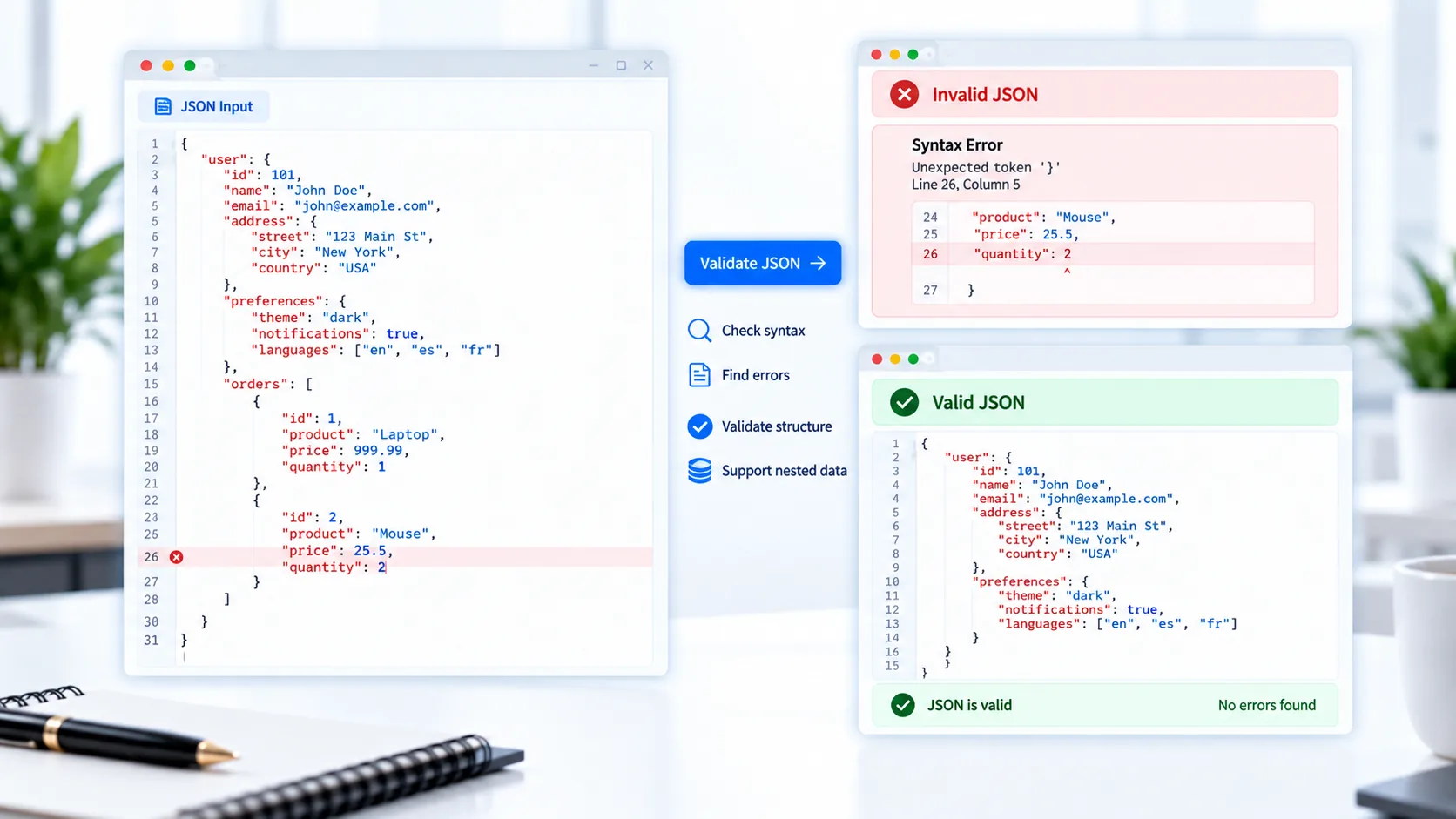
Validate JSON Online
JSON is commonly used for APIs, configuration files, web applications, and data exchange. A small syntax mistake such as a missing comma, quotation mark, or closing bracket can make an otherwise useful JSON document invalid.
PKCapra JSON Validator helps you check JSON syntax directly in your browser.
Paste your JSON or upload a .json file, validate it, and get a clear indication of whether the JSON is valid. When an error is detected, the tool can provide useful line and column information where available.
JSON Validator
Check JSON syntax, find errors, and preview valid JSON directly in your browser.
Enter JSON and click Validate JSON.
What Is a JSON Validator?
A JSON validator checks whether a JSON document follows valid JSON syntax.
For example, this is valid JSON:
{
  "name": "PKCapra",
  "free": true
}
But removing the comma between properties can make the JSON invalid.
A validator helps identify these types of syntax problems before the JSON is used elsewhere.
How to Validate JSON
Using PKCapra JSON Validator is simple:
- Paste your JSON into the validator.
- Or upload a
.jsonfile. - Click the validation option.
- Review the result.
- If the JSON is invalid, check the reported error information.
- Correct the JSON and validate it again.
This makes the tool useful for quickly checking JSON before using it in an application, API request, configuration file, or data workflow.
Check JSON Syntax Online
JSON has a defined syntax that uses objects, arrays, property names, strings, numbers, Boolean values, and null.
Common syntax problems include:
- Missing commas
- Missing quotation marks
- Unclosed objects
- Unclosed arrays
- Incorrect brackets
- Invalid property names
- Invalid JSON values
- Extra characters after the JSON document
A JSON validator can catch these problems before they cause issues in another application.
Find JSON Errors
When JSON is invalid, simply knowing that it is invalid may not be enough.
PKCapra JSON Validator provides an error message and, where available, line and column information to help locate the problem.
For example, if an error occurs several lines into a large JSON document, the reported location can make it easier to find the area that needs attention.
Validate a JSON File
You can validate JSON without manually copying the entire document into the tool.
Upload your .json file and let the validator inspect its syntax.
This is useful for:
- API response files
- Configuration files
- Application data
- JSON exports
- Development files
- Structured datasets
Preview Valid JSON
When the supplied JSON is valid, the tool can show a formatted preview of the data.
This gives you an additional way to inspect the structure of objects and arrays after validation.
For more information about JavaScript’s JSON handling, see the MDN JSON Reference.
Validate Nested JSON
Real-world JSON often contains nested objects and arrays.
For example:
{
  "user": {
    "name": "Ali",
    "address": {
      "city": "Dubai"
    }
  }
}
A validator checks the syntax of the complete structure, including nested objects and arrays.
This is particularly useful when inspecting API responses or configuration files containing many levels of data.
JSON Validator for API Responses
APIs frequently return JSON data. If an API response has been copied into a text editor or saved as a file, validating the structure can help confirm that the content is syntactically valid JSON.
You can validate the response before moving on to another processing step.
If you need to make valid JSON easier to read afterward, use the JSON Formatter.
Validate JSON Before Converting It
Validation is also useful before converting JSON into another format.
For example, you can:
JSON → Validate → JSON to Excel
PKCapra’s JSON to Excel Converter can then be used when the JSON data needs to be converted into a spreadsheet.
For the reverse workflow, you can use the Excel to JSON Converter.
Process JSON in Your Browser
PKCapra JSON Validator is designed for browser-side processing. Your JSON is processed directly in your browser rather than requiring the data to be uploaded to a remote processing server.
This can be useful when checking configuration files, API responses, or other JSON data that you prefer to keep on your device.
JSON Validation Without Installing Software
You don’t need to install a separate JSON application just to check whether a JSON document is syntactically valid.
PKCapra provides a focused online workflow for checking JSON files and pasted JSON directly from your browser.
After fixing any reported syntax issue, validate the JSON again to confirm that the document is valid.
Features
JSON Syntax Validation
Check whether pasted or uploaded JSON follows valid syntax.
Error Information
Receive readable validation errors with line and column information where available.
JSON File Upload
Upload .json files for validation.
Paste JSON
Paste JSON directly into the validator.
Formatted Preview
Inspect valid JSON in a readable structure.
Nested Data Support
Validate JSON containing nested objects and arrays.
Sample JSON
Load sample valid and invalid JSON for testing.
Copy & Download
Copy or download valid JSON after validation.
Browser-Based Processing
Process JSON directly in your browser.
Mobile-Friendly
Use the validator on desktop, tablet, or mobile.
FAQ
What is a JSON validator?
A JSON validator checks whether JSON follows the required syntax and identifies errors when the document is invalid.
How can I validate JSON online?
Paste your JSON or upload a .json file into PKCapra JSON Validator and run the validation.
What are common JSON syntax errors?
Common problems include missing commas, quotation marks, brackets, braces, or invalid JSON values.
Can I validate a JSON file?
Yes. You can upload a .json file directly to the validator.
Does the validator show where an error occurs?
Yes. The tool can provide line and column information where available.
Can it validate nested JSON?
Yes. JSON containing nested objects and arrays can be validated.
What should I do after validating JSON?
If the JSON is valid, you can use it as needed. If it is invalid, correct the reported syntax problem and validate it again.
Can I format valid JSON?
Yes. After validation, you can use the JSON Formatter to pretty-print or minify JSON.
Is the JSON uploaded to a server?
The tool is designed for browser-side processing, so the JSON is processed locally in your browser.
Is the JSON Validator free?
Yes. PKCapra provides the JSON Validator as a free online tool.