
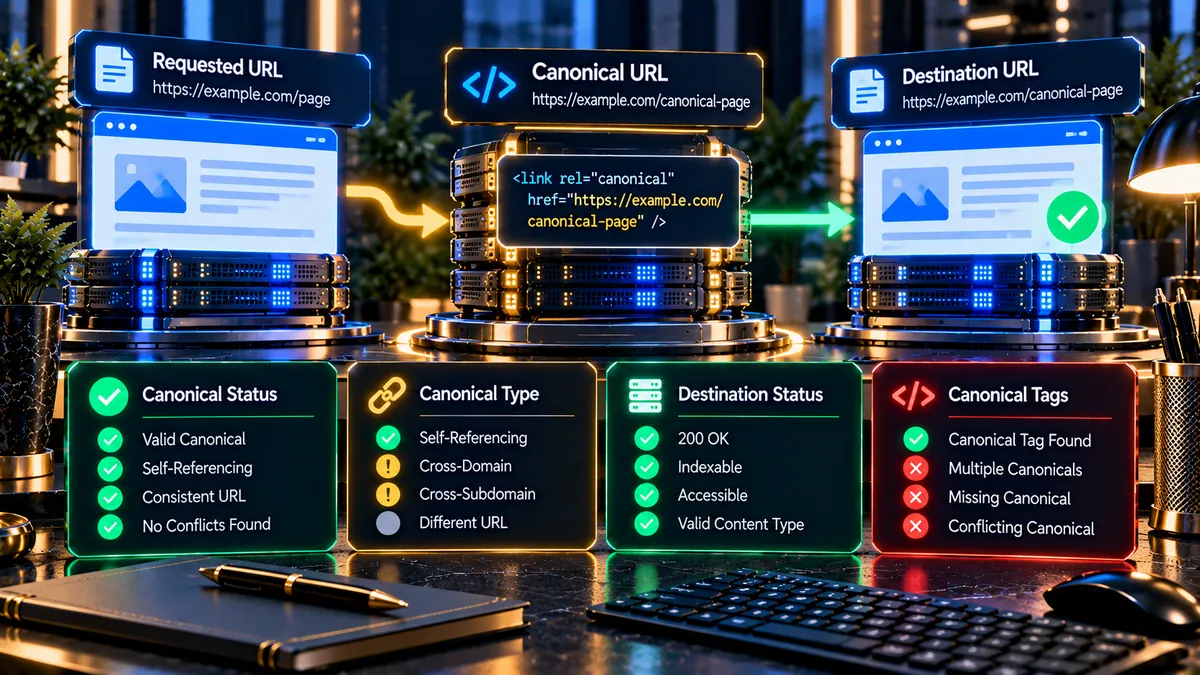
Check canonical URLs before they create duplicate or conflicting SEO signals. PKCapra’s free Canonical Checker analyzes canonical tags, identifies the declared canonical URL, checks the destination response, and highlights important canonical issues.
Canonical Checker
Inspect canonical tags, compare the canonical URL with the requested page, and validate the destination response.
The report reflects the HTML and HTTP responses returned to the local WordPress server at scan time. Redirects are not followed during canonical destination validation.
Only submit public URLs that you are authorized to analyze. The checker uses native WordPress HTTP transport or local cURL and does not use a paid proxy, premium SEO API, or VPS.
What Is a Canonical Checker?
A Canonical Checker analyzes the canonical information of a webpage and shows which URL the page declares as its preferred version.
Canonical tags help search engines understand which URL should represent a page when multiple URLs contain the same or substantially similar content.
PKCapra checks the canonical signal, compares it with the requested URL, and evaluates the canonical destination so you can identify configuration problems quickly.
How Does Canonical URL Checking Work?
The checker starts with the URL you enter and analyzes the page HTML for canonical information.
PKCapra identifies the canonical href, counts the canonical tags, determines the canonical relationship, and checks the destination response.
The dashboard then presents the results through clear status cards, URL details, a canonical signal flow, and priority findings.
Canonical Status Detection
The Canonical Status card shows whether a canonical tag was detected on the analyzed page.
Canonical Present
A Present result means the checker detected a canonical tag in the page HTML.
Canonical Missing
A Missing result means the checker did not detect a canonical tag during the analysis. Review the page configuration when a canonical signal is expected.
Self-Referential Canonical Detection
A self-referential canonical points back to the same URL being analyzed.
For example:
Requested URL → Same Canonical URL
This relationship is shown by PKCapra as Self-Referential when the canonical URL matches the requested URL.
Canonical URL Details
The Canonical URL Details section provides the URLs and response information discovered during the audit.
Requested URL
The Requested URL is the webpage you entered into the Canonical Checker.
Canonical href
The Canonical href is the URL declared by the page through its canonical tag.
Resolved Canonical
The Resolved Canonical represents the canonical URL after URL resolution and normalization performed during the analysis.
Destination HTTP Status
The Destination HTTP Status shows the response returned by the canonical destination.
Canonical Destination Status
The canonical destination should be reviewed together with the canonical URL itself. A valid-looking canonical URL can still lead to an unexpected HTTP response.
HTTP 200 OK
A 200 OK response means the canonical destination returned a successful HTTP response.
Redirect Response
A redirect response means the canonical destination sends the request somewhere else. Review the final destination and canonical configuration during a technical SEO audit.
404 or 500 Error
A 404 or 500 response indicates a problem with the canonical destination and should be investigated before relying on that URL as the preferred page.
Canonical Tag Detection
PKCapra counts the canonical tags detected in the analyzed HTML.
One Canonical Tag
A single detected canonical tag provides one clear canonical signal for the page.
Multiple Canonical Tags
Multiple canonical tags can create conflicting signals. Review the page source and identify which system or plugin is generating each declaration.
Canonical Verdict
The Canonical Verdict summarizes the main result of the analysis and combines the important canonical signals into an easy-to-understand dashboard result.
Canonical Valid
A valid result indicates that the detected canonical configuration satisfies the checks performed by the tool.
Canonical Issues
An issue result indicates that one or more canonical signals require attention, such as a missing tag, multiple tags, or an inaccessible destination.
Visual Canonical Signal
The Canonical Signal section presents the relationship between the requested URL, canonical URL, and destination response.
Requested URL → Canonical → Destination
This visual flow makes it easier to understand where the canonical signal points and whether the destination responds correctly.
Healthy signals are shown with green status indicators, standard review conditions use yellow indicators, and serious configuration or destination problems use red indicators.
Why Canonical URLs Matter for SEO
Websites can expose the same content through multiple URL variations. Parameters, tracking values, filters, duplicate paths, and other URL variations can make it difficult to identify the preferred version.
Canonical tags provide an explicit signal about the preferred URL for a page.
A properly reviewed canonical configuration can help maintain consistent URL signals across a website.
For a broader technical review, use the Technical SEO Checker to examine additional technical SEO signals.
Common Canonical SEO Problems
Canonical problems can appear after website migrations, URL structure changes, CMS updates, plugin changes, or template modifications.
- Missing canonical tags.
- Multiple canonical tags on one page.
- Canonical URLs pointing to the wrong page.
- Canonical URLs returning 404 errors.
- Canonical destinations returning server errors.
- Canonical URLs pointing through unnecessary redirects.
- Inconsistent HTTP and HTTPS canonical signals.
- Canonical URLs using an unintended domain or URL version.
Review the complete URL relationship before changing canonical settings on a production website.
Canonical Checker vs HTTP Status Checker
The HTTP Status Checker focuses on HTTP response codes and server responses for URLs.
The Canonical Checker focuses specifically on canonical tags, canonical relationships, canonical destinations, and related SEO signals.
Using both tools can provide a clearer picture when a canonical destination returns an unexpected response.
Canonical Checker vs Robots.txt Analyzer
The Robots.txt Analyzer focuses on robots.txt rules and crawler access directives.
The Canonical Checker focuses on the preferred URL declared by the page itself.
Both checks can be useful during technical SEO troubleshooting because crawler access and canonical signals address different parts of the crawling and indexing process.
Canonical URLs and XML Sitemaps
Canonical signals should also be reviewed alongside the URLs included in an XML sitemap.
The XML Sitemap Analyzer can help inspect sitemap URLs during a broader technical SEO review.
Comparing sitemap URLs with canonical destinations can help identify inconsistent URL signals that deserve further investigation.
Canonical URLs and Meta Tags
Canonical information is one part of a webpage’s HTML metadata.
The Meta Tags Analyzer can be used to review additional page metadata alongside canonical information.
Reviewing these signals together provides a more complete view of how the page communicates information to search engines.
How to Use the Canonical Checker
1. Enter a URL
Enter the complete public HTTP or HTTPS URL that you want to analyze.
2. Start the Analysis
Click Check Canonical and allow PKCapra to analyze the page.
3. Review the Canonical Verdict
Start with the main verdict, then review the Canonical Status, Canonical Type, Destination Status, and Canonical Tags cards.
4. Inspect the URL Details
Compare the Requested URL, Canonical href, Resolved Canonical, and Destination HTTP status.
5. Review the Canonical Signal
Follow the visual path from the requested URL to the canonical destination.
6. Review Priority Findings
Check the findings section for successful checks and signals that require attention.
7. Save the Audit
Use Copy Canonical JSON when you need the structured audit data, or use Download PDF Report to save a visual copy of the complete canonical analysis.
When Should You Check Canonical URLs?
Run a canonical check after launching a new website or changing the URL structure.
It is also useful after website migrations, HTTPS changes, domain changes, CMS updates, and major SEO plugin configuration changes.
Use the checker whenever search engines appear to be selecting an unexpected URL as the preferred version of a page.
For a broader website review, use the Full SEO Site Audit.
How to Fix Canonical Issues
Start with the exact issue identified by the audit. Check the page source and locate the canonical declaration.
If the canonical is missing, review the website or SEO plugin configuration responsible for generating canonical tags.
If multiple canonical tags exist, identify the systems generating them and remove the conflicting declaration.
If the canonical points to the wrong URL, update the configuration so the preferred page is declared correctly.
If the canonical destination returns an error, fix the destination before using it as the preferred URL.
Run the Canonical Checker again after making changes to confirm the updated configuration.
Canonical URLs After Website Migration
Website migrations can change domains, URL paths, protocols, or page structures.
Old canonical declarations can remain in templates or plugins after the migration and may continue pointing toward previous URLs.
Check important pages after migration and confirm that canonical URLs point to the intended new versions.
A wider migration review can also include HTTP responses, redirects, sitemap URLs, and crawlability signals.
Use the SEO Website Tools collection to access additional technical SEO utilities.
Canonical URLs and Technical SEO Audits
Canonical analysis should form part of a wider technical SEO process rather than being reviewed in isolation.
A technical audit can also examine HTTP status codes, crawlability, robots directives, XML sitemaps, metadata, redirects, and other website signals.
The Technical SEO Checker can help with broader technical checks, while the Canonical Checker provides focused canonical analysis.
For a complete site-level review, use the Full SEO Site Audit.
Privacy and Processing
Only submit public URLs that you are authorized to analyze.
Review the audit results carefully before changing canonical configurations on a production website.
Canonical analysis should be treated as a technical diagnostic rather than a replacement for reviewing the actual website configuration and source code.
Frequently Asked Questions
What is a canonical URL?
A canonical URL is the preferred URL that a webpage declares for itself when multiple URL versions may represent the same or similar content.
What is a canonical tag?
A canonical tag is an HTML link element that communicates a preferred URL for a webpage.
What does Self-Referential mean?
Self-Referential means the canonical URL points back to the same URL being analyzed.
What does Canonical Missing mean?
It means the checker did not detect a canonical tag in the analyzed page HTML.
What does HTTP 200 OK mean for a canonical URL?
HTTP 200 OK means the canonical destination returned a successful HTTP response.
Why are multiple canonical tags a problem?
Multiple canonical tags can create conflicting signals because the page may communicate more than one preferred URL.
Can a canonical URL return a 404 error?
Yes. A canonical destination can return a 404 response. Such a configuration should be reviewed because the preferred URL is not successfully serving the expected page.
Should the canonical URL redirect?
A canonical URL can redirect, but the configuration should be reviewed to determine whether the canonical should point directly to the preferred final destination.
How can I check a canonical URL?
Enter the webpage URL into PKCapra’s Canonical Checker and click Check Canonical. The tool will display the detected canonical information and related destination signals.
Can I download the canonical audit?
Yes. The Canonical Checker provides a Download PDF Report option for saving the completed visual audit.
Can I copy the canonical audit data?
Yes. Use the Copy Canonical JSON option to copy the structured canonical audit data.
Is the Canonical Checker useful for technical SEO?
Yes. Canonical configuration is an important technical SEO signal, especially when websites contain multiple URL versions or undergo migrations and structural changes.
Final Thoughts
Canonical URLs help websites communicate their preferred URL signals to search engines. Missing, conflicting, incorrect, or inaccessible canonical destinations can make technical SEO troubleshooting more difficult.
Use PKCapra’s Canonical Checker to inspect canonical tags, compare requested and canonical URLs, check destination responses, and identify important canonical signals from one clear dashboard.
After fixing an issue, run the checker again and confirm that the canonical configuration now matches the intended page.