
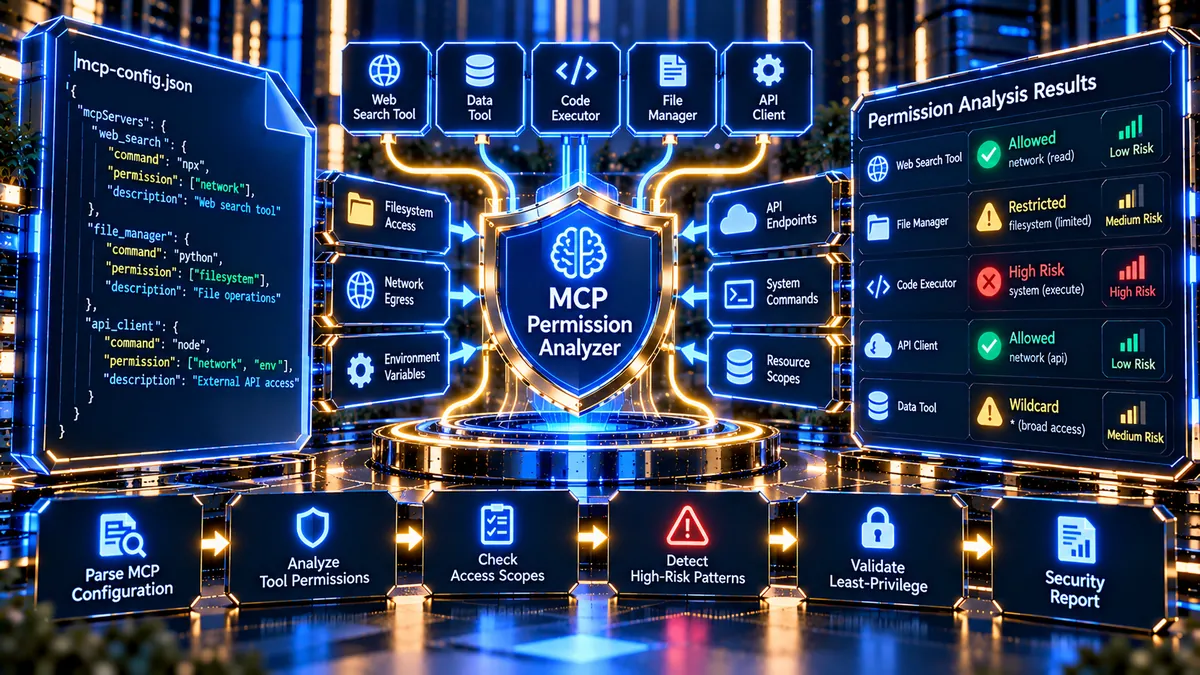
MCP Tool Permission Analyzer helps developers, AI platform teams, security engineers, and technical architects inspect MCP-style tool configurations for excessive permissions, unsafe execution capabilities, wildcard scopes, filesystem access, network exposure, missing enforcement controls, and other security-sensitive configuration patterns. PKCapra’s free MCP Tool Permission Analyzer provides a structured permission audit without requiring premium API keys, paid proxies, or VPS infrastructure.
MCP Tool Permission Analyzer
Audit MCP-style tool manifests and permission configurations for least-privilege scope, wildcard access, execution paths, filesystem exposure, network egress and policy-bound enforcement.
Permission Architecture Blueprint
Each discovered tool or permission-bearing node is mapped to its declared scope, risk tier, bound enforcement and security verdict.
| # | Tool / Endpoint Node | Declared Permission String | Risk Assessment | Bound Enforcement | Security Compliance |
|---|
Capability Token Sniffer & Security Findings
Recursive inspection looks for shell execution, root escalation, wildcard scopes, filesystem exposure, network egress, secret access and enforcement bypass signals.
Developer Diagnostics
0 linesThe analyzer uses deterministic structural and capability-token heuristics. It is a configuration audit utility, not a formal certification of an MCP implementation or runtime authorization system.
What Is an MCP Tool Permission Analyzer?
An MCP Tool Permission Analyzer is a security-focused utility for reviewing the permissions and capability boundaries declared by MCP-style tool configurations.
Modern AI systems can connect language models and agents to external tools, APIs, files, databases, command execution environments, and other resources. These integrations can provide powerful functionality, but they also introduce permission and capability risks when access boundaries are too broad.
A configuration that grants unrestricted filesystem access, shell execution, broad network access, wildcard permissions, or bypassed enforcement controls deserves additional security review.
PKCapra’s MCP Tool Permission Analyzer examines configuration data and organizes potentially dangerous capabilities into a structured security report.
The tool is designed for configuration review, security auditing, development QA, and permission-boundary analysis.
Why Analyze MCP Tool Permissions?
AI tool integrations should follow the principle of least privilege whenever practical.
A tool should receive only the capabilities required for its intended operation.
Overly broad permissions can increase the potential impact of a compromised integration, malicious input, configuration mistake, or unauthorized tool invocation.
Permission analysis can help identify:
- Wildcard permissions
- Broad authorization scopes
- Shell execution capabilities
- Root or sudo execution strings
- Filesystem access
- Unrestricted filesystem paths
- Network egress permissions
- Missing enforcement controls
- Bypassed permission enforcement
- High-risk tool declarations
- Suspicious command execution patterns
- Secret and credential exposure patterns
- Malformed configuration structures
The analyzer does not replace a complete security assessment. Instead, it provides a focused first-pass inspection of the configuration and its declared capabilities.
MCP Permission Architecture Analysis
The analyzer examines the permission architecture represented by the supplied configuration.
It extracts relevant fields and attempts to understand how access is distributed between the server, tools, scopes, and enforcement controls.
Server and Tool Name Extraction
The analyzer attempts to identify the configured server or tool name.
This makes the resulting report easier to understand when a configuration contains multiple tool nodes.
The extracted information can include:
- Server name
- Tool name
- Endpoint or node identifier
- Permission declaration
- Risk tier
- Enforcement state
Declared Permission Scopes
Permission scopes describe what a tool or integration is intended to access.
Examples can include:
read:customersread:orderswrite:ordersexecute:reports
The analyzer records discovered permission strings and evaluates them for potentially broad or sensitive patterns.
Risk Multiplier Tier
Configurations may declare a risk level such as:
- Low
- Medium
- High
The analyzer extracts available risk indicators and combines them with detected capability patterns.
A declared low-risk value does not automatically make a configuration safe. Actual capabilities can still require review.
Bound Enforcement Status
Permission enforcement is an important part of an authorization architecture.
The analyzer identifies enforcement indicators such as:
ENFORCEDBYPASSED- Missing or undeclared enforcement
A bypassed enforcement state can increase the severity of a configuration finding when combined with sensitive capabilities.
MCP Protocol Security Violation Detection
The analyzer looks for configuration patterns associated with high-risk execution capabilities.
Root and Sudo Execution
Root-level or sudo-based execution can provide substantially broader system access than a restricted application account.
The analyzer looks for indicators such as:
rootsudo- privileged execution
- unrestricted administrative commands
When these patterns occur alongside execution permissions, the configuration can receive a high-risk security finding.
Shell Execution Detection
Shell execution is one of the most sensitive capability patterns in an AI tool environment.
The analyzer looks for command-oriented fields and strings associated with:
- Shell execution
- Bash
- Sh
- Command interpreters
- System command execution
- Process execution
A tool that genuinely requires command execution should have tightly defined boundaries and appropriate authorization controls.
Code Execution Indicators
The analyzer can identify suspicious configuration patterns associated with dynamic execution.
Examples include strings associated with:
eval- executable command pipelines
- dynamic command invocation
- unrestricted execution handlers
Detection of a string does not by itself prove that an exploit exists. It identifies a configuration pattern that deserves security review.
Filesystem Permission Analysis
Filesystem access can expose sensitive application and server resources.
The analyzer checks for filesystem-related capability declarations.
Filesystem Access Detection
The tool identifies configuration indicators suggesting that a tool can access local files.
Examples include:
- Filesystem access enabled
- File read capabilities
- File write capabilities
- Directory access
- Local path permissions
Root Path Detection
A configuration referencing / or similarly unrestricted filesystem roots can represent a broad access boundary.
Such configurations should be reviewed carefully because a root filesystem scope is substantially broader than a narrowly defined application directory.
Path Traversal Indicators
The analyzer also looks for suspicious path patterns such as:
../- unrestricted relative paths
- broad directory traversal patterns
- unescaped path references
These findings are intended as security signals for further investigation.
Network Egress Analysis
AI tools may require access to external APIs or services.
Network access should ideally be restricted to the destinations required by the tool.
Restricted API Access
A configuration that explicitly limits network access to known destinations provides a clearer security boundary.
For example, a configuration may declare an allowed API destination rather than permitting arbitrary outbound connections.
Broad Network Access
Broad or unrestricted network egress deserves additional review.
Potentially broad patterns can include:
*- unrestricted hosts
- unrestricted domains
- unrestricted outbound network access
The analyzer can flag these conditions as potential over-privilege.
Wildcard Permission Detection
Wildcard permissions can simplify configuration, but they can also create unnecessarily broad access.
The analyzer specifically looks for wildcard tokens such as:
*
Critical Scope Wildcards
A wildcard inside a sensitive capability boundary can be particularly important.
Examples include:
- Filesystem permissions
- API execution permissions
- Administrative scopes
- Command execution permissions
- Network destinations
A wildcard finding does not automatically prove that the system is vulnerable. It indicates that the declared permission boundary is broader than a narrowly scoped alternative.
Wildcard Optimization Warning
When the configuration is otherwise structurally valid but contains broad wildcard permissions, the analyzer can classify the condition as an optimization or security-hardening warning.
The recommended principle is simple:
Use the narrowest permission scope that satisfies the tool’s actual requirements.
Recursive Permission and Structure Inspection
MCP-style configurations can contain nested objects and arrays.
A simple top-level scan can miss important permissions buried inside nested structures.
PKCapra’s analyzer therefore performs recursive inspection of supported configuration structures.
The recursive engine can inspect:
- Objects
- Arrays
- Nested tool definitions
- Permission arrays
- Scope arrays
- Configuration properties
- Endpoint definitions
- Capability declarations
This helps identify security-sensitive strings even when they are not located at the root of the configuration.
Permission Scope Counting
The analyzer counts declared permissions and authorization scopes where they can be identified.
This can help provide a quick overview of configuration complexity.
Useful metrics can include:
- Total tool nodes
- Total permission declarations
- Total scope declarations
- Wildcard findings
- High-risk findings
- Enforcement failures
- Filesystem findings
- Network findings
- Execution findings
These metrics help security teams understand the configuration before reviewing individual nodes.
Permission Architecture Blueprint
The dashboard provides a high-level view of the configuration’s permission architecture.
Valid Configuration
A valid configuration should have:
- Parseable configuration data
- Recognizable structural elements
- Clearly declared capabilities
- Understandable permission scopes
- Defined enforcement states
- No obvious critical execution violations
Malformed Configuration
Malformed JSON or structurally unusable configuration should be identified separately from security findings.
A syntax failure means the configuration cannot be reliably analyzed.
This distinction is important because a parser failure should not be interpreted as proof that the underlying MCP system is secure or insecure.
Microscopic Syntax Diagnostics
When JSON parsing fails, the analyzer can expose parser-related diagnostic information where available.
This can help developers locate the approximate area requiring correction.
Security Compliance Verdict
The analyzer uses a simple visual security classification.
SAFE
A SAFE result indicates that the inspected configuration did not trigger the analyzer’s defined critical security patterns and that the available permission structure appears appropriately constrained.
SAFE does not mean that the entire MCP deployment has been penetration-tested or guaranteed secure.
OPTIMIZE
OPTIMIZE indicates that the configuration is structurally usable but contains permission patterns that could be tightened.
Examples include:
- Wildcard scopes
- Broad network access
- Redundant permission declarations
- Missing explicit enforcement indicators
- Overly broad capability boundaries
VULNERABLE
VULNERABLE indicates that the analyzer detected one or more high-risk configuration patterns.
Potential examples include:
- Root execution
- Sudo execution
- Shell execution
- Critical wildcard permissions
- Bypassed enforcement
- Unrestricted filesystem access
- Suspicious command execution patterns
- Malformed configuration combined with critical security indicators
The verdict represents the analyzer’s rule-based findings, not a complete security certification.
Visual Security Status System
The dashboard uses green, yellow, and red states to make findings easier to interpret.
Green — Restricted and Compliant
Green indicates that the tested permission condition is appropriately constrained according to the analyzer’s rules.
Examples include:
- Restricted read scope
- Explicit enforcement
- Disabled filesystem access
- Limited network destinations
- No critical wildcard
Yellow — Overly Broad or Requires Review
Yellow indicates that a configuration may function correctly but has a broader-than-necessary security boundary.
Examples include:
- Wildcard scope
- Broad API destination
- Redundant permissions
- Missing explicit enforcement information
Red — Critical Security Finding
Red indicates a high-risk configuration pattern.
Examples include:
- Root or sudo execution
- Shell command execution
- Bypassed enforcement
- Unrestricted filesystem access
- Critical execution wildcard
- Malformed configuration that prevents safe interpretation
Tool and Endpoint Permission Table
The analyzer provides a structured data grid for individual nodes.
The table can include:
| Field | Purpose |
|---|---|
| Tool / Endpoint Node | Identifies the tool or capability |
| Declared Permission | Shows the detected authorization string |
| Risk Level | Shows low, medium, or high risk |
| Enforcement | Shows enforcement state |
| Security Verdict | Shows the resulting security status |
This makes it easier to identify which individual capability requires attention.
Access Connectivity Status
Remote configuration analysis requires the target resource to be reachable.
The analyzer provides a connectivity status for the requested configuration URL.
The connectivity layer can report conditions such as:
- Successful retrieval
- HTTP failure
- Connection failure
- Invalid URL
- Unsupported resource
- Access restriction
The result should be interpreted separately from the permission analysis.
A configuration that cannot be retrieved cannot be fully audited.
Remote Configuration Security
Public URL analysis introduces its own security requirements.
A public WordPress tool should not blindly request arbitrary internal network resources.
PKCapra’s analyzer applies URL and host validation designed to reduce SSRF exposure.
Public Host Protection
The analyzer can reject or restrict destinations associated with local or private network targets.
This is important for a publicly accessible WordPress security utility.
Controlled Remote Requests
Remote configuration retrieval should be performed with controlled request behavior.
The analyzer is designed to avoid unnecessary request chaining and excessive resource consumption.
JSON Configuration Analysis
JSON is one of the easiest formats to process reliably in PHP.
The analyzer attempts to parse JSON configurations using native PHP functionality.
It can then recursively inspect the resulting arrays and objects.
Valid JSON
Valid JSON can be analyzed for:
- Names
- Scopes
- Permissions
- Risk levels
- Enforcement
- Filesystem capabilities
- Network capabilities
- Execution capabilities
Invalid JSON
Malformed JSON should result in a configuration parsing failure rather than a misleading security verdict.
The parser diagnostic should be shown where available.
YAML Configuration Analysis
Some MCP-related configuration workflows may use YAML.
The analyzer can inspect supported YAML-style configuration structures where its safe parser path can interpret the submitted configuration.
YAML support should be considered subject to the parser capabilities available in the WordPress hosting environment.
When a YAML parser is unavailable or the input cannot be safely interpreted, the tool should report the limitation rather than silently converting an uncertain configuration into a security verdict.
Capability Token Sniffer
The analyzer uses capability-oriented keyword and token detection to identify security-sensitive configuration patterns.
Potential indicators include:
rootsudoshellbashshexecexecutecommandevalfilesystemfilewritenetworkegress*bypassdisabled
Token detection is a first-pass security heuristic.
A detected token does not automatically prove exploitability.
The surrounding configuration and declared permission boundary should always be reviewed.
Recursive Array Security Checks
Nested configuration structures can contain security-sensitive values at any depth.
The recursive checker walks supported nested arrays and objects and evaluates relevant keys and values.
This helps detect patterns such as:
- Nested shell commands
- Nested wildcard scopes
- Nested filesystem paths
- Nested network permissions
- Nested enforcement bypasses
- Nested high-risk declarations
Recursive inspection is especially useful when configurations are generated by frameworks or contain multiple tool definitions.
Memory-Safe Analysis
Public security tools need resource controls.
Very large configuration files or deeply nested structures can consume excessive server resources.
PKCapra’s analyzer uses practical processing boundaries for:
- Input size
- Recursion depth
- Node count
- Permission count
- Scope count
- Output rows
- Execution time
These limits help reduce the risk of a single analysis request consuming disproportionate WordPress resources.
Async Safe Execution
The analyzer uses a WordPress AJAX workflow for remote analysis.
The frontend sends the request asynchronously so that the interface remains responsive while the server processes the configuration.
The AJAX layer uses:
- WordPress nonce validation
- Sanitized request parameters
- Controlled input handling
- Safe response formatting
- Server-side boundaries
The frontend then renders the returned security analysis into the dedicated analyzer dashboard.
Copy JSON Report
Security teams often need machine-readable findings.
The Copy JSON feature allows the current analysis result to be copied for:
- Developer tickets
- Security reviews
- Internal documentation
- QA records
- Configuration audits
- Incident investigation
- AI infrastructure documentation
The copied JSON represents the current analysis rather than requiring the user to manually transcribe individual findings.
PDF Security Report
The analyzer also provides a client-side PDF reporting workflow.
A PDF report can be useful when security findings need to be shared with:
- Developers
- Technical SEO teams
- AI platform engineers
- Security consultants
- Project managers
- Clients
- Internal audit teams
The report is generated on the client side using the configured browser-side reporting libraries.
No premium PDF API is required.
How to Use the MCP Tool Permission Analyzer
Step 1: Open the Tool
Open the PKCapra MCP Tool Permission Analyzer page.
The dashboard provides the URL-based configuration analysis interface.
Step 2: Enter the Configuration URL
Enter the publicly accessible JSON or supported configuration URL.
The URL should point directly to the configuration resource rather than a normal HTML webpage.
Step 3: Start the Analysis
Run the permission analysis.
The tool attempts to retrieve and inspect the configuration within its security and processing boundaries.
Step 4: Review Connectivity
Check whether the configuration was successfully retrieved.
If the target returns an HTTP error, resolve the accessibility problem before interpreting deeper configuration findings.
Step 5: Review Configuration Structure
Check whether the configuration parsed successfully.
Malformed JSON or unsupported configuration syntax should be corrected before relying on deeper results.
Step 6: Review Permission Findings
Review the declared scopes and permission strings.
Pay particular attention to:
- Wildcards
- Filesystem access
- Network egress
- Execution permissions
- Administrative permissions
Step 7: Review Risk Findings
Review each tool or endpoint node individually.
Identify any high-risk capability that requires tighter controls.
Step 8: Review Enforcement
Check whether security boundaries are explicitly enforced.
A BYPASSED or missing enforcement indicator should be investigated.
Step 9: Review the Overall Verdict
Review whether the analyzer reports:
- SAFE
- OPTIMIZE
- VULNERABLE
Then inspect the underlying findings before making configuration changes.
Example of a Restricted Permission Architecture
A narrowly scoped tool may only need read access to a specific resource.
For example, a customer lookup tool may require:
- Read-only customer access
- No filesystem access
- No shell execution
- No administrative permission
- Restricted API egress
- Explicit enforcement
This is generally easier to reason about than a configuration that grants broad access across multiple unrelated resources.
Example of an Over-Privileged Configuration
A configuration may declare:
*scope- Filesystem access to
/ - Broad network egress
- Shell execution
sudo- Bypassed enforcement
Such a configuration contains multiple signals requiring immediate security review.
The analyzer can surface these signals individually rather than hiding them behind one generic warning.
Least Privilege for AI Tool Integrations
Least privilege is particularly important when an AI system can invoke tools.
A tool should ideally receive only the permissions required to complete its intended task.
For example:
A reporting tool may need read-only database access.
It may not need:
- Shell execution
- Filesystem write access
- Root privileges
- Unrestricted network access
- Administrative permissions
Reducing unnecessary capabilities can reduce the potential impact of an unexpected tool invocation or compromised integration.
MCP Permission Review During Development
Permission analysis should begin during development rather than only after deployment.
Developers can use the analyzer while designing:
- Tool schemas
- Authorization boundaries
- API integrations
- Filesystem integrations
- Agent capabilities
- Network access policies
Running the analyzer during development can help identify unnecessarily broad permissions before they become embedded into production configuration.
MCP Security Review During Deployment
Deployment changes can alter permission boundaries.
Validate configurations after:
- Server migrations
- MCP framework changes
- Tool additions
- Permission changes
- API endpoint changes
- Filesystem changes
- Security policy changes
- Environment configuration changes
A previously safe configuration may require another review after capabilities are expanded.
MCP Tool Permission Analyzer vs Generic JSON Validator
A generic JSON validator checks whether JSON is syntactically valid.
That is useful, but syntax validation alone does not answer security questions.
The MCP Tool Permission Analyzer goes further by inspecting the meaning of security-sensitive configuration patterns.
It can examine:
- Permission scopes
- Capability tokens
- Wildcards
- Filesystem access
- Network access
- Execution capabilities
- Enforcement state
- Risk declarations
Therefore, valid JSON does not automatically mean a configuration is safely scoped.
MCP Tool Permission Analyzer vs General Security Scanner
A general website security scanner may focus on:
- HTTP headers
- TLS
- Software versions
- Web vulnerabilities
- Exposed services
An MCP permission analyzer focuses on the authorization model of AI tool integrations.
This makes it useful as a specialized layer within a broader application and AI security workflow.
Common MCP Permission Problems
Wildcard Scope
A wildcard permission can grant a much broader capability boundary than required.
Review whether the scope can be replaced with a specific resource permission.
Root Filesystem Access
Access to / can expose a very broad filesystem boundary.
Use a narrowly defined application directory where possible.
Shell Execution
Shell execution introduces a powerful system capability.
Review whether command execution is genuinely required and whether the command set can be restricted.
Sudo Execution
Sudo can elevate operating-system privileges.
It should receive additional security scrutiny.
Bypassed Enforcement
A BYPASSED enforcement state can undermine otherwise well-defined permission declarations.
Investigate why enforcement is bypassed and whether it is required.
Broad Network Egress
Unrestricted network access can allow a tool to communicate with destinations outside its intended integration boundary.
Prefer explicit destination controls where practical.
Missing Enforcement
If a configuration declares permissions without a clear enforcement mechanism, the authorization architecture may require further review.
Security Findings Are Heuristics
The analyzer is a rule-based configuration inspection tool.
A detected keyword does not automatically mean that a production vulnerability exists.
For example, a tool may legitimately require command execution for its intended purpose.
The correct security question is whether the capability is:
- Necessary
- Explicitly authorized
- Narrowly scoped
- Properly enforced
- Appropriately isolated
Use the findings as a technical review aid rather than as a replacement for a complete security assessment.
Who Should Use the MCP Tool Permission Analyzer?
The tool is designed for:
- AI application developers
- MCP developers
- AI platform engineers
- Security engineers
- Application security teams
- DevSecOps teams
- API developers
- Technical architects
- WordPress developers
- Enterprise AI teams
- Security consultants
- Technical auditors
It can also be useful for developers experimenting with MCP-style tool architectures who want a quick permission review before deployment.
Why Use a Free MCP Permission Analyzer?
Security analysis tools can become expensive when they depend on paid APIs, cloud scanners, proxies, or specialized infrastructure.
PKCapra’s MCP Tool Permission Analyzer is designed to run directly through the WordPress environment using native processing and browser-side reporting.
The workflow does not require:
- Premium security API keys
- Paid proxy services
- Dedicated VPS infrastructure
- External AI APIs
- Subscription-based scanning services
This makes it suitable for development teams that need an accessible first-pass configuration review.
MCP Security Audit Workflow
A practical AI tool security workflow can include several stages.
Stage 1: Define the Tool Purpose
Document exactly what the MCP tool needs to do.
Stage 2: Define Required Permissions
List only the permissions required for that purpose.
Stage 3: Avoid Wildcards
Replace broad wildcard permissions with explicit scopes whenever practical.
Stage 4: Restrict Filesystem Access
Avoid unrestricted filesystem access.
Stage 5: Restrict Network Access
Define the smallest practical network destination boundary.
Stage 6: Review Execution Capabilities
Investigate shell, command, code, root, and sudo capabilities.
Stage 7: Enforce Authorization
Ensure that declared permissions are actually enforced by the surrounding system.
Stage 8: Run the Analyzer
Submit the configuration to PKCapra’s MCP Tool Permission Analyzer.
Stage 9: Review Findings
Investigate every yellow and red finding.
Stage 10: Re-Test After Changes
Run the analyzer again after modifying the configuration.
Combining MCP Security With Technical SEO Auditing
AI-enabled websites increasingly combine traditional web infrastructure with AI tools and automation.
A broader website technical workflow can therefore include both traditional SEO checks and AI infrastructure reviews.
For example, the Technical SEO Checker can be used for technical website analysis, while the MCP Tool Permission Analyzer can be used to inspect AI tool permission configurations.
The HTTP Header Security Analyzer can provide another security-oriented layer for website HTTP configuration.
For broader site analysis, the Full SEO Site Audit can be used alongside specialized technical tools.
MCP Configuration Security Checklist
Use this checklist when reviewing an MCP-style tool configuration:
- Configuration URL is accessible
- Configuration parses successfully
- Tool/server names are identifiable
- Permission scopes are explicit
- Wildcards are minimized
- Filesystem access is restricted
- Root filesystem access is avoided
- Network egress is restricted
- Shell execution is reviewed
- Command execution is reviewed
- Root/sudo execution is reviewed
- Dynamic execution indicators are reviewed
- Enforcement is explicitly defined
- Enforcement is not bypassed
- High-risk tools are documented
- Recursive permissions are reviewed
- Sensitive credential patterns are investigated
- Configuration size is reasonable
- Remote retrieval is successful
- Final findings are reviewed after every configuration change
Frequently Asked Questions
What is an MCP Tool Permission Analyzer?
It is a security-focused tool that examines MCP-style tool configuration data for permission scope, capability, execution, filesystem, network, wildcard, and enforcement risks.
Does the tool require an MCP API key?
No. The PKCapra analyzer is designed as a configuration inspection utility and does not require a premium MCP API key.
Does it require a VPS?
No. The tool is designed to operate through the WordPress environment.
Can it analyze JSON?
Yes. JSON configuration is a primary input format for the analyzer.
Can it analyze YAML?
Supported YAML-style configurations can be inspected where the hosting environment provides an appropriate parser path.
What does a wildcard permission mean?
A wildcard such as * represents a broad permission pattern.
Its exact meaning depends on the configuration system, but wildcard authorization should generally receive additional review when used around sensitive capabilities.
Does a wildcard automatically mean the system is vulnerable?
No.
The analyzer treats broad wildcard patterns as a security-hardening signal. The actual security impact depends on how the permission is interpreted and enforced by the MCP implementation.
Why is shell execution considered high risk?
Shell execution can expose powerful operating-system capabilities.
If a tool can execute arbitrary or insufficiently restricted commands, the potential impact of misuse can be substantially greater than a narrowly scoped read-only capability.
Why is root execution dangerous?
Root privileges can provide broad operating-system access.
A tool that does not need administrative privileges should generally not receive them.
What does BYPASSED enforcement mean?
It indicates that the configuration contains an enforcement state suggesting that a declared permission boundary may be bypassed or disabled.
The surrounding implementation should be investigated.
Does SAFE mean the MCP system is completely secure?
No.
SAFE means that the analyzer did not detect the defined critical configuration patterns in the inspected data.
It is not a penetration test, code audit, or complete security certification.
Can the analyzer detect malformed JSON?
Yes.
Malformed JSON should be reported as a configuration parsing problem, with parser diagnostics where available.
Can it inspect nested permissions?
Yes.
The analyzer performs recursive inspection of supported nested arrays and objects.
Can it detect filesystem permissions?
Yes.
Filesystem-related access declarations and suspicious path patterns are included in the permission audit.
Can it detect network permissions?
Yes.
The analyzer looks for network and egress-related configuration patterns.
Can it detect shell or command execution?
Yes.
The analyzer includes capability-token detection for command and shell execution patterns.
Can I copy the analysis result?
Yes.
The Copy JSON feature is designed to provide a machine-readable representation of the current analysis.
Can I create a PDF report?
Yes.
The tool includes a client-side PDF reporting workflow for the current analysis.
Is this a replacement for a professional penetration test?
No.
It is a configuration-level security analysis tool. A complete security program may also require source-code review, threat modeling, penetration testing, runtime monitoring, infrastructure security controls, and application security testing.
Final Takeaway
AI tool integrations can expose powerful capabilities, making permission boundaries an important part of MCP security architecture.
A configuration should be reviewed for unnecessary permissions, broad wildcard scopes, filesystem access, unrestricted network egress, command execution, administrative privileges, and enforcement weaknesses.
PKCapra’s MCP Tool Permission Analyzer provides a free, structured way to inspect these configuration patterns directly from a WordPress-based tool environment.
Use it during MCP development, security reviews, configuration changes, deployment QA, and troubleshooting.
For broader website security and technical SEO analysis, combine the analyzer with other PKCapra tools such as the Technical SEO Checker, HTTP Header Security Analyzer, and Full SEO Site Audit.