
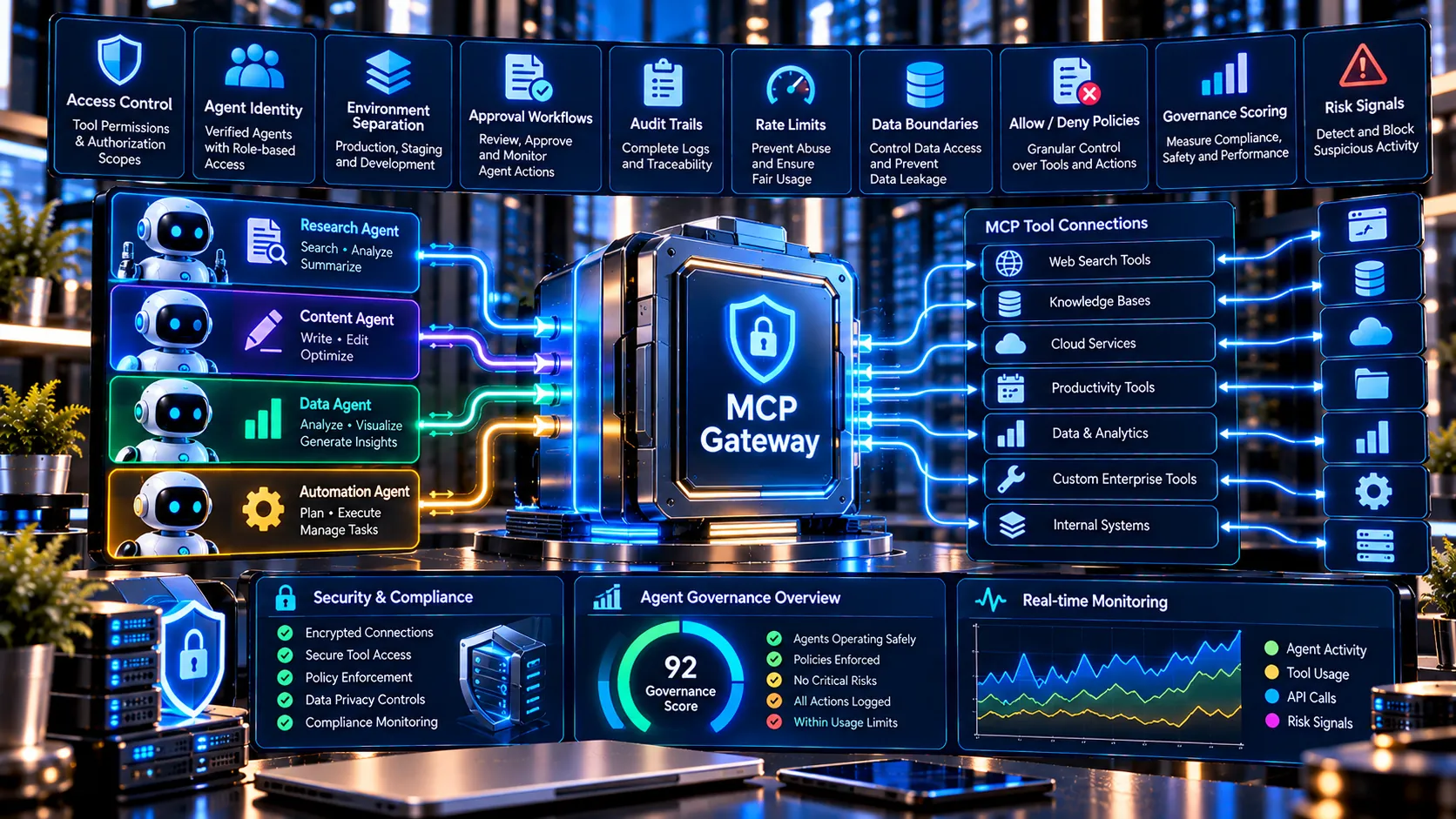
Design and review enterprise MCP governance policies for AI agents, tools, permissions, environments, approvals, audit controls, rate limits, and data boundaries with PKCapra. Upload or paste a governance configuration in JSON, analyze its control signals, identify policy gaps and high-risk areas, and generate a structured governance report.
Enterprise MCP Gateway / Agent Governance Platform
Design and review an enterprise MCP governance policy from JSON. Define agents, tools, environments, scopes, approvals, rate limits, audit requirements, and data boundaries, then generate a governance report and policy JSON. This is a browser-side policy design and validation utility; it is not a live network gateway or traffic proxy.
Governance Summary
Agent / Tool Governance Matrix
Findings & Recommendations
Normalized Policy
What Is an Enterprise MCP Gateway and Agent Governance Platform?
An Enterprise MCP Gateway / Agent Governance Platform helps organizations define and review how AI agents interact with Model Context Protocol (MCP) tools and enterprise environments.
As AI agents gain access to business systems, governance becomes important for controlling which agents can use which tools, what permissions they receive, which environments they can access, and what activities require approval or auditing.
PKCapra provides a browser-based governance analysis utility for reviewing these configuration signals in a structured way.
The platform can analyze information about:
- AI agents and their owners
- MCP tools and their risk levels
- Tool permissions and scopes
- Development, staging, and production environments
- Approval requirements
- Audit requirements
- Rate limits
- Data boundaries
- Allow and deny policies
- Sensitive permissions
- Governance gaps
- High-risk configuration signals
The analysis is designed to help teams understand their governance configuration before implementing or reviewing production controls.
How the Enterprise MCP Governance Tool Works
The PKCapra tool works with a governance or MCP gateway configuration represented as JSON.
You can paste your configuration directly into the tool or upload a compatible JSON, TXT, or Markdown file.
The workflow is:
- Provide governance configuration
Paste or upload your MCP governance configuration. - Analyze governance controls
PKCapra evaluates the defined agents, tools, policies, permissions, environments, approvals, and audit signals. - Review the governance score
The tool generates a governance score based on the configuration signals detected by its built-in checks. - Inspect agents and tools
Review the relationship between agents, owners, environments, tools, scopes, and approval requirements. - Identify governance gaps
The tool highlights missing or insufficiently defined governance controls. - Review high-risk signals
Potentially sensitive tool permissions and high-risk configuration patterns can be surfaced for further review. - Generate a structured report
Export the resulting governance analysis as structured JSON.
AI Agent Governance
AI agents can perform actions through tools, which makes permission boundaries an important part of enterprise AI governance.
A governance configuration can define which agent is responsible for an operation, which tools it can access, which scopes are permitted, and which environments are available.
For example, an organization may allow a support agent to read documentation and create support tickets while requiring additional approval before an automation agent performs production deployment operations.
PKCapra can represent these relationships through its agent and tool governance analysis.
MCP Tool Permissions and Scopes
Tool permissions define what an AI agent or application is allowed to do.
The governance configuration can include scopes such as:
docs:readtickets:readtickets:createdeployment:prod
Reviewing scopes helps organizations identify whether tool access is clearly defined or whether important permissions are missing from the governance model.
The platform also displays agent-to-tool relationships so teams can review which tools are associated with individual agents.
Production and Staging Environment Controls
Different environments can have different security and governance requirements.
For example:
- Development environments may contain test data.
- Staging environments may contain internal operational data.
- Production environments may contain restricted or sensitive business information.
PKCapra allows governance configurations to define environments and data boundaries so that these relationships can be reviewed as part of the overall governance analysis.
Approval Requirements
Not every AI-agent operation should necessarily be treated the same way.
Organizations can define approval requirements for sensitive operations such as production deployments or other privileged actions.
PKCapra checks configuration signals related to approval requirements and reports whether approval controls are explicitly defined for relevant operations.
This can help teams identify areas where a governance policy may need additional review.
Audit Controls for AI Agents
Enterprise AI governance often requires visibility into important agent and tool activity.
Governance configurations can include audit-related controls such as:
- Actor identity
- Timestamps
- Tool invocation records
- Policy decisions
- Retention periods
PKCapra detects these audit-control signals and includes them in the governance report.
The resulting analysis can help teams review whether important audit concepts have been represented in their governance configuration.
MCP Rate Limits
Rate limits can help organizations define operational boundaries around agent and tool activity.
A governance configuration may specify limits such as:
- Requests per agent per minute
- Requests per tool per minute
PKCapra can identify these rate-limit definitions as part of the configuration analysis.
Rate-limit configuration should still be implemented and enforced by the relevant production infrastructure; PKCapra does not enforce network traffic.
Data Boundaries
AI agents may interact with data across multiple environments and systems.
Governance policies can define which data classifications are permitted and which categories should be prohibited.
For example, an enterprise policy may allow an agent to access restricted internal information while prohibiting access to secrets or cross-tenant data.
PKCapra includes data-boundary information in its normalized governance representation and report.
Governance Score and Findings
After analyzing the configuration, PKCapra provides a governance score together with a structured summary.
The result can include:
- Governance score
- Number of agents
- Number of tools
- High-risk findings
- Policy gaps
- Audit-control signals
- Governance status
- Agent governance matrix
- Tool governance matrix
- Findings and recommendations
The score is a configuration-analysis signal, not a certification or proof that a production AI system is secure.
Agent and Tool Governance Matrix
The governance matrix provides a structured view of relationships between agents and tools.
For agents, the report can show:
- Agent
- Owner
- Environment
- Tools
- Scopes
- Approval requirements
For tools, the report can show:
- Tool name
- Risk level
- Scopes
- Approval requirement
- Audit requirement
- Environment
This makes it easier to review an AI-agent governance model without manually inspecting every part of a large JSON configuration.
Governance Policy JSON
PKCapra also generates a normalized governance representation.
This can help teams review the structure of their policy in a consistent format and use the resulting JSON as a reference for further development or governance workflows.
The generated report can include:
- Organization information
- Governance score
- Agents
- Tools
- Environments
- Policies
- Audit controls
- Rate limits
- Data boundaries
- Agent matrix
- Tool matrix
- Findings
- Limitations
JSON Report Export
After analysis, users can copy or download the generated JSON report.
This can be useful for:
- Governance documentation
- Internal reviews
- Security assessments
- Architecture discussions
- Policy development
- AI-agent inventories
- Compliance preparation
- Development workflows
Browser-Based Governance Analysis
PKCapra’s Enterprise MCP Governance Platform performs its configuration analysis in the browser.
No external AI API is required for the governance analysis.
This means users can review supported governance JSON without sending the configuration to a separate generative-AI service through PKCapra.
Important Limitations
This tool is a governance policy design and configuration analysis utility.
It does not:
- Create a live MCP gateway
- Proxy MCP network traffic
- Authenticate production users
- Enforce production authorization
- Intercept live tool calls
- Deploy an MCP gateway
- Guarantee runtime security
- Certify regulatory compliance
- Prove that a production system is secure
The governance score and findings are based on the configuration signals evaluated by the tool. Production security controls must be implemented and verified within the organization’s actual infrastructure.
Who Can Use This Tool?
The Enterprise MCP Gateway / Agent Governance Platform can be useful for:
- AI engineering teams
- MCP developers
- AI platform teams
- Enterprise architects
- Security engineers
- DevOps teams
- AI governance teams
- Application security teams
- Compliance teams
- Organizations deploying AI agents
It can also be used during architecture reviews when teams are defining how AI agents should access MCP tools and enterprise environments.
Frequently Asked Questions
What is an MCP gateway?
An MCP gateway is an infrastructure layer that can sit between clients or AI agents and MCP services to provide centralized controls such as access management, routing, policy enforcement, monitoring, or other governance functions.
PKCapra’s H13 tool analyzes gateway and governance configuration concepts but does not operate as a live network gateway.
What is AI agent governance?
AI agent governance is the process of defining and reviewing how AI agents are allowed to operate, which tools they can access, what permissions they receive, which environments they can use, and what controls apply to sensitive operations.
Does this tool require an OpenAI API key?
No. The H13 governance analysis is browser-based and does not require an external AI API.
Can I upload a governance configuration?
Yes. The tool supports uploading JSON, TXT, or Markdown files containing the supported governance configuration.
Does the tool analyze MCP tools?
Yes. It can analyze tool definitions including tool names, risk levels, scopes, approval requirements, audit requirements, and environments.
Does it check AI agent permissions?
Yes. Agent ownership, environments, tools, scopes, and approval information can be analyzed as part of the governance configuration.
Does it provide a security certification?
No. The governance score is an analysis signal based on the supplied configuration. It is not a security certification, compliance certification, or proof of runtime security.
Can it enforce MCP permissions?
No. PKCapra analyzes the configuration but does not enforce live network authorization or production tool permissions.
Can I export the governance analysis?
Yes. The tool provides a structured JSON report that can be copied or downloaded.