
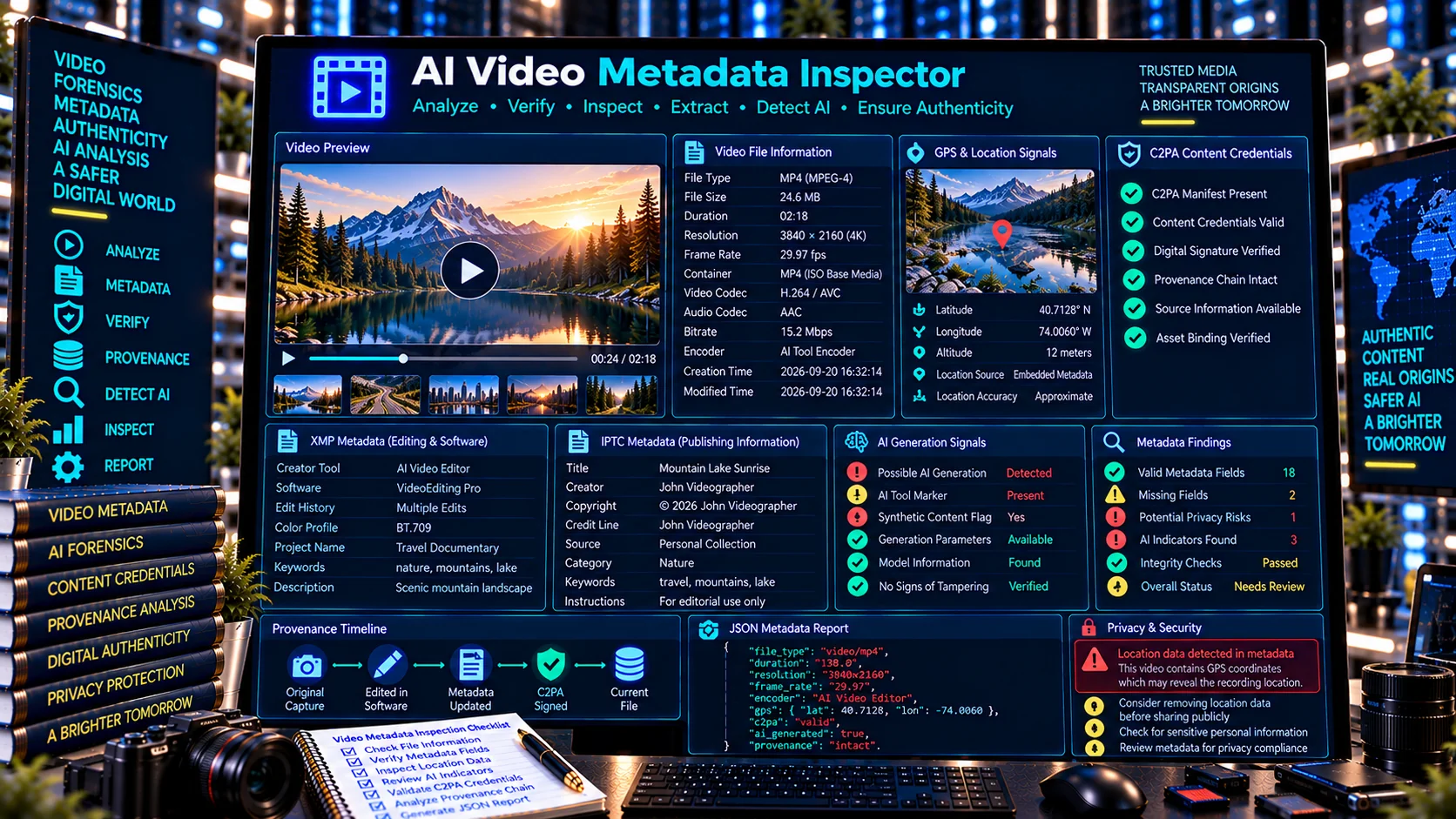
AI Video Metadata Inspector is a browser-based tool for examining video metadata and identifying available technical, software, location, provenance, and AI-related metadata signals. Analyze a video file for its basic media properties, metadata markers, C2PA Content Credentials signals, and other embedded information without relying on an external AI API.
Inspect a Video
Choose a video to inspect file properties, duration, dimensions, codec/container markers, metadata, and provenance-related signals.
Inspection Scope
Checks browser-readable video properties and detectable metadata markers. The video is processed locally in your browser and is not uploaded.
- File type and size
- Video dimensions and duration
- Container / codec / encoder signals
- Creation-time and location markers
- XMP / IPTC / QuickTime-style metadata signals
- C2PA / Content Credentials and AI-related markers
Metadata Findings
Detected Video Metadata Signals
Video Summary
JSON Report
What Is an AI Video Metadata Inspector?
An AI Video Metadata Inspector helps users examine information associated with a video file beyond the visible frames. Depending on the video format and the metadata retained by the file, this can include technical properties, encoder or software markers, location information, XMP or IPTC-related signals, and digital provenance indicators.
PKCapra’s AI Video Metadata Inspector is designed as a privacy-friendly browser tool for metadata inspection. Video processing is performed locally in the browser, so the tool does not require sending the video to an external AI service.
What Does the AI Video Metadata Inspector Check?
Video File Information
The inspector identifies available basic file information such as:
- Video file type
- File size
- Video dimensions
- Duration
- Container-related signals
- Available technical metadata
These details provide an initial overview of the video asset before examining deeper metadata.
Encoder and Software Metadata
Video files may retain information about the software or encoding pipeline used to create or process them. The inspector looks for available encoder and software-related markers that may help identify how a video was processed.
Such metadata can sometimes provide useful production or workflow context, although its presence or absence should not be treated as definitive proof of how a video was created.
XMP and IPTC Metadata Signals
Some media workflows preserve structured metadata through standards such as XMP and IPTC. When available, the inspector identifies relevant metadata signals associated with the video.
This can help users review creator, descriptive, copyright, workflow, or other embedded metadata without manually examining the underlying file structure.
GPS and Location Metadata
Some media files may contain geographic metadata. The AI Video Metadata Inspector checks for available GPS or location-related signals.
Location metadata can contain sensitive information, so inspecting a video before publishing or sharing it can help identify potentially exposed geographic information.
C2PA and Content Credentials Signals
The inspector also checks for available C2PA or Content Credentials-related signals.
These provenance technologies can provide structured information about the history or declared provenance of digital media when credentials are present in the asset.
The inspector identifies available signals for examination; it does not independently establish cryptographic trust or prove that a video is authentic.
AI-Generation and Provenance-Related Metadata
Some media workflows may leave software, generator, provenance, or other metadata markers associated with AI-assisted or AI-generated content.
PKCapra can identify relevant available signals, but metadata alone cannot reliably prove that a video was or was not generated using AI.
Why Inspect Video Metadata?
Video metadata can contain information that is not visible when watching the video.
Metadata inspection can help users:
- Review technical video properties
- Identify encoder and software markers
- Check for location-related information
- Examine XMP or IPTC signals
- Look for C2PA Content Credentials
- Review provenance-related metadata
- Identify potentially sensitive embedded information
- Prepare media before publication or sharing
- Investigate available file-level information
AI Video Metadata Inspector for Privacy Checks
Metadata can sometimes expose information that users did not intend to publish.
For example, a video may retain location information, software identifiers, timestamps, creator information, or other embedded fields depending on the recording and editing workflow.
Reviewing metadata before uploading media to a public platform can therefore be a useful privacy step.
AI Video Metadata Inspector vs C2PA Tools
PKCapra provides separate tools for different metadata and provenance tasks.
The AI Video Metadata Inspector focuses on examining metadata and identifying available signals within a video asset.
The C2PA Content Credentials Inspector focuses specifically on examining Content Credentials, manifests, assertions, actions, ingredients, and provenance information.
The C2PA Metadata Validator focuses on checking the structural validity of C2PA-related metadata.
These tools can be used together when a video contains provenance information.
Browser-Based Video Metadata Inspection
PKCapra’s AI Video Metadata Inspector is designed for browser-side inspection rather than requiring an external AI processing service.
The workflow is simple:
- Select a supported video file.
- Let the browser inspect available file and metadata signals.
- Review technical and metadata findings.
- Examine provenance and C2PA-related signals when available.
- Export the structured JSON report if needed.
What Video Metadata Cannot Prove
Metadata should always be interpreted carefully.
The presence of software information does not necessarily prove who created a video. Similarly, the absence of metadata does not prove that a video is original, manipulated, or AI-generated.
C2PA or Content Credentials signals can provide important provenance information, but a metadata inspector should not be treated as an independent cryptographic trust verifier.
PKCapra’s tool is therefore an inspection and reporting utility, not an authoritative forensic authenticity system.
Who Can Use an AI Video Metadata Inspector?
The tool can be useful for:
- Content creators
- Video editors
- Journalists
- Researchers
- Digital investigators
- Media teams
- Social media managers
- Privacy-conscious users
- AI content reviewers
- Digital asset managers
- Developers working with media pipelines
Frequently Asked Questions
Can the AI Video Metadata Inspector detect AI-generated videos?
It can identify available AI-generation, software, provenance, or related metadata signals, but metadata alone cannot conclusively determine whether a video was generated by AI.
Does the tool upload my video?
The tool is designed for browser-side processing and does not require an external AI API for metadata inspection.
Can video metadata reveal my location?
Potentially. If a video contains GPS or location metadata, the information may reveal where the media was recorded or processed.
Can the tool verify C2PA signatures?
The inspector can identify C2PA and Content Credentials-related signals, but it should not be treated as an authoritative cryptographic signature or certificate trust verifier.
Can metadata be missing from a video?
Yes. Many platforms, editing applications, transcoding workflows, and export processes can remove or alter metadata.
Does missing metadata mean a video is fake?
No. Missing metadata alone does not establish whether a video is authentic, manipulated, or AI-generated.
Inspect Video Metadata Before You Share It
Use PKCapra’s AI Video Metadata Inspector to examine available technical, software, privacy, provenance, and C2PA-related metadata signals in your video files and generate a structured report for further review.