
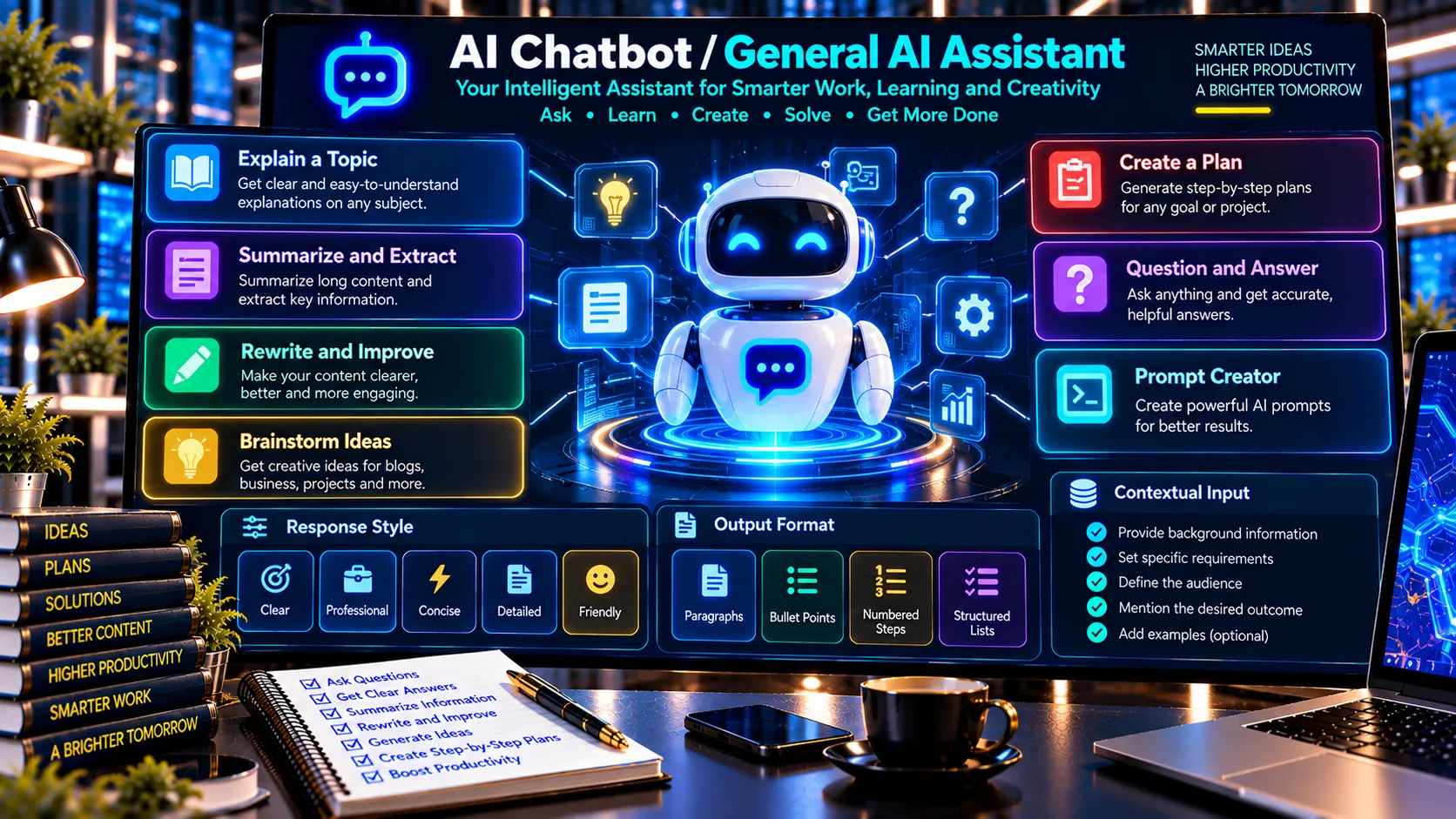
Use PKCapra’s AI Chatbot / General AI Assistant to organize common AI-style tasks such as explaining topics, summarizing information, rewriting text, brainstorming ideas, creating plans, answering questions, and building prompts.
The tool provides several structured task modes, writing styles, and output formats to help turn an input into a clear, organized response.
AI Chatbot / General AI Assistant
Use a structured browser-based assistant for brainstorming, explanations, rewriting, summaries, planning, and question-and-answer workflows. This standalone utility does not connect to an external AI model.
This is a browser-side structured assistant, not a connected generative AI chatbot. Do not treat generated content as authoritative without review.
Handle Common AI Tasks
The assistant supports multiple practical workflows, including:
- Explain a Topic
- Summarize / Extract
- Rewrite / Improve
- Brainstorm Ideas
- Create a Plan
- Question & Answer
- Prompt Creator
Choose the task that best matches what you want to accomplish and provide your instructions or source context.
Choose a Response Style
You can select a preferred response style to influence how the generated result is structured.
Available styles include:
- Clear
- Professional
- Concise
- Detailed
- Friendly
This makes the same underlying request adaptable to different communication requirements.
Control the Output Format
The tool supports several output structures:
- Paragraph
- Bullets
- Numbered Steps
- Structured List
For example, a planning request can be organized into numbered steps, while brainstorming can be easier to review as a bullet list.
Add Context and Guidance
Additional context can be provided to help the tool understand the subject or requirements.
You can also provide custom guidance describing how the response should be structured or what considerations should be followed.
This can be useful for:
- Business planning
- Content ideas
- Explanations
- Writing improvements
- Research preparation
- Prompt development
- Task planning
- General question answering
Explain Complex Topics
Use Explain a Topic when you need a subject organized into a clearer explanation.
You can provide the topic along with additional context and choose whether the result should be concise, detailed, professional, or presented in another available style.
Summarize or Extract Information
The Summarize / Extract mode can help organize supplied information into a shorter or more structured response.
For source-based work, review the output against the original material to ensure important context has not been lost.
Rewrite and Improve Text
The Rewrite / Improve mode can restructure supplied text while allowing you to specify the desired style and output format.
This can be useful for improving clarity, organization, readability, and presentation.
Brainstorm Ideas
Use Brainstorm Ideas to develop multiple possible directions around a topic.
This can help with:
- Content ideas
- Business ideas
- Marketing concepts
- Project ideas
- Names and concepts
- Creative planning
Generated ideas should be reviewed and adapted to your specific requirements.
Create Structured Plans
The Create a Plan mode can turn a goal or task into a more organized sequence of actions.
Numbered output can be particularly useful when you want a step-by-step structure.
Create Prompts
The Prompt Creator mode can help turn an objective into a more structured prompt.
You can provide the desired outcome, context, requirements, and preferred format to create a reusable prompt framework.
Browser-Based Processing
PKCapra’s current AI Chatbot / General AI Assistant implementation uses browser-side structured processing and does not connect to an external generative AI model or external AI API.
This distinction is important: the tool provides structured assistant-style workflows, but it should not be represented as equivalent to a cloud-based large language model or as having live access to external knowledge.
Review Important Results
For factual, technical, financial, legal, medical, or other high-stakes information, independently verify important claims before relying on the output.
The assistant should be treated as a productivity and organization utility rather than an authoritative source of real-time information.
Copy and Download Results
After producing a response, you can copy the result for use elsewhere. The tool also provides a structured JSON report for downloading and further processing.
This makes the assistant useful for content workflows, planning, drafting, brainstorming, and structured information processing.
Frequently Asked Questions
What is an AI Chatbot / General AI Assistant?
It is a general-purpose assistant-style tool designed to organize tasks such as explanations, summaries, rewriting, brainstorming, planning, question answering, and prompt creation.
Can it answer questions?
Yes. The Question & Answer mode is designed for general question-and-answer workflows.
Can it rewrite text?
Yes. Select Rewrite / Improve and provide the text and any additional instructions.
Can it create plans?
Yes. The Create a Plan mode can organize a goal or task into a structured sequence.
Can it create prompts?
Yes. The Prompt Creator mode can help structure reusable prompts from your objective and requirements.
Does it use ChatGPT or another external AI model?
No. The current PKCapra implementation uses browser-side structured processing and does not connect to an external generative AI API.
Does it have live web access?
No. The tool should not be treated as a live web-search or real-time information system.
Should important information be verified?
Yes. Important factual or high-stakes information should be independently checked against reliable sources before being used.