
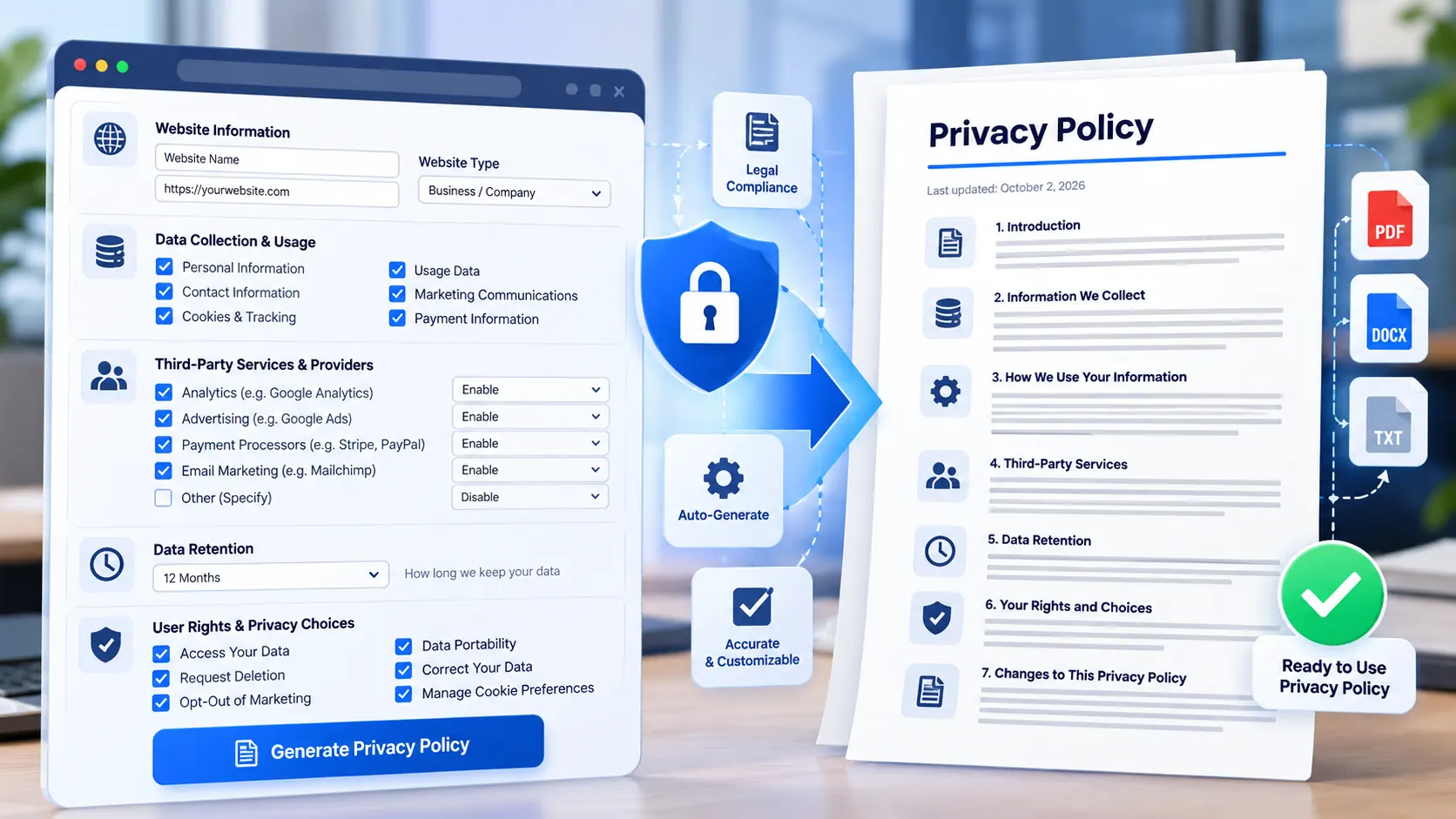
Privacy Policy Generator creates a structured privacy-policy draft from the information you provide about your website, app, business, data practices, and service features. The generator uses deterministic templates and conditional sections in your browser, so the information you enter is processed locally and is not sent to a PKCapra upload endpoint. The generated draft can be copied, downloaded as a TXT file, printed, or reviewed as a browser-local document before publication.
Privacy Policy Generator
Create a customizable privacy policy draft from your site's actual data practices. Everything entered into this tool is processed in your browser; this module does not send your answers to a PKCapra upload endpoint.
This generator creates a customizable drafting starting point. It does not determine which laws apply to your business, verify your actual data practices, or provide legal advice. Review and adapt the generated policy before publishing.
How to Use the Privacy Policy Generator in Simple Steps
- Enter the basic organization and website details. Provide your business or legal entity name, website or app name, website URL, privacy contact email, effective date, and primary operating location.
- Select the data practices and service features that apply to your website or app. The generator uses these selections to determine which relevant policy sections should appear in the generated draft.
- Add the applicable privacy details. You can provide information about third-party providers and integrations, retention, privacy rights and special considerations, international transfers, children’s privacy, automated decision-making or profiling, and additional service-specific information.
- Generate and review the policy, then choose the required output action. You can copy the generated policy, download it as TXT, print it, or clear the current form and start again. The tool also provides generated configuration JSON for the current policy setup.
Technical breakdown of the tool’s competitive edge
The Privacy Policy Generator is a browser-local structured drafting utility. The form data, configuration choices, conditional section logic, and generated policy text are processed in the browser. The module does not send the entered information to a PKCapra upload endpoint and does not require an external AI API or remote drafting service.
The generator uses deterministic local templates instead of a remote language-generation service. This makes the generation process dependent on the inputs selected in the interface rather than on a network request to an external drafting system.
The input model covers several practical parts of a privacy-policy document:
- Business or legal entity information.
- Website or application identity and URL.
- Privacy contact information.
- Effective date and primary operating location.
- Categories of information collected.
- Website or application service features.
- Third-party providers and integrations.
- Data retention information.
- Privacy rights and special considerations.
- International transfer information when selected.
- Children’s privacy considerations.
- Automated decision-making and profiling.
- Additional service-specific details.
The generated document uses conditional sections so the output can reflect the selections made in the form. Available sections include the introduction, information collected, cookies and similar technologies, processing purposes, sharing, providers and integrations, retention, international transfers when selected, security, children’s privacy, automated decision-making and profiling, privacy rights, policy changes, contact information, and additional service-specific information.
The generator does not determine which privacy laws apply to a particular organization. It also does not inspect your website, verify your actual data collection practices, independently verify third-party services, or promise legal compliance. The generated document is therefore a structured draft that must be reviewed and adapted to the actual operation of the website or app before publication.
The tool does not request passwords, API keys, or other secrets. Additional service-specific details should contain policy-relevant information only and should never be used as a place to paste credentials, API keys, passwords, private tokens, or other secrets.
For the site’s actual published privacy document, see the PKCapra Privacy Policy. You can also review the PKCapra Terms of Service and PKCapra Disclaimer when preparing the legal-information section of your website.
Developer Snippets (Automate This Tool Offline)
The following Python script provides a deterministic offline drafting workflow for teams that want to generate a basic privacy-policy draft from a JSON configuration file. It does not call an external API and does not claim to determine applicable law or legal compliance.
Save the configuration as privacy-policy-config.json:
{
  "entity_name": "Example Company LLC",
  "website_name": "Example Website",
  "website_url": "https://example.com",
  "privacy_email": "privacy@example.com",
  "effective_date": "2026-10-02",
  "location": "United States",
  "data_categories": [
    "Contact information",
    "Account information",
    "Usage information"
  ],
  "features": [
    "Contact forms",
    "Analytics",
    "Newsletter"
  ],
  "providers": [
    "Google Analytics"
  ],
  "retention": "Information is retained only for as long as reasonably necessary for the stated purposes.",
  "international_transfers": "Personal information may be processed in countries where our service providers operate.",
  "children": "The service is not directed to children.",
  "automated_decisions": "The service does not use automated decision-making to make decisions with legal or similarly significant effects.",
  "additional_details": ""
}
Then run this production-ready Python script:
import json
from pathlib import Path
from html import escape

CONFIG_PATH = Path("privacy-policy-config.json")
OUTPUT_PATH = Path("privacy-policy-draft.txt")

def require(config, key):
    value = str(config.get(key, "")).strip()
    if not value:
        raise ValueError(f"Missing required configuration value: {key}")
    return value

def bullet_list(items):
    values = [str(item).strip() for item in items if str(item).strip()]
    if not values:
        return "No specific categories were supplied."
    return "\n".join(f"- {value}" for value in values)

with CONFIG_PATH.open("r", encoding="utf-8") as handle:
    config = json.load(handle)

entity = require(config, "entity_name")
website_name = require(config, "website_name")
website_url = require(config, "website_url")
privacy_email = require(config, "privacy_email")
effective_date = require(config, "effective_date")
location = require(config, "location")

data_categories = config.get("data_categories", [])
features = config.get("features", [])
providers = config.get("providers", [])

retention = str(config.get("retention", "")).strip()
transfers = str(config.get("international_transfers", "")).strip()
children = str(config.get("children", "")).strip()
automated = str(config.get("automated_decisions", "")).strip()
additional = str(config.get("additional_details", "")).strip()

sections = [
    f"{website_name} Privacy Policy",
    "",
    f"Effective date: {effective_date}",
    "",
    "Introduction",
    f"{entity} operates {website_name} ({website_url}). This draft explains the information practices supplied in the configuration used to generate this document.",
    "",
    "Information Collected",
    bullet_list(data_categories),
    "",
    "Purposes of Processing",
    "Information may be processed for the purposes associated with the services and features selected in the configuration.",
    "",
    "Service Features",
    bullet_list(features),
    "",
    "Sharing and Providers",
    bullet_list(providers),
    ""
]

if retention:
    sections.extend([
        "Retention",
        retention,
        ""
    ])

if transfers:
    sections.extend([
        "International Transfers",
        transfers,
        ""
    ])

sections.extend([
    "Security",
    "Reasonable technical and organizational measures should be maintained according to the actual systems, services, and risks associated with the website or application.",
    ""
])

if children:
    sections.extend([
        "Children's Privacy",
        children,
        ""
    ])

if automated:
    sections.extend([
        "Automated Decision-Making and Profiling",
        automated,
        ""
    ])

sections.extend([
    "Privacy Rights",
    "Users should be informed about the privacy rights that actually apply to the service and the procedures available for submitting privacy requests.",
    "",
    "Policy Changes",
    "This privacy policy should be updated when the organization's information practices, service features, providers, or applicable requirements materially change.",
    "",
    "Contact",
    f"Privacy contact: {privacy_email}",
    f"Operating location: {location}",
    ""
])

if additional:
    sections.extend([
        "Additional Information",
        additional,
        ""
    ])

sections.extend([
    "Review Before Publication",
    "This document is a structured draft based on the supplied configuration. Review and adapt it to the actual data practices, service providers, jurisdictions, and requirements applicable to the website or application before publication."
])

OUTPUT_PATH.write_text("\n".join(sections), encoding="utf-8")

print(f"Privacy policy draft written to: {OUTPUT_PATH.resolve()}")
This offline workflow is intentionally deterministic. It does not inspect a website or independently determine whether the supplied information is complete.
For batch generation, keep one JSON configuration per website or application and run the same script against each configuration after reviewing the actual data practices.
Native software workaround integration tutorial
Microsoft Word provides a practical native workflow for turning a generated TXT draft into a structured website policy document.
- Generate the policy with the PKCapra tool and choose the TXT download option.
- Open Microsoft Word and select File → Open. Select the downloaded TXT file and allow Word to import the plain-text content.
- Apply heading structure to the generated sections. Select the document title and use Home → Styles → Title. Apply Heading 1 or Heading 2 to the major policy sections such as Information Collected, Cookies and Similar Technologies, Sharing and Providers, Retention, Privacy Rights, and Contact.
- Review every factual section against the actual website or application. Check the data categories, analytics and advertising services, payment processors, forms, account systems, email providers, retention practices, international processing, children’s privacy position, and any automated decision-making statements.
- Use File → Save As to save the reviewed document as DOCX or PDF, depending on how the policy will be maintained internally. For the public website, copy the reviewed policy into the site’s legal/privacy page rather than publishing an unreviewed generated draft.
This native workflow changes the presentation and review process; it does not independently validate legal applicability or determine whether the underlying privacy statements are accurate.
Frequently Asked Questions
What is the Privacy Policy Generator?
The Privacy Policy Generator is a browser-local drafting utility that creates a structured privacy-policy document from user-supplied organization, data-practice, service, provider, retention, and rights information.
Does the generator determine which privacy law applies to my website?
The generator does not determine applicable privacy law. It uses the information selected in the form to assemble conditional policy sections, so the resulting document still requires review for the jurisdictions and requirements relevant to the actual service.
Does PKCapra receive the information entered into the generator?
The privacy generator processes the entered information in the browser and does not send that information to a PKCapra upload endpoint through this module. No external AI API or remote drafting service is required.
Can I generate a policy without providing every optional detail?
The generator supports conditional sections based on the information and selections supplied. Missing service-specific information should be reviewed before publication rather than assumed to be irrelevant.
What sections can the generated policy contain?
The generated policy can contain sections covering the introduction, information collected, cookies and similar technologies, processing purposes, sharing, providers and integrations, retention, international transfers when selected, security, children’s privacy, automated decision-making and profiling, privacy rights, policy changes, contact information, and additional service-specific information.
Can I copy or download the generated privacy policy?
The generator supports copying the generated policy, downloading it as TXT, printing it, and displaying the generated configuration JSON. These outputs are produced from the browser-local generated result.
Can I use the Additional Details field for passwords or API keys?
The Additional Details field is not a secure secret-storage area. Do not enter passwords, API keys, authentication tokens, private keys, or other secrets into the generator.
Is the generated policy legally compliant automatically?
The generator does not guarantee legal compliance. It does not verify the actual data practices of your website, determine applicable laws, or independently validate your service providers and processing activities.
Should I publish the generated policy immediately?
The generated document should be reviewed and adapted before publication. The review should compare the draft with the website or application’s actual collection, processing, sharing, retention, rights, provider, and security practices.
Can I update a policy later?
A privacy policy can be regenerated when the underlying website or application’s information practices change. The effective date and policy statements should be reviewed whenever services, providers, data categories, processing purposes, or other material practices change.